
Designing a SharePoint Information Architecture (IA) is not just about creating sites and libraries. It’s about building a structure that can grow with your organization, adapt to change, and remain usable years down the line. Many SharePoint environments fail not because of technology limitations, but because of poor planning, over-complexity, or a lack of governance.
A future-proof SharePoint Information Architecture balances business needs, user experience, and technical scalability. In this blog, we’ll explore what future-proofing really means, common pitfalls to avoid, and step-by-step technical guidance to design an IA that stands the test of time.
What Is SharePoint Information Architecture?
SharePoint Information Architecture defines how information is organized, labeled, stored, and accessed across SharePoint Online or on-premises environments. It includes:
- Site collections and site hierarchies
- Navigation structure
- Content types and metadata
- Document libraries and lists
- Permissions and governance rules
A strong IA ensures users can find what they need quickly, while administrators can manage content efficiently.
Why Future-Proofing Matters in SharePoint
Organizations change constantly—new departments, mergers, compliance requirements, and digital transformation initiatives. If your SharePoint IA is rigid, it becomes difficult and expensive to adapt.
A future-proof IA helps you:
- Scale without restructuring everything
- Support automation, Power Platform, and Copilot
- Reduce content sprawl and duplication
- Improve search accuracy and user adoption
- Lower long-term maintenance costs
Common SharePoint IA Mistakes to Avoid
Before designing the ideal architecture, it’s important to understand what usually goes wrong.
1. Overusing Folders Instead of Metadata
Folders feel familiar, but they limit scalability and search capabilities. Deep folder hierarchies become unmanageable over time.
2. Designing Around Current Org Charts
Departments change. Designing IA strictly based on today’s structure can break tomorrow.
3. Too Many Site Collections
Creating a site collection for every team or project creates governance chaos and complicates search and permissions.
4. Ignoring Governance
Without clear rules, users create sites, columns, and libraries inconsistently, leading to long-term technical debt.
Principles of a Future-Proof SharePoint Information Architecture
1. User-Centric Design
Design based on how users work, not how IT thinks they should work. Conduct workshops, interviews, and card-sorting exercises.
2. Flat Architecture Over Deep Hierarchies
Modern SharePoint favors hub sites and flat structures instead of deeply nested subsites.
3. Metadata Over Folders
Metadata enables dynamic filtering, better search, automation, and reporting.
4. Reusability and Standardization
Reusable content types, site templates, and naming conventions make scaling easier.
5. Governance by Design
Governance should be built into the architecture, not added later.
Step-by-Step Technical Guide to Designing a Future-Proof SharePoint IA
Step 1: Business & Content Discovery
Technical Activities:
- Inventory existing SharePoint sites and content
- Identify content owners and lifecycle requirements
- Classify content (documents, records, knowledge, collaboration)
Tools:
- Microsoft Purview Content Explorer
- SharePoint Admin Center reports
- Excel or Power BI for analysis
Outcome:
A clear understanding of what content exists and what truly matters.
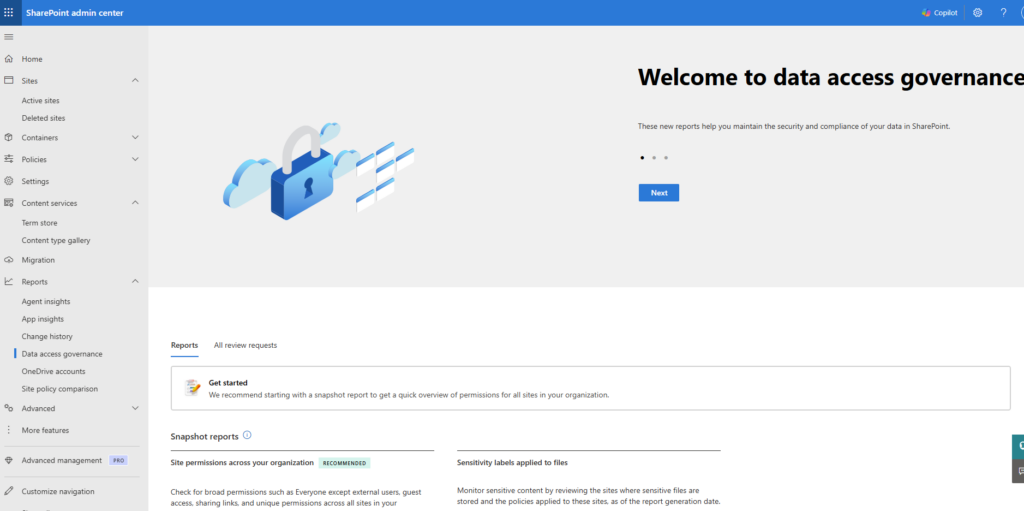
Step 2: Define Site Architecture (Modern SharePoint)
Best Practice Approach:
- Use hub sites for major business areas (e.g., HR, Finance, Operations)
- Use communication sites for publishing content
- Use team sites for collaboration
Technical Steps:
- Create communication sites for top-level business functions
- Register them as hub sites
- Associate related team sites to hubs
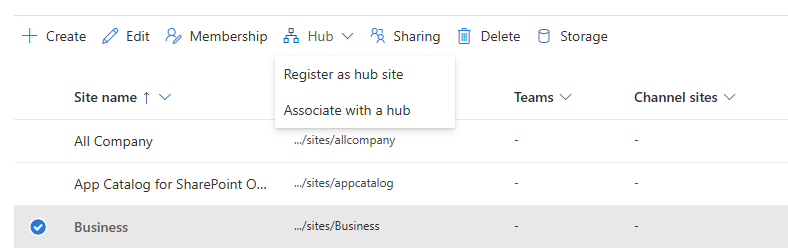
Why This Is Future-Proof:
Hub sites allow you to reorganize without moving content.
Step 3: Design a Metadata Strategy
Core Metadata Types:
- Business Unit
- Document Type
- Sensitivity / Classification
- Lifecycle Status
Technical Steps:
- Create site columns at the tenant or hub level
- Group columns logically (e.g., “Corporate Metadata”)
- Create managed metadata terms using the Term Store
- Apply metadata via content types
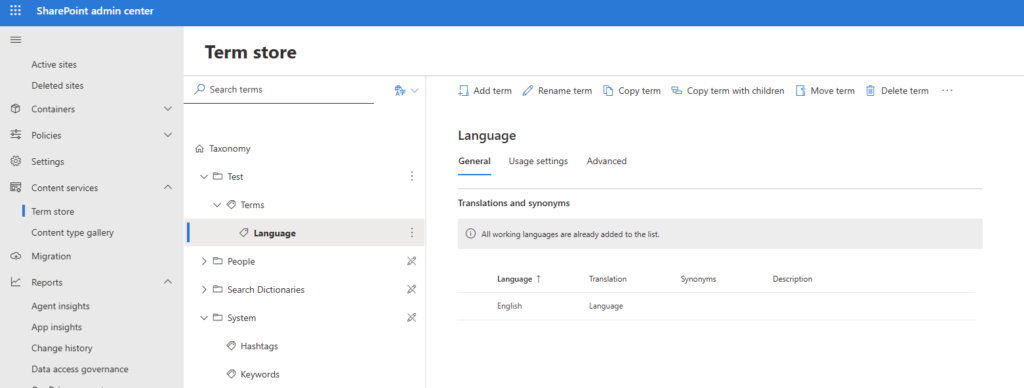
Tip:
Keep metadata minimal—too many required fields hurt adoption.
Step 4: Create Content Types
Content types are key to consistency.
Technical Steps:
- Define document types (Policy, Procedure, Contract, Report)
- Create content types in the Content Type Gallery
- Attach site columns and templates
- Publish content types to relevant sites
Benefits:
- Consistent metadata
- Easier automation
- Improved compliance and search
Step 5: Navigation & Findability
Modern Navigation Best Practices:
- Use hub navigation instead of subsites
- Limit menu items to 7–9 links
- Use audience targeting for role-based navigation
Technical Steps:
- Configure hub navigation from the SharePoint Admin Center
- Enable search verticals for key content types
- Create custom search result pages using Microsoft Search
Step 6: Permissions & Security Model
Future-Proof Permission Strategy:
- Use Microsoft 365 Groups
- Avoid item-level permissions
- Align with sensitivity labels
Technical Steps:
- Define permission tiers (Owners, Members, Visitors)
- Apply permissions at site and library levels
- Integrate sensitivity labels and retention policies
Step 7: Governance & Automation
Governance ensures sustainability.
Technical Governance Tools:
- Power Automate for site provisioning
- Azure AD group policies
- SharePoint site templates
Governance Rules to Define:
- Site creation process
- Naming conventions
- Metadata standards
- Content lifecycle and retention
Making Your SharePoint IA Ready for the Future
To truly future-proof your SharePoint IA:
- Design for change, not perfection
- Embrace Microsoft 365 evolution (Copilot, Viva, Power Platform)
- Review and refine architecture every 6–12 months
- Educate users continuously
A well-designed Information Architecture becomes invisible—users simply find what they need, when they need it.
Extra posts:
 The Future of SharePoint AI, Agents, and Smarter Collaboration (2025 Update)
  Architecture vs. Design Key Differences Explained
  Common Pitfalls in Software Architecture Design
  Copilot + SharePoint Search: How AI Changes Information Discovery
  Event Based Design Architecture Pattern in Azure
  Embracing the Future Latest Trends in Software Architecture (2025)