
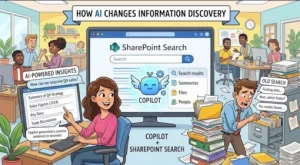
In most organizations, SharePoint has become the backbone of collaboration housing documents, pages, lists, policies, and knowledge accumulated over years. Yet despite all this information, one problem persists: finding the right content at the right time.
Traditional SharePoint Search has always relied on keywords, filters, and user intuition. While it often assumes users know what they’re looking for and how it’s stored. With the introduction of Microsoft Copilot, SharePoint Search is undergoing a fundamental transformation from keyword-based retrieval to AI-driven information discovery.
This shift is not just a feature upgrade. It’s a change in how employees interact with organizational knowledge.
The Evolution of SharePoint Search
Before Copilot, SharePoint Search worked primarily on:
- Indexed content
- Keyword matching
- Metadata refinement
- Security trimming
While these capabilities remain essential, they often result in:
- Too many results
- Irrelevant documents
- Time wasted refining queries
- Knowledge locked in silos
Users frequently asked questions like:
- “Where is the latest version of this document?”
- “Which file should I trust?”
- “Who owns this content?”
Copilot changes this experience by adding context, reasoning, and conversational intelligence to SharePoint Search.
What Is Copilot in SharePoint Search?
Microsoft Copilot uses large language models (LLMs) combined with Microsoft Graph to understand user intent and organizational context.
Instead of searching for documents, users can now search for answers.
Examples:
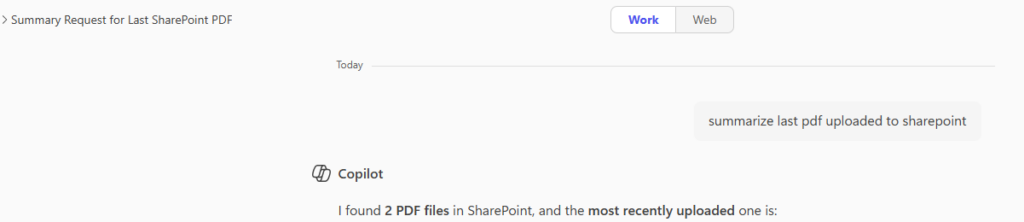
- “Summarize our remote work policy”
- “Find the latest project plan for the CRM migration”
- “What decisions were made in last quarter’s leadership meeting?”
Copilot doesn’t just return links—it analyzes, summarizes, and explains content pulled securely from SharePoint.
How AI Changes Information Discovery
1. From Keywords to Natural Language
Traditional search:
“Remote policy PDF 2024”
Copilot-powered search:
“What is our current remote work policy?”
Copilot understands:
- Intent
- Synonyms
- Organizational language
- Document relevance
This dramatically lowers the barrier to entry, especially for non-technical users.
2. Context-Aware Results
Copilot considers:
- Your role
- Your recent activity
- Your team’s documents
- Permissions (security trimming still applies)
For example, a project manager and a finance analyst asking the same question may receive different answers, tailored to their context.
This personalization makes discovery faster and more meaningful.
3. Summaries Instead of Documents
One of the most powerful changes is AI-generated summaries.
Instead of opening:
- Multiple documents
- Long meeting notes
- Dense policy pages
Copilot can:
- Summarize key points
- Highlight decisions
- Extract action items
- Reference the source documents
This reduces cognitive load and improves productivity—especially in large tenants with thousands of files.
4. Knowledge Discovery Across Silos
Copilot connects information across:
- SharePoint sites
- Teams files
- OneDrive
- Meeting transcripts
- Emails (when permitted)
This enables insights that traditional search could never provide, such as:
- “What are the risks mentioned across all project reports?”
- “Which teams are working on similar initiatives?”
Technical Architecture: How Copilot Works with SharePoint
At a high level, Copilot for SharePoint Search relies on:
- Microsoft Graph
- Retrieves content from SharePoint, OneDrive, Teams
- Enforces security permissions
- Semantic Index
- Converts content into embeddings
- Understands meaning, not just words
- Large Language Models (LLMs)
- Interpret user queries
- Generate summaries and answers
- Compliance & Security Layer
- No access beyond user permissions
- Data stays within Microsoft 365 tenant boundaries
This architecture ensures AI is powerful and safe for enterprise use.
Technical Steps to Enable Copilot for SharePoint Search
Step 1: Licensing Requirements
Ensure your tenant has:
- Microsoft 365 Copilot license
- Supported base licenses (e.g., E3, E5, Business Premium)
Without Copilot licensing, AI features in SharePoint Search will not activate.
Step 2: Enable Microsoft Search & Semantic Index
- Go to Microsoft 365 Admin Center
- Navigate to Settings → Org Setting
- Ensure Microsoft Search is enabled
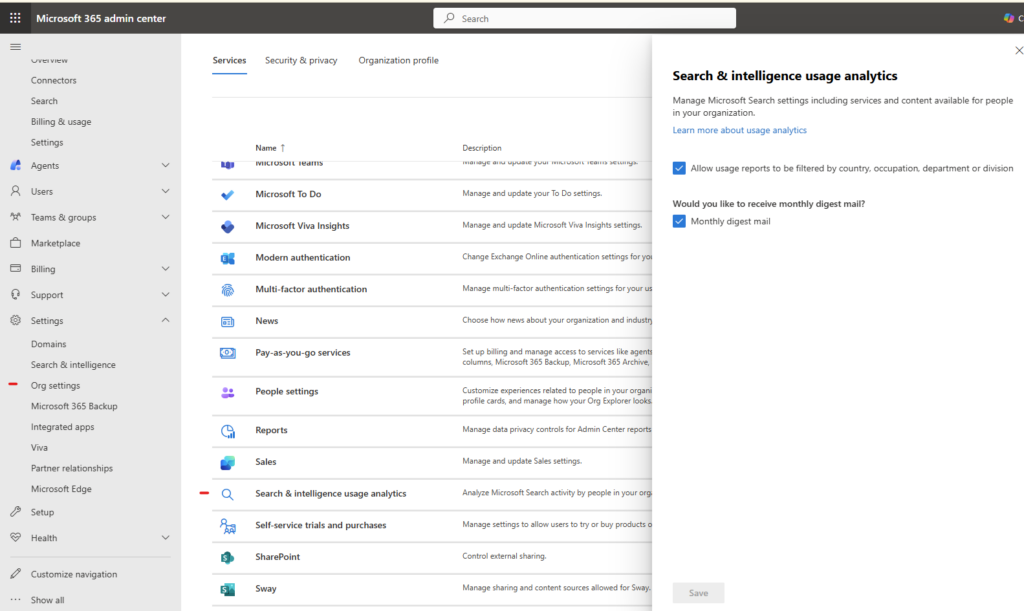
This allows SharePoint content to be processed semantically.
Step 3: Optimize SharePoint Content Structure
Copilot performs best when SharePoint is well-organized.
Best practices:
- Use content types
- Apply consistent metadata
- Avoid duplicate or outdated documents
- Clearly label authoritative sources
AI can only be as good as the content it analyzes.
Step 4: Manage Permissions Carefully
Copilot respects SharePoint permissions exactly as configured.
Actions to take:
- Audit site permissions
- Remove over-sharing
- Use Microsoft Purview for sensitivity labels
- Define document ownership
This ensures users only see AI-generated answers from content they are allowed to access.
Step 5: Train Users on Prompting
While Copilot is intuitive, guidance helps adoption.
Examples of effective prompts:
- “Summarize the onboarding process for new hires”
- “List key risks mentioned in the Q4 project reports”
- “Compare the last two versions of the vendor contract”
Teaching users how to ask better questions dramatically improves results.
Governance and Compliance Considerations
AI-powered search raises important governance questions.
Key safeguards include:
- No data is used to train public AI models
- Copilot responses are grounded in tenant data
- Compliance with Microsoft Purview policies
- Full audit logging via Microsoft 365
Admins should regularly review:
- Search usage reports
- Copilot interaction logs
- Content access patterns
Business Benefits of Copilot + SharePoint Search
Organizations adopting Copilot experience:
- Faster decision-making
- Reduced time spent searching
- Improved knowledge reuse
- Higher employee satisfaction
- Better ROI on SharePoint investments
Instead of being a document repository, SharePoint becomes a living knowledge system.
The Future of Information Discovery
Copilot is just the beginning.
Future capabilities are likely to include:
- Proactive insights (“You may want to review…”)
- Cross-tenant knowledge graphs
- Deeper integration with business processes
- Automated content recommendations
Information discovery is shifting from searching to conversing.
Copilot + SharePoint Search represents a fundamental change in how organizations interact with knowledge. By combining AI, semantic understanding, and enterprise security, Microsoft is turning SharePoint from a storage platform into an intelligent assistant.
For organizations overwhelmed by information, this is not just an upgrade—it’s a transformation
Extra posts:
 How to Use Copilot Cowork to Find Information Across SharePoint and OneDrive
  How to Design a Future-Proof SharePoint Information Architecture
  Sensitivity Labels vs. Copilot Creating an AI Policy That Honors Information Protection (MIP)
  What to Do When SharePoint Search Doesn’t Return the Right Results
  Pre-Flight Check The 5 Non-Negotiable SharePoint Cleanups Before Deploying Copilot
  SharePoint Gets an AI Upgrade: New Copilot Citation Analytics Show Which Content Matters Most