
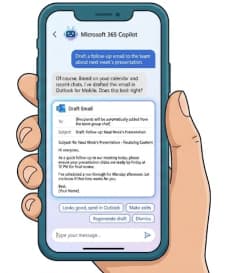
Microsoft is making mobile email drafting a little easier. With a new Microsoft 365 Copilot update, users can now draft, review, and move Outlook emails into Outlook Mobile without having to leave Copilot Chat.
For people who spend much of their working day jumping between chat, email, documents, and meetings, even a small change to the workflow can make a noticeable difference. Microsoft is now bringing one of those small-but-useful improvements to its mobile Copilot experience: users will be able to create Outlook email drafts directly inside Microsoft 365 Copilot Chat.
The feature is designed to remove one of the familiar interruptions in modern work: thinking of an email in one application, generating the text in another, and then switching back to Outlook to actually send it.
With the new experience, Copilot can recognize when a user wants to write an email and present an embedded Outlook drafting experience directly within the Copilot Chat interface. Users can then review the generated message before opening it in Outlook Mobile for further editing and sending.
The worldwide rollout is scheduled to begin in mid-August 2026 and is expected to be completed by mid-September 2026.
A More Connected Email Workflow
The biggest change is not necessarily what Copilot can write. AI-powered email drafting is already familiar to many Microsoft 365 users. Instead, the important part of this update is where the drafting experience happens.
Previously, a user working in Copilot Chat might ask the assistant to create an email and then need to move to another application or workflow to continue with the message. The new experience brings an embedded Outlook compose interface into Copilot Chat on mobile.
Imagine a manager heading into a meeting and realizing they need to send a quick update to their team. Instead of opening Outlook, starting a new message, thinking through the wording, and switching between apps, the user can ask Copilot to draft the email from within the Copilot Chat experience.
Copilot can generate the draft, and the user can review it without immediately leaving the conversation. Once the message looks right, the user can open the draft in Outlook Mobile, make any final changes, and send it.
That creates a much more natural sequence:
Ask Copilot → Review the draft → Open in Outlook → Edit if necessary → Send.
For mobile users, where switching between applications can feel particularly cumbersome, that streamlined process could be especially useful.
What Users Can Expect
When an eligible user asks Copilot Chat to draft an email, the system will display an embedded Outlook compose experience within the chat.
The user can review the generated content before moving to Outlook. This is important because AI-generated communication should not automatically be treated as ready-to-send communication.
Users can inspect the wording, check the context, make changes, and then open the draft in Outlook Mobile. From there, Outlook provides the familiar editing and sending experience.
The update therefore does not attempt to completely replace Outlook. Instead, it connects Copilot’s generative capabilities with Outlook’s established email workflow.
That distinction matters.
Copilot can help users get from a blank page to a useful first draft faster, while Outlook remains the place where users can make final adjustments and send the message.
The Feature Will Be Enabled by Default
For organizations using Microsoft 365 Copilot, another notable detail is that the new functionality will be enabled by default for eligible users.
Microsoft says administrators do not need to perform any configuration to activate the experience.
The worldwide general availability rollout is expected to take place from mid-August through mid-September 2026, meaning organizations may see the capability appear at different times during that window.
For IT teams, this makes the update relatively straightforward from an implementation perspective. There is no new setup process required just to make the feature available.
However, “no action required” does not necessarily mean “nothing to communicate.”
Organizations may want to tell employees that Copilot-generated email drafts can now appear directly within Copilot Chat on mobile. Users who are accustomed to an older workflow may otherwise be surprised when an Outlook compose experience appears inside Copilot.
Microsoft 365 Apps Involved
Although the visible experience centers on Copilot Chat and Outlook, the update touches several parts of the Microsoft 365 ecosystem.
The affected platforms and services include:
- Microsoft 365 Copilot mobile app
- Outlook Mobile
- Teams Mobile
- Exchange Online
This reflects Microsoft’s broader strategy of making Copilot less like a standalone AI destination and more like an integrated layer across Microsoft 365.
Instead of asking users to leave their existing workflow to interact with AI, Microsoft is increasingly placing Copilot capabilities alongside the applications people already use.
Email is an obvious area for this approach because writing messages is one of the most common knowledge-work tasks. People frequently need help turning short notes, meeting outcomes, requests, or ideas into professional communication.
Why This Could Matter for Productivity
Writing an email may only take a few minutes, but the mental effort involved can be much greater.
Users often have to decide how to start the message, determine the appropriate tone, organize several points, and make sure the recipient understands what action is expected. On a busy mobile device, that process can be even less convenient.
Copilot can reduce some of that friction by providing a starting point.
For example, a user could ask Copilot to draft a concise follow-up after a meeting, turn a set of notes into a customer update, or create a professional request to a colleague. The AI produces the initial wording, while the user remains responsible for reviewing and refining it.
The new embedded experience makes that process more seamless because the user does not have to treat drafting and email as two completely separate tasks.
For employees who frequently work from smartphones or tablets, that could translate into fewer application switches and a faster path from an idea to a finished message.
Review Still Matters
Despite the convenience, the human review step remains important.
Generative AI can produce polished text while still misunderstanding context, making assumptions, using an inappropriate tone, or including information that should not be sent.
That makes the ability to review the draft before opening it in Outlook particularly useful.
Users should still check the recipient, facts, dates, names, attachments, tone, and any sensitive information before sending an AI-assisted email.
The new feature should therefore be viewed less as “Copilot sends emails for you” and more as Copilot helps you prepare an email that you can review and send through Outlook.
That distinction is important for both everyday users and organizations developing responsible AI habits.
What It Means for IT and Compliance Teams
Microsoft’s update also highlights the growing role of generative AI in everyday communication.
Microsoft identifies the change as introducing or significantly modifying AI/ML capabilities that interact with customer data. It also provides end users with a new way to interact with generative AI by allowing them to generate and review Outlook email drafts directly within Copilot Chat.
For IT and compliance teams, this is another reminder that AI capabilities are becoming embedded in routine business processes rather than existing only in dedicated AI tools.
Organizations may therefore want to revisit internal guidance around AI-generated communications. Employees should understand what information is appropriate to provide to Copilot and what information requires additional care.
At the same time, the absence of required administrator configuration means organizations do not need to undertake a technical deployment simply to receive the feature.
The bigger task may be user awareness: helping employees understand what has changed, how the workflow works, and why reviewing AI-generated content before sending remains essential.
A Small Change With a Bigger Microsoft 365 Strategy Behind It
On the surface, embedded email drafting may look like a relatively minor Copilot improvement.
But it fits into a much larger direction for Microsoft 365.
Microsoft is increasingly positioning Copilot as an assistant that works across the tools people already use. Rather than forcing users to think about whether they should open an AI application, the goal is to make AI assistance available within everyday work.
Email is a natural extension of that strategy.
The new mobile experience connects conversational AI with one of the most established communication tools in the workplace. A user can begin with a simple request in Copilot and move toward a finished Outlook message with fewer interruptions.
For mobile-first employees, executives, sales teams, consultants, managers, and anyone frequently working away from a desktop, that could make Copilot feel considerably more practical.
Rollout: What Organizations Should Know
The worldwide general availability rollout begins in mid-August 2026 and is expected to finish by mid-September 2026.
The feature is enabled by default for eligible users, and Microsoft says no administrator action is required.
Organizations may nevertheless want to take a few practical steps:
- Inform users that the new email drafting experience is coming to Copilot Chat on mobile.
- Explain that users can review the generated draft before opening it in Outlook Mobile.
- Remind employees to verify AI-generated content before sending.
- Reinforce existing policies around confidential, sensitive, or regulated information.
- Monitor user feedback as the feature becomes available.
The rollout window also means that not every user will necessarily see the feature at the same moment. Organizations should expect availability to arrive progressively during the stated period.
The Bottom Line
Microsoft’s latest Copilot update is a good example of how AI productivity features are evolving beyond simple text generation.
The real benefit is not just that Copilot can write an email. It is that Microsoft is connecting the AI drafting process directly with the Outlook workflow users already understand.
With the new experience, mobile users can ask Copilot to draft an email, review the result within Copilot Chat, and then open the message in Outlook Mobile to edit and send it.
The feature is rolling out worldwide from mid-August through mid-September 2026 and will be enabled by default for eligible users, with no administrator configuration required.
For businesses, the technical impact may be minimal. For employees, however, the change could remove another small piece of friction from everyday mobile work.
And that may ultimately be where Microsoft 365 Copilot has the biggest opportunity: not by replacing familiar productivity applications, but by making the everyday tasks inside those applications faster, easier, and more connected.
Extra posts:
 Microsoft Planner Lands Inside Outlook and Copilot: A Major Productivity Upgrade for Microsoft 365 Users
  Copilot Chat Breaks Free in Outlook: Microsoft Brings a Floating AI Window to Mac and iPad
  Microsoft 365 Copilot Notebooks Get a Major Upgrade: What Users and IT Teams Need to Know
  Inside Microsoft 365 Copilot: How It Actually Works
  How do I automatically convert emails to tasks in Outlook using Copilot?
  Microsoft Teams Introduces Private Chat for Organizers and Presenters: A Major Upgrade for Meetings, Webinars, and Town Halls