
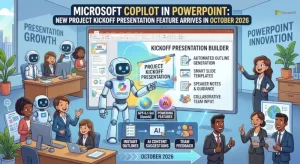
Microsoft is introducing a new Copilot capability in PowerPoint designed to help teams create formal project kickoff presentations with less manual preparation. The feature, scheduled for worldwide rollout from mid to late October 2026, will help users organize project goals, responsibilities, milestones, timelines, risks, and success measures into a structured presentation draft.
The update targets users with access to Copilot in PowerPoint across Windows desktop (Win32), Mac, and the web. Microsoft says organizations will not need to take administrative action to enable the rollout, making the feature a potentially useful addition for businesses that regularly launch projects and coordinate cross-functional teams.
Rather than starting every presentation from a blank slide, users will be able to use a scenario-specific Copilot skill to prepare a shared starting point for project planning and alignment.
What Is the New Copilot Project Kickoff Feature?
The new capability is designed specifically for project kickoff meetings, project launches, and other situations where teams need to agree on how a project will operate before execution begins.
Project kickoff presentations typically bring together essential information about a project’s purpose, boundaries, ownership, schedule, and expected outcomes. Preparing these materials can require input from project managers, department leads, technical teams, and other stakeholders.
Microsoft’s new Copilot skill aims to simplify that preparation by generating a draft tailored to the project kickoff scenario. Instead of assembling the entire presentation manually, users can start with an AI-generated structure and adapt it to their project’s requirements.
The feature is intended to help teams organize several important elements:
- Project goals: Establish what the team intends to accomplish and why the project matters.
- Roles and responsibilities: Clarify who is responsible for decisions, deliverables, and individual workstreams.
- Scope: Outline what the project includes and establish boundaries around the work.
- Milestones and schedule: Present major deliverables, target dates, and significant stages of execution.
- Risks: Identify potential obstacles that could affect delivery or project outcomes.
- Success measures: Define how the team will evaluate progress and determine whether the project has achieved its objectives.
- Next steps: Establish immediate priorities and actions following the kickoff meeting.
These elements give project teams a common framework for discussing expectations and moving from initial planning toward coordinated execution.
Microsoft Copilot in PowerPoint: Rollout Timeline and Availability
Microsoft’s published rollout information places the feature’s general availability window in October 2026, with deployment beginning in mid-October and expected to finish by late October.
As of October 24, the rollout window is underway. The supplied announcement does not confirm that the feature has reached every eligible user, so availability may depend on the progress of Microsoft’s deployment.
The planned availability covers three PowerPoint environments within Microsoft 365:
| Platform | Planned availability |
|---|---|
| PowerPoint for Windows desktop (Win32) | Worldwide rollout |
| PowerPoint for Mac | Worldwide rollout |
| PowerPoint for the web | Worldwide rollout |
The intended audience is users who already have access to Copilot in PowerPoint. The announcement does not specify additional licensing changes, a separate purchase requirement, or a new administrative configuration for this capability.
Organizations should distinguish the overall rollout schedule from individual user availability. A feature can be within its announced deployment window without appearing immediately in every user’s PowerPoint environment.
Users who do not see the new skill should check their organization’s Microsoft 365 guidance and the Copilot capabilities available in their current PowerPoint experience.
Why AI-Generated Project Kickoff Presentations Matter
A project kickoff meeting can influence how effectively a team works together during the weeks and months that follow. When goals are unclear, responsibilities overlap, or deadlines are poorly communicated, teams can spend valuable time resolving misunderstandings that could have been addressed during planning.
Creating a kickoff presentation is therefore more than a formatting exercise. It requires project information to be gathered, organized, reviewed, and translated into a format that stakeholders can understand.
Copilot’s new skill addresses the initial preparation stage. By generating a structured draft, it may help project managers spend less time building the presentation framework and more time reviewing the actual project decisions that need to be communicated.
The potential benefits include:
Faster preparation: Teams can begin with a draft rather than building every section from scratch. This may be particularly helpful when several projects need kickoff meetings within a short period.
More consistent documentation: A scenario-specific structure can encourage teams to address recurring planning topics, including ownership, scope, milestones, risks, and success criteria.
Clearer stakeholder alignment: A presentation that organizes key project information in one place gives participants a shared reference during discussions.
Easier collaboration: Project leads can use the initial draft as a starting point for collecting feedback, correcting assumptions, and agreeing on responsibilities before work begins.
These are potential operational benefits, not guaranteed outcomes. The quality of the final presentation will still depend on the accuracy of the source information, the user’s instructions, and the review process.
How Project Managers Can Use the New Copilot Skill
Although the supplied announcement does not document a step-by-step interface or exact prompts, the intended workflow is straightforward: use Copilot to produce an initial kickoff presentation draft, then refine it using project-specific information.
A practical approach would involve the following steps.
1. Gather the essential project information
Before generating a presentation, collect the project’s objectives, scope, stakeholders, planned deliverables, schedule, known risks, and measures of success.
The more complete and accurate this information is, the easier it will be to evaluate whether the resulting draft reflects the team’s actual plans.
2. Generate a structured presentation draft
Use the available project kickoff skill in Copilot for PowerPoint when it becomes available in your environment. Provide relevant context about the project so the draft can serve as a meaningful starting point rather than a generic outline.
3. Validate responsibilities and deadlines
Review names, ownership assignments, milestone dates, dependencies, and deliverables carefully. AI-generated material should not be treated as confirmation that a person has accepted a responsibility or that a deadline has been formally approved.
4. Review risks and success measures
Confirm that the presentation reflects known project constraints and agreed performance indicators. Add missing information and remove assumptions that have not been validated by the project team.
5. Align stakeholders before execution
Share the draft with relevant participants, resolve outstanding questions, and update the presentation based on decisions made during preparation or the kickoff meeting.
This approach positions Copilot as a preparation assistant rather than a replacement for project planning, stakeholder consultation, or managerial judgment.
What Organizations Need to Know About Deployment and Administration
One notable aspect of the announcement is that no administrator action is required for the rollout.
Organizations using Copilot in PowerPoint do not need to introduce a separate administrative deployment process specifically for this new skill, according to the supplied information. Microsoft also identifies no new compliance considerations associated with the feature.
However, the absence of newly identified compliance considerations should not be interpreted as a blanket exemption from existing organizational policies. Businesses should continue to apply their established rules for handling confidential information, reviewing AI-generated content, and sharing project documentation.
For IT administrators and Microsoft 365 support teams, the immediate priority is awareness rather than a mandatory configuration change.
Organizations may wish to notify eligible employees about the new capability and provide practical guidance on using AI-generated drafts responsibly. Project management offices could also evaluate whether the feature fits existing presentation templates, project governance procedures, and internal approval processes.
The announcement does not specify changes to licensing, retention policies, data residency, or other technical compliance arrangements. Organizations should consult their existing Microsoft 365 documentation and internal requirements when assessing those areas.
Limitations and Questions to Watch
The feature’s introduction offers a useful starting point for AI-assisted project documentation, but several details remain unspecified in the announcement.
For example, Microsoft has not provided, in the supplied material, a detailed list of supported prompts, the precise layout of generated slides, or the extent to which the skill can draw information from existing project documents.
It is also unclear from this announcement whether the feature will integrate directly with particular project management systems or automatically populate schedules and assignments from other Microsoft 365 services.
These distinctions matter because generating a presentation from supplied context is different from maintaining a live project plan. Teams should not assume that a generated kickoff deck will automatically synchronize with task trackers, update milestones, or reflect subsequent project changes unless those capabilities are separately documented.
Organizations evaluating the feature should focus on practical results: how much preparation time it saves, whether the draft covers the necessary planning topics, how much editing is required, and whether stakeholders find the resulting presentation easier to use.
A short internal pilot could help answer those questions without requiring a broad change to existing project workflows.
What Comes Next for Copilot in PowerPoint?
The October 2026 rollout gives eligible users a new way to approach one of the most common tasks in project delivery: preparing the materials that bring a team together at the beginning of an initiative.
The immediate opportunity is to reduce repetitive presentation preparation and establish a consistent starting structure for discussions about scope, ownership, timelines, risks, and expected outcomes.
The longer-term value will depend on how well teams incorporate the feature into their existing planning practices. An AI-generated presentation can organize information, but it cannot independently resolve disagreements over priorities, validate every project assumption, or secure stakeholder commitment.
As availability expands through late October, project managers and Microsoft 365 users can assess whether the new skill improves their preparation process and helps teams enter kickoff meetings with clearer documentation.
For organizations already using Copilot in PowerPoint, the practical next step is to watch for availability, test the generated drafts against real project requirements, and establish a review process before sharing them as authoritative project plans.
Extra posts:
 Microsoft Brand Kit Adds Custom Presentation Skills for Copilot in PowerPoint
  Microsoft 365 Copilot Personalization: New Work Insights Feature Rolls Out in October 2026
  Microsoft Makes Copilot Easier to Try: Free 30-Day Microsoft 365 Copilot Trial Arrives for SMBs Without Payment Details
  Microsoft Copilot to Add Usage-Based AI Models Across Chat, Word, Excel and PowerPoint in November 2026
  Microsoft 365 Copilot Chat Skills: Features, Admin Controls, and October 2026 Rollout
  Project Online Essentials Reaches End of Life on October 1, 2026: Organizations Need to Act Now