
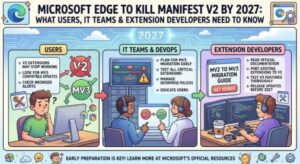
Microsoft Edge users and enterprise IT teams have another major browser change to prepare for: Manifest V2 extensions are on their way out.
Microsoft is moving the Edge extension ecosystem fully toward Manifest V3 (MV3), with enterprise deprecation of Manifest V2 (MV2) expected to begin in early 2027. The move means organizations that still depend on older MV2 browser extensions will need to start planning their migration now rather than waiting for the final deadline.
For everyday users, the change may initially seem like a technical update happening behind the scenes. For businesses, however, it could have a much bigger impact. Organizations that force-install, allow-list or rely on internally developed MV2 extensions will need to review their browser environment and make sure those extensions have an MV3 replacement before Microsoft completes the enterprise deprecation process.
Microsoft’s latest Edge documentation confirms that the company is continuing its transition from MV2 to MV3, while recommending that extension developers migrate existing MV2 extensions to MV3. Microsoft says the move is intended to improve privacy, security and performance across the extension ecosystem.
What Is Manifest V2?
Manifest V2 is an older extension framework used by browser add-ons to define their permissions, background processes, scripts and other capabilities.
For years, MV2 has been the foundation behind thousands of browser extensions. However, the extension ecosystem has changed significantly, and browser vendors have been moving toward a newer architecture.
That newer architecture is Manifest V3.
Microsoft has adopted the Chromium-based extension model and is transitioning Edge extensions to MV3. Microsoft says the move can enhance security, privacy and performance while reducing fragmentation for developers.
In practical terms, MV3 introduces stricter controls over what extensions can do. For example, remotely hosted code is no longer permitted in the same way it was under MV2, and extensions need to package the JavaScript they execute within the extension itself. MV3 also introduces changes to permissions, background processing and APIs.
When Will Microsoft Edge Stop Supporting MV2?
The important date for businesses is early 2027.
Microsoft’s current developer documentation says that deprecation of Manifest V2 extensions for enterprise customers is expected to begin in early 2027. Microsoft has already stopped accepting new MV2 extensions through Partner Center and the Edge Add-ons website, a change that took effect in July 2022. As of August 2026, Microsoft also began showing MV2 deprecation warnings in Partner Center for extensions that still use the older manifest.
According to the rollout information available for the Edge enterprise transition, the worldwide, GCC, GCC High and DoD rollout is expected to begin in January 2027, with completion targeted for late April 2027.
That makes 2026 a critical preparation period for organizations still running legacy extensions.
It is also worth noting that Microsoft’s public documentation currently describes the enterprise deprecation as beginning in early 2027, while some later stages of the Partner Center transition remain listed as “TBD.” Organizations should therefore monitor Microsoft’s Edge documentation and update their migration plans as Microsoft publishes additional milestones.
What Happens to Existing MV2 Extensions?
The transition will not simply mean that old extensions disappear overnight.
Microsoft has outlined several stages of the deprecation process.
First, users can expect to see deprecation warnings associated with MV2 extensions. Warnings can appear on the Edge extensions management page and on Edge Add-ons product pages.
MV2 extensions will also become less visible in the Edge Add-ons ecosystem, including restrictions on discovery and new installations.
For consumer users, MV2 extensions will be disabled by default as the deprecation progresses. Initially, users may have an option to re-enable them, but Microsoft plans to phase out that ability as the transition continues.
Eventually, new installations of MV2 extensions will be blocked, and after enterprise deprecation, MV2 extensions will no longer function even on managed devices.
This is particularly important for companies that have historically depended on enterprise policies to keep older extensions running.
What Does This Mean for Businesses?
For enterprises, this is much more than a browser update.
Many organizations manage Edge extensions centrally. IT departments may use policies such as ExtensionInstallForcelist, ExtensionInstallAllowlist, or the ExtensionManifestV2Availability policy to control which extensions employees can install or use.
Microsoft’s current policy documentation confirms that ExtensionManifestV2Availability exists to control whether MV2 extensions can be used in Edge. The policy supports different modes, including allowing MV2 extensions, disabling them, or allowing them specifically for forced extensions.
However, organizations should not treat that policy as a permanent solution.
Once enterprise MV2 support is removed, the policy will no longer provide a way to keep legacy MV2 extensions running. In other words, an organization cannot simply configure an exception and continue using MV2 indefinitely.
That makes migration the real solution.
Which Users and Devices Are Affected?
The change is relevant to a broad range of Edge users.
It affects consumers and enterprise users who have MV2 extensions installed, as well as organizations that manage extensions through Microsoft Edge policies.
It also affects extension developers who maintain older MV2 products and publish them through Microsoft Partner Center.
The change applies to Microsoft Edge desktop installations across Windows, macOS and Linux, covering the browser’s major release channels.
For managed environments, there is an important distinction between the consumer and enterprise phases of the rollout.
Enterprise-managed devices can continue to use available MV2 controls during the earlier transition period. But once enterprise deprecation begins, managed environments will also need to move away from MV2.
That distinction gives IT departments some breathing room, but it should not be interpreted as a reason to delay migration.
Why Is Microsoft Moving to Manifest V3?
The main argument behind MV3 is security.
Browser extensions can have significant access to websites, browser data and user activity. An extension with excessive permissions or vulnerable code can therefore create security and privacy risks.
MV3 introduces tighter restrictions around extension behavior and permissions. Microsoft specifically highlights improvements involving security, privacy and performance.
One notable change is the treatment of remotely hosted code. Under MV3, extension JavaScript must be included within the extension package rather than being remotely loaded in the same manner as before.
MV3 also changes the way background functionality works. Instead of relying on the persistent background pages commonly associated with MV2, MV3 uses service workers for background processing.
These changes can reduce the attack surface and encourage a more controlled extension architecture.
However, migration is not always a simple matter of changing "manifest_version": 2 to "manifest_version": 3.
Developers may need to modify APIs, permissions, background logic, networking behavior and other parts of their extensions.
What Extension Developers Need to Do
Developers with MV2 extensions should begin migration as soon as possible.
Microsoft recommends moving existing extensions to MV3 and submitting the updated version through Partner Center.
The migration can involve several technical changes.
Developers should review their manifest.json file, update the manifest version, evaluate permissions and host permissions, replace older APIs where necessary and migrate background functionality to service workers.
Remote code requirements also need to be reviewed because MV3 does not allow extensions to rely on remotely hosted executable JavaScript in the same way as MV2.
Microsoft’s migration documentation provides a detailed breakdown of these changes, including updates involving permissions, service workers, cross-origin requests and the Web Request API.
Developers should also test their extensions thoroughly before publishing the MV3 version.
A migration that works technically but changes an extension’s behavior could still create problems for users. Compatibility testing, performance testing and permission reviews should therefore be part of the transition.
What IT Administrators Should Do Now
The first step for IT departments is simple: find out where MV2 is being used.
Organizations should create an inventory of extensions installed across managed Edge environments. Microsoft recommends using Edge management reporting or the Edge management service to identify extensions in the environment.
Once the inventory is complete, administrators should classify extensions into several groups.
The first group should contain extensions that already have an MV3 replacement.
The second group should contain extensions where the vendor has announced an MV3 migration but has not released it yet.
The third group should include internal or line-of-business extensions that the organization owns and must migrate itself.
Finally, organizations should identify extensions with no clear replacement.
Those extensions represent the biggest business risk because they may require a change in workflow or the adoption of a completely different product.
Update Enterprise Policies
After identifying MV2 extensions, administrators should review Edge deployment policies.
If an organization uses ExtensionInstallForcelist or ExtensionInstallAllowlist, entries referencing MV2 extensions should eventually be replaced with the corresponding MV3 versions.
Administrators should also review their use of ExtensionManifestV2Availability.
Microsoft’s documentation shows that this policy can currently control MV2 availability, including an option for forced extensions. However, Microsoft’s broader migration plan makes clear that organizations should ultimately move to MV3 rather than depend on the legacy policy.
Don’t Forget Internal Extensions
Third-party extensions are only part of the problem.
Some businesses use internally developed browser extensions for specialized workflows, employee portals, automation, authentication or line-of-business applications.
These extensions can be particularly easy to overlook because they may not be publicly available through the Edge Add-ons store.
IT and development teams should therefore work together to locate internal MV2 extensions and establish migration owners.
If an internal extension is business-critical, the migration should be treated like any other software modernization project, with development, testing, security review and staged deployment.
What Should Users Do?
Most everyday users do not need to take immediate technical action.
However, users who rely heavily on browser extensions should pay attention to warnings in Edge and check whether their important extensions have MV3 versions available.
If an extension suddenly becomes disabled, users should avoid searching for unofficial copies from unknown websites simply to restore functionality. The safer approach is to look for an official MV3 replacement or an alternative extension from a trusted publisher.
For businesses, employees should also know who to contact if an extension stops working.
That is why helpdesk preparation is an important part of the migration.
Communication Will Be Just as Important as the Technical Migration
A technically successful MV3 migration can still become an operational headache if employees are not informed.
Organizations should notify affected users ahead of the change, particularly when an MV2 extension has no direct replacement.
Internal documentation should also be updated.
Any knowledge base article, onboarding guide, support document or internal procedure that references an MV2 extension should be reviewed and updated.
Helpdesk teams should receive information about the migration schedule, replacement extensions and expected user-facing symptoms.
Organizations should also communicate directly with third-party extension vendors to confirm their MV3 migration plans.
The Bottom Line
Microsoft Edge’s Manifest V2 retirement is no longer something enterprises can treat as a distant possibility.
The browser ecosystem is moving toward Manifest V3, and Microsoft’s current documentation places the beginning of enterprise MV2 deprecation in early 2027.
For users, the change should eventually result in a more modern and tightly controlled extension environment.
For developers, however, it means updating legacy code, APIs and extension architecture.
And for IT departments, the biggest task is discovering every place where MV2 is still being used before those extensions become a business disruption.
The smartest approach is to start with an inventory, identify MV3 replacements, migrate internally developed extensions, update deployment policies and communicate the change to employees.
The deadline may still be months away, but enterprise browser migrations rarely become easier when left until the final weeks.
If your organization still depends on Manifest V2, now is the time to move.
Extra posts:
 Microsoft Teams Is Changing How Users Join Private Teams With a Code
  Microsoft Edge Gets Smarter: Microsoft 365 Copilot Brings Contextual Answers to Tabs, Documents and YouTube
  Microsoft 365 Copilot Notebooks Get a Major Upgrade: What Users and IT Teams Need to Know
  Microsoft Teams Mobile Calendar to Require Latest App Update by October 2026: Microsoft Announces Critical Change for iOS and Android Users
  Microsoft Teams Adds In-Meeting AI Toggle: Users Gain More Control Over Copilot and Facilitator
  How to Use Windows Terminal Like a Pro: The Ultimate Guide for Developers, IT Professionals, and Power Users