
Microsoft Outlook is about to make one of the most common workplace tasks considerably easier. Starting in late August 2026, Microsoft will begin rolling out a new drag-and-drop feature that allows Outlook users to reschedule their own calendar events simply by moving them to a different time slot.
The update, listed under Microsoft 365 Roadmap ID 568367, is designed to simplify the everyday process of changing meetings and appointments. Instead of opening an event, editing its date or time, saving the change and returning to the calendar, users will be able to make the adjustment directly from the calendar surface.
For professionals who spend much of their working day managing meetings, the change may seem small. In practice, however, it could remove several unnecessary steps from one of the most repetitive parts of office work.
Microsoft published the update on August 18, 2026, with the rollout scheduled to begin in late August and continue through late September 2026. The feature is planned for worldwide availability as well as GCC and GCC High environments.
Outlook Is Bringing Simpler Rescheduling to the Calendar
Calendar management has become an increasingly important part of modern workplace productivity. With employees working across offices, remotely and in hybrid environments, calendars can change several times during a typical day.
A meeting that was originally scheduled for 10 a.m. might need to move to 11 a.m. because of another appointment. Until now, users generally had to interact with the calendar event itself to make such changes.
The new Outlook capability takes a more direct approach.
Users will be able to select their own calendar event and drag it to another available time slot. The event can then be rescheduled from the calendar view without requiring users to go through the traditional editing workflow.
The feature will work in both day view and multi-day calendar views, giving users more flexibility when organizing their schedules.
The result is a more visual approach to calendar management. Rather than thinking about the process as editing an appointment, users can simply look at their calendar, decide where an event should move and place it there.
Only Events Owned by the User Can Be Moved
There is an important limitation to the new functionality.
The drag-and-drop capability applies only to events that are owned by the user. In other words, users cannot simply grab any meeting appearing on their calendar and move it using this new feature.
This distinction is particularly relevant in workplaces where employees frequently participate in meetings organized by managers, colleagues or external contacts.
The feature is primarily intended to give individuals an easier way to manage the calendar events they control. It does not appear to change the broader permissions or ownership model surrounding Outlook meetings.
That should help organizations introduce the feature without needing to rethink their existing calendar-management policies.
No Administrator Configuration Required
For Microsoft 365 administrators, one of the most notable aspects of the update is that no administrative configuration is required.
Microsoft says no action is necessary for organizations to receive the feature.
Once the update reaches the applicable Outlook environment, users will be able to take advantage of the new functionality directly from their calendar.
That makes the rollout relatively straightforward for IT departments. There is no special setting that administrators need to enable and no complicated deployment process described in Microsoft’s announcement.
However, Microsoft recommends that organizations consider notifying users about the change and updating internal training or support documentation where necessary.
A Small Change That Could Save Time
Drag-and-drop functionality is hardly a new concept in software. Many productivity applications have used it for years because it provides an intuitive way to manipulate information.
Bringing the same interaction to Outlook calendar scheduling could make a noticeable difference for people who manage busy schedules.
Consider an employee with a calendar containing 10 or 15 meetings throughout the day. If one meeting needs to be moved, the traditional process can involve opening the event, finding the correct date and time, changing the details, saving the appointment and then checking the calendar again.
With drag and drop, the change becomes much more visual.
A user can see the event on the calendar and move it to the desired time slot. This reduces the amount of navigation required and makes scheduling feel more immediate.
For employees who frequently reorganize their calendars, those saved seconds can add up over the course of a week or month.
What Organizations Should Expect During the Rollout
Microsoft’s rollout window begins in late August 2026 and is expected to be completed by late September 2026.
That means organizations should not necessarily expect every user to see the feature immediately. Microsoft 365 updates can roll out progressively, so availability may vary during the rollout period.
The change affects Outlook’s calendar experience and is associated with Exchange Online. Microsoft identifies Android and iOS among the platforms and services associated with the update information, although the specific user experience may depend on the Outlook client and rollout stage.
For organizations with internal documentation covering Outlook scheduling workflows, this is a good opportunity to review those materials.
Existing guides may tell employees to open an event and manually change its time. Once drag and drop becomes available, those instructions could be unnecessarily complicated.
A short internal announcement could be enough to let employees know that they can now move their own calendar events directly from the day or multi-day calendar view.
What IT Administrators Need to Do
The short answer is: nothing is required.
Microsoft has not identified an administrator configuration requirement for this feature, and the company says no action is necessary.
However, IT and Microsoft 365 support teams may still want to take a few practical steps.
First, support teams can inform users that the feature is coming. This can prevent confusion when employees suddenly notice that calendar events can be moved directly.
Second, organizations may want to update internal Outlook training materials. Screenshots and instructions based on the old rescheduling workflow could become outdated.
Finally, help-desk teams should be aware of the ownership limitation. If a user tries to drag a meeting organized by someone else, they may not be able to move it using the new feature.
Why This Outlook Update Matters
The significance of Microsoft’s latest Outlook update is less about introducing a revolutionary capability and more about removing friction from a familiar task.
Microsoft 365 has increasingly focused on making everyday workplace actions faster and more intuitive. Calendar management is a natural area for this type of improvement because scheduling changes are frequent and often happen under time pressure.
A drag-and-drop interaction also fits naturally with how people already think about calendars. Users can visually see blocks of time and rearrange them without navigating through multiple menus.
For busy professionals, that can make Outlook feel more responsive and easier to manage.
It is also a good example of how relatively small interface improvements can contribute to overall productivity. Not every productivity enhancement needs to introduce a major new application or artificial intelligence capability. Sometimes, eliminating a few unnecessary clicks from a task people perform dozens of times a week can be just as useful.
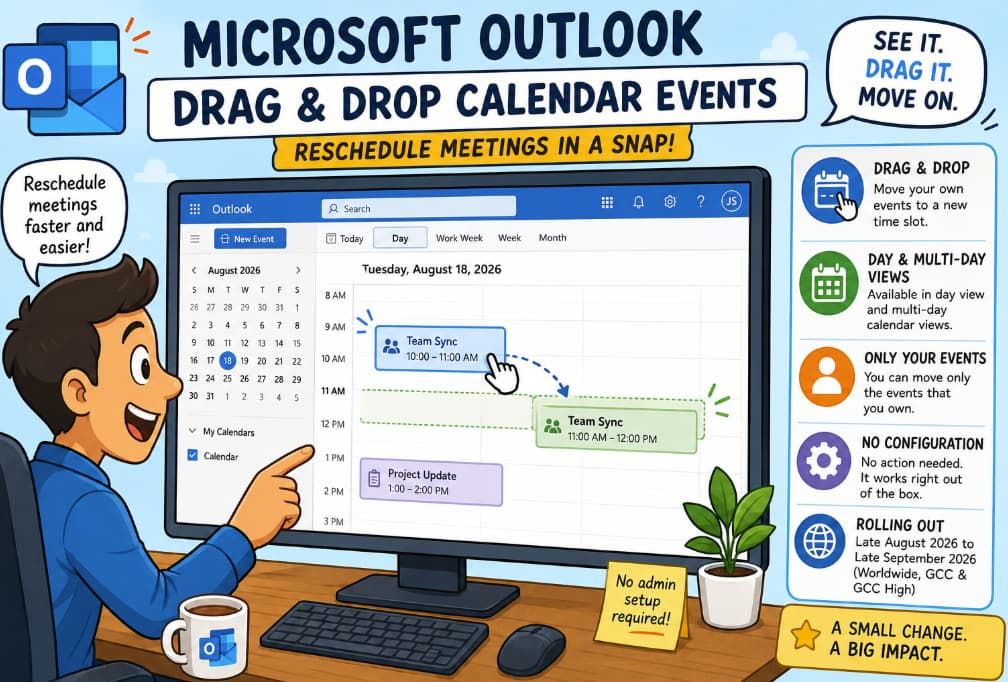
Microsoft Outlook users will soon have a faster way to reschedule their own calendar events.
Beginning in late August 2026, Microsoft will roll out drag-and-drop support for calendar events in day and multi-day views, with worldwide, GCC and GCC High availability expected to complete by late September.
The feature requires no administrator setup, and users will be able to move events directly on the calendar. The main restriction is that only events owned by the user can be moved through the new drag-and-drop experience.
For Microsoft 365 administrators, there is no mandatory action. Still, notifying employees and updating internal Outlook training materials could help organizations get the most from the change.
In a world where calendars are constantly shifting, Microsoft is making one of the most basic scheduling tasks a little faster: see it, drag it, and move on