
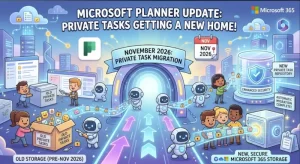
Microsoft is changing the way private tasks in Microsoft Planner are stored, with the transition scheduled to begin in early November 2026 and finish by late November.
Under the change, new private tasks created in Planner and Planner-powered experiences will be stored in a user’s own private Planner plan rather than the Microsoft To Do task store.
For users, the day-to-day experience is designed to remain private. Private tasks will still be visible only to their owner and cannot be shared or assigned to other people.
For organizations, however, the storage change is worth noting because it may affect internal documentation, compliance processes, reporting and governance workflows that currently reference Microsoft To Do.
What Is Changing in Microsoft Planner?
Today, private tasks created through Planner can rely on the Microsoft To Do task store.
Beginning in November 2026, Microsoft is moving new private tasks into a user’s private Planner plan. The change applies to Microsoft Planner, Planner on the web and other Planner-powered experiences.
The shift is intended to bring private task management more closely into the Planner platform while retaining the privacy users expect.
The key distinction is that new private tasks will no longer appear in Microsoft To Do when they are created in Planner.
Existing private tasks will continue to be visible in Planner’s My Tasks experience.
The main changes at a glance
- New private Planner tasks will be stored in a private Planner plan.
- Private tasks will remain visible only to the task owner.
- Users cannot share or assign these private tasks to others.
- Existing private tasks remain visible in Planner My Tasks.
- New Planner private tasks will no longer appear in Microsoft To Do.
- Planner capabilities such as labels and task history can become available for private tasks.
- Existing security and compliance protections continue to apply.
- The rollout is automatic, with no administrator deployment action required.
Why Microsoft Is Making the Change
The move is primarily about aligning private task storage with Planner itself.
By keeping private tasks inside Planner, Microsoft can provide capabilities associated with the Planner platform rather than maintaining a separate storage model through Microsoft To Do.
That includes richer task functionality such as labels and task history.
The privacy model is not being removed or weakened. A private task remains private to the person who owns it, and the update does not turn those tasks into collaborative Planner tasks.
The result is a change in where the task is stored, rather than a fundamental change in who can access it.
What Users Will Notice
For most users, the change should be relatively straightforward.
Someone creating a new private task in Planner will continue to work with that task through the Planner experience. The important difference is behind the scenes: the task will now reside in the user’s private Planner plan.
One visible consequence is particularly important for people who use both Planner and Microsoft To Do.
New private tasks created in Planner will no longer appear in Microsoft To Do.
That could affect personal workflows where users previously expected Planner-created private tasks to surface alongside their To Do tasks.
Existing private tasks, however, will remain available in Planner’s My Tasks view.
The Bigger Issue for Microsoft 365 Administrators
Although Microsoft says no administrator action is required, organizations should not necessarily treat the update as something that can be ignored.
The storage location of new private tasks is changing, and that can matter for organizations with detailed governance or compliance processes.
IT and Microsoft 365 administrators should consider whether internal policies, documentation or reporting processes make assumptions about private Planner tasks being stored in Microsoft To Do.
Potential areas for review include:
- Internal Microsoft 365 documentation
- Help desk and support guidance
- Retention and deletion workflows
- eDiscovery and discovery procedures
- Compliance reporting
- Governance documentation
- Data location and storage references
- User training materials
The change may be invisible to many employees, but it can be significant to teams responsible for understanding where Microsoft 365 data is stored and how it is governed.
Compliance and Governance Considerations
Microsoft’s update specifically highlights several areas that organizations should validate.
The first is data storage. New private tasks will be stored in a user’s private Planner plan rather than the Microsoft To Do task store.
That means organizations should review processes that depend on the underlying service where these tasks reside.
Retention and deletion
The storage change may affect retention, discovery or deletion workflows.
Organizations that have policies built around Microsoft To Do storage should determine whether those policies continue to work as intended for private Planner tasks.
This does not necessarily mean organizations need to redesign their compliance framework. It does mean that existing assumptions should be checked against the new storage model.
Reporting and monitoring
The update may also have implications for organizations that use reporting or governance processes to demonstrate compliance activities.
If an organization previously treated Microsoft To Do as the relevant location for private Planner task data, administrators may need to update those processes.
That is especially relevant in environments where service-specific data handling is documented for audit or governance purposes.
No New Generative AI Capability
The update does not introduce a new generative AI interaction for end users.
Microsoft describes this as a Planner task storage and experience change rather than an AI capability.
That distinction matters because the update is primarily about the underlying service architecture and task-management experience, not about adding AI features to private tasks.
When Will the Change Roll Out?
Microsoft’s current schedule calls for the worldwide rollout to begin in early November 2026.
The company expects the rollout to be completed by late November 2026.
The feature will be enabled automatically, so administrators do not need to activate it manually.
Organizations can still use the rollout window as an opportunity to review internal processes before users begin encountering the updated behavior.
What Organizations Should Do Now
There is no mandatory administrative action, but a small amount of preparation could prevent confusion.
Recommended steps
1. Brief support teams
Help desk and IT support staff should know that Planner private tasks are moving to Planner storage and that new tasks will no longer surface in Microsoft To Do.
2. Review internal documentation
Look for instructions that tell users their Planner private tasks can be found or managed through Microsoft To Do.
3. Check compliance processes
Organizations should review retention, discovery, reporting and governance procedures that depend specifically on Microsoft To Do storage.
4. Update user communications
If employees have been trained to use Microsoft To Do as part of their Planner private-task workflow, a short communication may be useful.
5. Review Microsoft 365 documentation
Administrators should keep internal guidance aligned with Microsoft’s updated Planner service and administrative documentation.
What This Means for Microsoft Planner’s Direction
The change also offers a glimpse into how Microsoft is positioning Planner.
Moving private tasks into private Planner plans gives Microsoft a more unified foundation for task management. Instead of treating private tasks as something that sits alongside Planner in a separate To Do storage model, the platform can apply more Planner-native capabilities to them.
For users, that could eventually mean a more consistent experience between private and collaborative task management, even though the privacy boundaries remain different.
The immediate benefit is access to richer Planner functionality, including features such as labels and task history.
The trade-off is that users who have relied on the connection between Planner private tasks and Microsoft To Do will need to adjust their expectations.
What to Watch After the November Rollout
The most important question after deployment will be whether organizations experience any unexpected differences in governance or reporting.
The change itself is relatively contained, but Microsoft 365 environments often contain interconnected processes that are not obvious to end users.
Organizations should pay particular attention to:
- Whether compliance workflows identify the new Planner storage location correctly
- Whether internal reporting continues to capture relevant information
- Whether retention and discovery processes behave as expected
- Whether support requests increase from users looking for private Planner tasks in To Do
- Whether users take advantage of new Planner functionality for private tasks
For everyday users, the transition should largely preserve the private nature of their tasks. For administrators, the more important shift happens behind the interface: Microsoft Planner is becoming the storage home for new private Planner tasks, replacing Microsoft To Do as the underlying task store.
As the worldwide rollout begins in November 2026, organizations have a relatively simple window to update documentation and validate governance processes before the new storage model becomes the standard experience.
Extra posts:
 Microsoft Teams Is Changing How Users Join Private Teams With a Code
  Microsoft Is Changing SharePoint’s FAQ Experience: What Authors Need to Know Before November
  Manage Planner tasks assigned to you within Microsoft To-Do
  Microsoft Planner Lands Inside Outlook and Copilot: A Major Productivity Upgrade for Microsoft 365 Users
  Microsoft Is Retiring SharePoint Page Agent: What Users Need to Know Before November 2026
  Microsoft Planner Is Getting a New Capacity View to Make Team Workloads Easier to See