
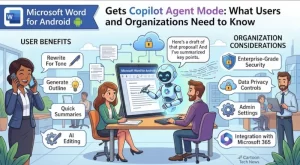
Microsoft is bringing Copilot Agent Mode to Word for Android, giving mobile users a more task-oriented way to work with AI inside the word processor. The update is scheduled to roll out worldwide in late September 2026, with Microsoft expecting the deployment to be completed by the end of that month.
The change means eligible Android users will be able to use Copilot to help draft, reason over and refine Word content directly from their mobile devices.
For individual users, the update expands what Microsoft’s AI assistant can do on a phone. For organizations, the more important development is the shift toward an agent-style Copilot experience that can interact with user content and support more task-oriented workflows.
What Is Changing in Word for Android?
The core update is straightforward: Copilot Agent Mode is coming to Microsoft Word on Android.
Rather than limiting Copilot to conventional question-and-answer interactions, Agent Mode is designed around tasks. Users can ask the AI to assist with writing and reasoning over content, potentially making it easier to move from an idea or rough draft to a more polished document.
The experience will be available to users who already have access to Copilot in Word on Android.
Microsoft’s rollout information identifies the affected products as:
- Microsoft Word for Android
- Microsoft 365 Copilot
The update will be delivered automatically during the rollout window. Administrators do not need to manually enable the feature for the deployment to take place.
Why Agent Mode Matters on Mobile
AI-assisted writing is not new to Microsoft Word, but the arrival of an agentic experience on Android represents a meaningful expansion of how users can interact with Copilot.
Traditional AI assistance often starts with a direct prompt: write something, summarize something or improve a passage. Agent-oriented experiences are more focused on accomplishing a broader task, with the AI helping the user reason through the steps needed to reach an outcome.
On a smartphone, that distinction could be particularly useful.
People increasingly use mobile devices to review documents, make edits, respond to work requests and prepare content away from a desktop. Bringing a more task-oriented Copilot experience into Word means users can potentially perform more of that work without switching between multiple applications or waiting until they return to a PC.
What Users Can Do With Copilot Agent Mode
According to Microsoft’s update details, Agent Mode in Word for Android will help users with three broad areas of document work:
- Drafting: Users can ask Copilot to help create content.
- Reasoning: Copilot can assist users in working through content and ideas.
- Refining: Existing Word content can be improved with AI assistance.
The emphasis is on working with documents rather than simply asking isolated questions.
That distinction is important because it positions Copilot as part of the document-creation workflow. Instead of treating AI as a separate tool, Microsoft is putting the capability directly into Word on Android.
Organizations Don’t Need to Take Administrative Action
One of the more straightforward aspects of the rollout is that no admin action is required.
Organizations that already provide users with access to Microsoft 365 Copilot experiences on Android will receive the update automatically during Microsoft’s scheduled rollout.
That does not mean IT and business teams should ignore the change.
Microsoft specifically recommends that organizations inform users and support teams about the arrival of Copilot Agent Mode. Internal guidance may also need to be updated if it describes the Copilot features currently available on Android devices.
For companies with formal AI policies, this is also a useful point to review how those policies apply to mobile Copilot usage.
Key takeaway: No technical rollout action is required, but organizations should still review their user guidance and AI policies.
The Policy Question May Be More Important Than the Update
The introduction of an agentic AI capability raises a different set of questions from a conventional software feature update.
Microsoft’s compliance information classifies the change as one that introduces or significantly modifies AI and machine-learning capabilities that can interact with or provide access to customer data.
That is significant for organizations operating under strict data governance requirements.
Users will be able to interact with generative AI through Agent Mode in Word for Android, while the feature also introduces an agentic capability designed for task-oriented assistance.
Organizations should therefore consider whether existing rules adequately address AI use on mobile devices.
Areas worth reviewing include:
- What employees are permitted to enter into AI-assisted workflows.
- Whether sensitive or confidential information can be processed through Copilot.
- Existing Microsoft 365 Copilot access policies.
- Mobile application and device-management policies.
- User training and acceptable-use guidance.
- Support procedures for questions about AI-generated content.
The update does not necessarily require a new policy from scratch. In many cases, organizations may simply need to make sure existing policies clearly cover Copilot’s expanding capabilities.
The Mobile AI Trend Is Becoming More Practical
The Word update also reflects a broader direction in workplace software: AI is moving closer to the actual tasks users perform.
Instead of opening a dedicated AI chatbot, copying information into it and then transferring the result back into an application, users increasingly encounter AI capabilities inside the applications where their work already happens.
Word is a natural environment for that approach.
A user editing a document on an Android phone can potentially ask Copilot for assistance without leaving the document workflow. That could make AI more useful for quick edits, early drafts and document refinement when a desktop computer is unavailable.
The real measure of the feature, however, will be how effectively users can control the AI and how reliably it handles context.
What IT Teams Should Do Now
Although Microsoft says administrators do not need to take action to enable the rollout, organizations can still prepare before or during deployment.
A practical checklist includes:
- Notify users: Let employees know that Copilot Agent Mode will appear in Word for Android.
- Update documentation: Check mobile Microsoft 365 and Copilot guidance for outdated descriptions.
- Review policies: Confirm that existing AI, data-handling and mobile-use policies cover the new experience.
- Prepare support teams: Help desks may receive questions about what Agent Mode does and who can access it.
- Check access expectations: Organizations should understand which users already have Copilot access and therefore may encounter the feature.
These steps are less about managing the technical rollout and more about managing the organizational impact.
What Users Should Keep in Mind
For employees, the arrival of Agent Mode should be viewed as an additional productivity capability rather than a replacement for human review.
AI can help produce and refine text quickly, but users remain responsible for checking the accuracy, context and appropriateness of generated content.
That becomes especially important for professional documents, where a polished-looking AI-generated passage can still contain incorrect assumptions or wording that does not reflect an organization’s standards.
The mobile setting adds another consideration: people may be creating or editing documents in less controlled environments than they would at a company workstation.
What Happens Next?
Microsoft’s rollout schedule places the worldwide deployment in late September 2026, with completion expected by the end of that month. Since the feature is being delivered automatically, eligible users and organizations should see the capability as Microsoft’s rollout reaches their environments.
The bigger story is what comes after the initial launch.
As Microsoft continues adding agent-style capabilities to its productivity applications, the distinction between an AI assistant and an AI agent is likely to become increasingly important for businesses. A tool that can help with a single writing request presents different governance questions from one designed around completing broader tasks.
For Word users on Android, the immediate benefit is convenience: more capable AI assistance without leaving the mobile document experience.
For organizations, the longer-term question is how quickly their AI governance, employee training and mobile policies can keep pace as Copilot moves from answering prompts toward helping users accomplish tasks.
Extra posts:
 Microsoft Defender for Endpoint Android Update Required: What Organizations Need to Know Before September 2026
  Microsoft Teams Mobile Calendar to Require Latest App Update by October 2026: Microsoft Announces Critical Change for iOS and Android Users
  Microsoft Expands Microsoft 365 Copilot Legal Agent Worldwide: AI-Powered Contract Review Comes to Global Frontier Users
  Microsoft Planner Lands Inside Outlook and Copilot: A Major Productivity Upgrade for Microsoft 365 Users
  Microsoft Teams PowerPoint Live Gets a Light Mode for Presenters
  Microsoft 365 Copilot Gets a Faster Way to Work in Word, Excel and PowerPoint