
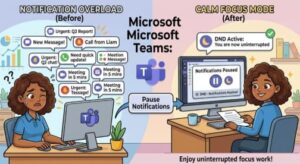
Microsoft Teams is getting a small but potentially very useful update that could make a big difference for people who spend much of their working day dealing with notifications.
The collaboration platform is set to introduce a new feature that will allow users to temporarily pause all Teams notifications for a selected period of time. Instead of changing notification settings manually or turning individual alerts on and off, users will be able to pause interruptions for a specific duration and let Teams automatically restore their normal notification preferences afterward.
The feature is scheduled to roll out worldwide starting in mid-September 2026, with availability expected to expand through October. It will be available across Microsoft Teams desktop, web, and mobile, giving users the same basic control regardless of which device they use.
And perhaps the best part for IT administrators: no admin action is required.
Why Microsoft Teams Is Adding Temporary Notification Pausing
Notifications are useful until there are too many of them.
For many employees, Teams has become one of the main channels for workplace communication. Messages, mentions, reactions, meeting reminders and other alerts can keep people informed, but they can also become a constant source of interruption.
Even when someone is working on an important report, preparing for a presentation or participating in a meeting, a new Teams notification can pull their attention away from the task at hand.
That is where the new temporary pause feature comes in.
Microsoft is giving users a simpler way to create a distraction-free period without permanently changing their notification preferences. Users will be able to select a period during which Teams notifications are paused. Once that period expires, notifications will automatically resume according to the user’s existing settings.
In practical terms, it means users don’t have to remember to switch notifications back on.
How the New Teams Feature Will Work
The experience is designed to be straightforward.
According to the rollout information, users will be able to access the capability through the profile menu in the upper-right corner of the Microsoft Teams application.
From there, users will be able to choose a duration for temporarily pausing notifications.
Once activated, Teams will stop notifications for the selected period. When the pause period ends, the user’s normal notification preferences will automatically take effect again.
This is an important distinction from changing notification settings manually.
If someone normally receives alerts for messages, mentions and other activity, they won’t need to rebuild those preferences after their focused-work session. The temporary pause simply acts as a short-term interruption blocker.
Useful for Meetings, Deep Work and Breaks
The obvious use case is focused work.
Imagine you have an hour to finish an important presentation. Normally, you might receive Teams notifications throughout that hour, each one tempting you to check what is happening.
With the new feature, you can pause notifications before starting and concentrate on the presentation without changing your permanent Teams configuration.
The same idea could be useful during meetings.
Employees who are presenting or attending an important meeting can temporarily silence Teams notifications and avoid unrelated alerts appearing at an inconvenient moment.
It could also be useful for employees who need uninterrupted time for writing, analysis, coding, planning or other work that requires sustained concentration.
And there is another simple use case: taking a break.
Instead of worrying about notifications arriving while stepping away from the computer, users can pause them for a chosen period and return to their regular notification experience afterward.
No Need for IT Administrators to Make Changes
For organizations, the update should be relatively easy to adopt.
Microsoft says no administrator action is required to enable the feature. The capability is being introduced as a user-level option, meaning individual Teams users can decide when they want to temporarily pause notifications.
That also means organizations don’t need to redesign their existing notification policies simply because the feature is becoming available.
IT teams may still want to inform employees about the change, particularly in companies where notification overload has become an issue. A short internal announcement or Teams training tip could be enough to introduce the feature.
The feature essentially gives employees another tool for managing their own attention without requiring IT intervention.
When Will Microsoft Teams Users Get the Feature?
The rollout will happen in stages.
For Targeted Release worldwide, Microsoft plans to begin the rollout in mid-September 2026, with completion expected by early October 2026.
For General Availability, the rollout is scheduled to begin in early October 2026 and is expected to finish by late October 2026.
General availability will cover users worldwide as well as environments including GCC, GCC High and DoD.
Because the rollout is gradual, users may not all see the option at exactly the same time. Some Teams users could receive the capability earlier, while others may need to wait until the rollout reaches their account or organization.
The feature is expected across the major Teams platforms:
- Microsoft Teams desktop
- Microsoft Teams web
- Microsoft Teams mobile
This cross-platform availability is particularly useful for people who move between computers and mobile devices throughout the day.
What Happens When Notifications Are Paused?
One of the most convenient aspects of the feature is what happens afterward.
Users won’t have to manually restore their notification settings when the selected pause period ends. Teams will automatically resume notifications using the preferences that were already configured.
That makes the feature different from simply changing notification settings for a meeting or work session.
The goal is temporary interruption management rather than permanent customization.
For everyday users, that could make the feature much easier to use. Instead of thinking, “I need to change my notification settings and remember to change them back later,” the process becomes more like setting a temporary focus period.
A Small Change That Could Have a Big Impact
At first glance, temporarily pausing notifications might not sound like a major Teams update. But notification management is increasingly important as workplace communication becomes more digital.
Employees can receive messages across multiple Teams channels, chats and meetings throughout the day. Constant alerts can make it harder to maintain concentration, particularly when workers are handling tasks that require uninterrupted attention.
The new feature recognizes a simple reality: sometimes people need Teams to stop talking for a while.
Rather than forcing users to disconnect completely or modify their notification configuration, Microsoft is giving them a quick way to create some breathing room.
It also reflects a broader trend in workplace software toward helping users manage digital distractions and protect focused working time.
What Organizations Should Do
There is no required administrative action associated with this update.
However, organizations may want to consider telling employees about the feature once it becomes available.
A simple internal message could explain when the feature is useful — for example, during focused work sessions, important meetings or other periods when employees don’t want to be interrupted.
Managers and team leaders could also encourage employees to use notification controls appropriately while maintaining agreed expectations around urgent communication.
For example, employees might use the pause feature during scheduled deep-work periods while continuing to monitor other channels when they are responsible for time-sensitive requests.
No Compliance Changes Identified
The rollout information currently identifies no specific compliance considerations associated with the feature.
Organizations should nevertheless review the change against their own internal policies and communication requirements, particularly in environments where timely notifications are important.
For most organizations, however, the update appears to be a straightforward quality-of-life improvement rather than a change requiring major administrative preparation.
Microsoft Teams Is Putting More Control in Users’ Hands
The upcoming notification pause capability may be a relatively small addition to Microsoft Teams, but it addresses a problem familiar to almost anyone working in a notification-heavy environment.
The ability to temporarily silence Teams without changing existing notification preferences gives users more control over when they are available and when they need uninterrupted time.
With the rollout beginning in September 2026 and continuing through October, Teams users should start seeing the feature appear on desktop, web and mobile.
There is no admin configuration required, so organizations can simply make employees aware of the option and let them decide when it makes sense to use it.
Do you think temporarily pausing all Microsoft Teams notifications will help you stay focused, or do you prefer managing individual notification settings?
Extra posts:
 Microsoft Teams Is Getting a Smarter Way to Manage Channel Notifications
  Microsoft Teams Is Changing How Users Join Private Teams With a Code
  Microsoft Teams Mobile Calendar to Require Latest App Update by October 2026: Microsoft Announces Critical Change for iOS and Android Users
  Microsoft Teams Adds In-Meeting AI Toggle: Users Gain More Control Over Copilot and Facilitator
  Microsoft 365 Copilot Notebooks Get a Major Upgrade: What Users and IT Teams Need to Know
  Microsoft Edge to Kill Manifest V2 by 2027: What Users, IT Teams and Extension Developers Need to Know