
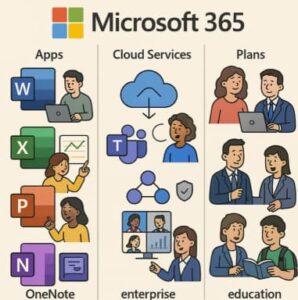
In today’s digital-first world, productivity suites need to do more than provide word-processing and spreadsheets. They must offer seamless cloud storage, real-time collaboration, security, and intelligent features across devices. That’s exactly what Microsoft 365 delivers. Whether you’re an individual, a family, a small business, or a global enterprise, Microsoft 365 offers tailored products and plans to meet your needs.
This blog explores what Microsoft 365 includes, the key differences between its home, business, and enterprise plans, and how to choose the right option for your work or lifestyle.
What is Microsoft 365?
Microsoft 365 is a subscription-based productivity platform that combines the familiar Microsoft Office apps (Word, Excel, PowerPoint, Outlook, and OneNote) with powerful cloud services, AI tools, and advanced security features.
Unlike older versions of Office that required a one-time purchase, Microsoft 365 ensures you always have the latest versions of the apps, along with continuous updates, cloud access, and built-in security.
The platform is designed to support collaboration, file sharing, and remote access—making it ideal for modern hybrid and remote work environments.
Key Microsoft 365 Products and Apps
Here are the major apps and services included in most Microsoft 365 plans:
- Word, Excel, PowerPoint, Outlook: The classic productivity apps, available for desktop, mobile, and web use.
- OneDrive: Cloud storage for easy file access and sharing across devices, typically providing 1 TB per user.
- Teams: A hub for chat, calls, video meetings, and collaborative document editing.
- SharePoint and Exchange: Core tools for email hosting, intranets, and secure file collaboration in business and enterprise plans.
- Security and Management Tools: Advanced features like multi-factor authentication, device management, and threat protection.
- Copilot (AI): AI-powered assistance integrated across Microsoft 365 apps, helping users write, analyze, and create faster.
Microsoft 365 for Home Users
For individuals and families, Microsoft offers plans that focus on personal productivity, file storage, and everyday use.
Microsoft 365 Personal
- Designed for one user, usable across multiple devices.
- Includes premium desktop and mobile apps plus 1 TB of OneDrive cloud storage.
- Ideal for professionals, students, or individuals needing full Office apps and storage.
Microsoft 365 Family
- Covers up to six people, each with their own 1 TB of storage (total 6 TB).
- Perfect for households where multiple users need access to apps, storage, and shared calendars.
- Includes additional family-safety tools, such as location sharing and content filters.
Microsoft 365 Premium (Home)
- A newer plan tier that adds enhanced AI capabilities through Microsoft Copilot, expanded security options, and higher limits for storage and productivity features.
- Best for users who want premium AI and cybersecurity tools beyond the standard Family plan.
Microsoft 365 for Business
For small and medium-sized businesses (typically up to 300 users), Microsoft 365 offers several scalable plans tailored for collaboration, communication, and data protection.
Business Basic
- Web and mobile versions of Office apps only (no desktop apps).
- Includes Microsoft Teams, OneDrive, SharePoint, and Exchange for business email.
- Suitable for small teams that work primarily online and need cloud collaboration tools.
Business Standard
- Includes everything in Business Basic, plus full desktop Office apps.
- Adds productivity tools such as Clipchamp and Publisher.
- A great choice for small companies that need desktop functionality and cloud collaboration.
Business Premium
- Combines all features from the previous tiers with advanced device and data security.
- Includes threat protection, device management, and conditional access policies.
- Ideal for businesses handling sensitive information or managing multiple company devices.
Business plans typically provide 1 TB of cloud storage per user, business-class email with custom domains, and administrative controls to manage users and devices.
Microsoft 365 for Enterprise
Enterprise plans are designed for large organizations that need advanced compliance, analytics, and security features at scale.
Enterprise E3
- Offers desktop Office apps, email hosting, cloud storage, and enterprise-level security features.
- Includes compliance tools, data loss prevention, and advanced information governance.
Enterprise E5
- Adds advanced analytics, security, and voice capabilities such as Microsoft Defender, Power BI Pro, and audio-conferencing features.
- Suitable for global companies that require top-tier compliance and data-protection standards.
Apps for Enterprise
- Focused mainly on productivity apps and cloud storage without advanced security tools.
- A cost-effective choice for organizations that already manage security through other platforms.
Enterprise plans are highly scalable, supporting thousands of users, multiple departments, and global collaboration while meeting stringent data-compliance regulations.
How to Choose the Right Microsoft 365 Plan
Choosing the right Microsoft 365 plan depends on your user type, needs, and budget. Here’s a quick guide:
- Identify the number of users.
- Individual → Personal
- Families → Family or Premium
- Small businesses → Business Basic, Standard, or Premium
- Large organizations → Enterprise E3 or E5
- Check if you need desktop apps.
- Web-only versions work for light use.
- Businesses often require full desktop apps for professional work.
- Assess storage requirements.
- All paid plans include 1 TB of OneDrive storage per user.
- Businesses and enterprises can expand storage limits as needed.
- Evaluate your security needs.
- Business Premium and Enterprise plans include advanced security and compliance tools.
- Home users may benefit from built-in ransomware detection and file recovery features.
- Consider collaboration and communication needs.
- Teams and SharePoint are essential for team collaboration.
- Email hosting and shared calendars improve business productivity.
- Budget and flexibility.
- Microsoft 365 is billed monthly or annually, making it easy to scale as your needs grow.
Key Benefits of Microsoft 365
- Work anywhere: Access your files and applications on PC, Mac, or mobile devices.
- Automatic updates: Always have the latest features and security patches.
- Collaboration made easy: Real-time co-authoring and integrated Teams meetings enhance teamwork.
- Robust security: Multi-layer protection against phishing, malware, and unauthorized access.
- Scalability: Easily add users, licenses, and services as your team grows.
- Value for money: Get multiple productivity tools in a single subscription rather than paying separately for apps, storage, and email.
Potential Drawbacks
While Microsoft 365 offers a lot of value, it’s worth noting a few considerations:
- Ongoing subscription costs compared to one-time software purchases.
- Complex plan structures that can be confusing for first-time buyers.
- Some features, like advanced AI and security, are only in higher-tier plans.
- Dependence on an internet connection for syncing and updates.
Microsoft 365 is far more than an updated version of Office—it’s a complete ecosystem for productivity, collaboration, and security. With options for every user type—individual, family, business, or enterprise—Microsoft 365 continues to lead the productivity software market.
When choosing your plan, consider how you work, how many people you need to support, and which features matter most to you. Whether you want personal cloud storage, a collaborative business environment, or enterprise-level protection, there’s a Microsoft 365 plan built for your needs.
Extra posts:
 Microsoft 365 Admin Center Overview for Beginners
  Microsoft 365 Pricing Plans, Features, and Comparison
  License Plans for Microsoft 365 Copilot
  Highlight on Microsoft Products for end of support in 2019 and 2020
  Microsoft 365 vs Azure vs Dynamics 365 – What’s the Difference?
  Data Residency and Compliance in the Microsoft Cloud with Microsoft 365