
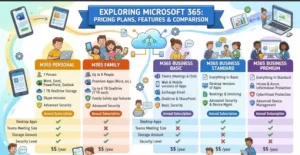
Choosing a Microsoft 365 plan looks simple until you compare the licensing details. Business Basic, Business Standard, Business Premium, E3, and E5 all cover familiar tools such as Word, Excel, Outlook, OneDrive, and Teams—but the differences in desktop applications, security, device management, compliance, and scalability can materially affect your architecture and IT budget.
For a small company, paying for enterprise capabilities may add unnecessary complexity. For a regulated organization, choosing a productivity-focused plan without the required security and compliance controls can create a very different problem.
This guide breaks down the major Microsoft 365 pricing plans, what each includes, and how to approach the decision from an IT and solution-architecture perspective.
Microsoft 365 Business Plans at a Glance
Microsoft’s Business plans are designed for organizations with 1–300 users. The three main options are Business Basic, Business Standard, and Business Premium.
| Plan | U.S. price/user/month, annual | Desktop Office apps | 1 TB OneDrive | Security/device management |
|---|---|---|---|---|
| Business Basic | $7 | No | Yes | Core identity |
| Business Standard | $14 | Yes | Yes | Core identity |
| Business Premium | $22 | Yes | Yes | Advanced |
| Enterprise E3 | $39 | Yes | Yes, scalable | Advanced |
| Enterprise E5 | $60 | Yes | Yes, scalable | Advanced/extended |
Microsoft lists these Business prices as annual-commitment pricing. Monthly subscriptions cost more, and Microsoft also offers versions without Teams. Prices can vary by country, currency, agreement, and applicable taxes.
The table is useful for narrowing the field, but the real differences appear when you examine what each tier means operationally.
Microsoft 365 Business Basic: Cloud-First Productivity
Business Basic costs $7 per user/month when paid annually in Microsoft’s current U.S. pricing. It provides web and mobile versions of Word, Excel, PowerPoint, and Outlook rather than the full desktop Office applications. Users also get custom business email, Teams, 1 TB of OneDrive storage, and additional applications such as Planner, Forms, and Bookings.
This makes Basic a practical option when users primarily work through browsers and mobile devices.
For example, consider a distributed support team that spends most of its day in Teams, Outlook on the web, SharePoint, and browser-based business applications. Giving every employee a full desktop Office license may not provide enough additional value to justify the extra cost.
Business Basic fits well when:
- Web and mobile Office apps are sufficient.
- Users need business email and cloud storage.
- Teams is central to collaboration.
- Endpoint security requirements are relatively modest.
- The organization wants to keep licensing costs controlled.
The key limitation is straightforward: desktop Office applications aren’t included.
Microsoft 365 Business Standard: The General-Purpose Business Tier
Business Standard moves up to $14 per user/month with annual billing and adds desktop versions of Word, Excel, PowerPoint, Outlook, and other applications. It retains the core cloud services found in Basic, including business email, Teams, and 1 TB of OneDrive storage per user.
For many organizations, this is where Microsoft 365 becomes a complete end-user productivity platform rather than primarily a cloud collaboration suite.
Think about employees who regularly work with large Excel models, PowerPoint presentations, Outlook workflows, or documents that need offline access. Desktop applications become important in these environments.
Business Standard is generally relevant when your requirements include:
- Full desktop Office applications.
- Offline productivity.
- Professional email.
- Teams collaboration and meetings.
- Cloud file storage and sharing.
- Additional productivity applications such as Planner, Forms, and Bookings.
From an architecture perspective, Standard is primarily about productivity breadth, not advanced endpoint security.
Microsoft 365 Business Premium: Productivity Plus Security
Business Premium costs $22 per user/month with annual billing under Microsoft’s current U.S. pricing. It includes the core capabilities of Standard while adding stronger identity, device-management, and threat-protection capabilities.
This is an important distinction for IT teams.
Business Premium includes policy-based identity and access management, device security and management, and advanced threat protection. Microsoft positions these capabilities for organizations that need more than basic cloud productivity controls.
For a company managing laptops remotely, enforcing security policies, protecting users from phishing, and controlling access to corporate resources, these features can reduce the need to assemble as many separate security products.
A common architecture question is therefore not:
“Is Premium more expensive?”
It is:
“What would we have to buy and operate separately if we chose Standard?”
That comparison should include licensing, administration, integration, deployment, monitoring, and security operations—not just subscription price.
Microsoft 365 Enterprise E3 vs. E5
When an organization exceeds the Business plan’s 300-user boundary—or needs broader enterprise capabilities—the Microsoft 365 Enterprise family becomes more relevant.
Microsoft currently lists Microsoft 365 E3 at $39 per user/month and Microsoft 365 E5 at $60 per user/month, based on annual pricing in the U.S.
E3 provides a broader enterprise platform covering productivity applications, Windows Enterprise, identity and access management, cloud storage, and enhanced security capabilities. Microsoft also describes E3 as supporting organizations of any size.
E5 builds on E3 with more advanced security, compliance, analytics, and voice capabilities. Microsoft’s licensing documentation specifically identifies Defender and Purview capabilities among the additional E5 functionality.
That distinction matters for enterprises with centralized security and compliance teams.
When E3 Makes Sense
E3 is worth examining when you need:
- Enterprise-scale identity and access management.
- Windows Enterprise licensing.
- Desktop, web, and mobile Office applications.
- Larger-scale storage requirements.
- Enterprise security and compliance capabilities.
- Centralized endpoint and application management.
What E5 Adds
E5 is designed for environments where advanced security, compliance, analytics, and communications capabilities justify the additional licensing cost.
Microsoft’s E5 offering includes capabilities such as advanced threat protection, sensitive-information controls, compliance tooling, and Power BI-based analytics.
For an enterprise architect, E5 should therefore be evaluated against the organization’s risk and compliance architecture, not simply against the number of applications included.
Microsoft 365 Pricing Isn’t Just About the Sticker Price
One of the easiest mistakes is comparing plans solely by monthly license cost.
A better calculation is:
Total licensing cost = users × license price × subscription period + required add-ons + complementary services
Then consider operational cost.
For example, moving from Standard to Premium costs more per user, but it may consolidate some endpoint security and management requirements. Conversely, choosing E5 for every user may be unnecessary if only a subset of employees requires advanced capabilities.
A mixed licensing model can sometimes be more appropriate.
You might have:
- Business Premium for employees handling corporate endpoints.
- Basic for workers who only need browser-based applications.
- E3 or E5 for enterprise users with specific regulatory or security requirements.
- Separate licensing for specialized workloads or services.
Licensing architecture should follow user requirements rather than forcing every employee into the highest tier.
Don’t Ignore Copilot and Teams Variants
Microsoft’s current catalog also includes plans with and without Teams, as well as versions bundled with Microsoft 365 Copilot Business. For example, Microsoft lists Business Standard with Copilot at $23.50 per user/month annually, while Business Premium with Copilot is listed at $32.
This means a pricing comparison published previously can become misleading if it doesn’t identify:
- Whether Teams is included.
- Whether Copilot is included.
- Monthly versus annual billing.
- Geographic pricing.
- Taxes.
- Existing volume or enterprise agreements.
- Whether the organization needs separate security or compliance products.
Microsoft also updated several enterprise prices effective July 1, 2026, including Microsoft 365 E3 and E5.
For procurement teams, the date on which a pricing table was published matters.
A Practical Framework for Choosing a Microsoft 365 Plan
Instead of starting with the cheapest license, start with the workload.
Ask five questions:
- Do users need desktop Office applications?
If yes, Basic is generally insufficient. - Do users need managed and secured corporate devices?
If yes, investigate Premium or enterprise licensing. - Are advanced security and compliance controls required?
Regulated or security-sensitive environments may need E3/E5 capabilities. - How many users need each capability?
Avoid assuming every employee requires the same license. - Which features are already covered elsewhere?
Compare Microsoft 365 with your existing identity, endpoint, security, communications, and analytics stack.
This approach turns Microsoft 365 pricing from a simple product comparison into an architecture decision.
The Practical Takeaway
There isn’t one Microsoft 365 plan that fits every organization.
Business Basic targets cloud-first users who can work with web and mobile applications. Business Standard adds full desktop productivity applications. Business Premium adds a much stronger security and device-management layer. Enterprise E3 expands the platform for enterprise-scale requirements, while E5 adds higher-end security, compliance, analytics, and communications capabilities.
The next logical step is to build a requirements matrix around your users rather than starting with license names. Map each user group to application requirements, device-management needs, identity controls, security policies, compliance obligations, and collaboration workloads.
Then compare the licensing cost against the total cost of operating the surrounding technology stack.
That is where the meaningful difference between Microsoft 365 plans usually emerges.
Extra posts:
 Overview of Microsoft 365 Products and Plans
  How to Roll Out Microsoft 365 Features Without Overwhelming Employees
  Accessibility Features in Microsoft 365 That Most Admins Forget to Enable
  How to Test and Roll Out New Features Without Disrupting Users in Microsoft 365
  Lesser-Known Microsoft 365 Features That Save Hours (Beyond Teams and Outlook)
  License Plans for Microsoft 365 Copilot