
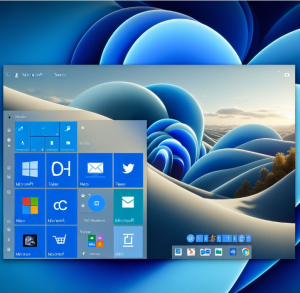
Microsoft’s Windows 11 has evolved significantly since its initial release, delivering a fresh user experience and powerful productivity enhancements. Whether you’re an IT pro, developer, or everyday user, Windows 11 brings a blend of elegance and efficiency. In this blog post, we’ll walk through the key features of Windows 11, especially those added or improved in the latest builds.
✨ A Refreshed UI: Fluent Design in Action
The first thing you notice in Windows 11 is the revamped user interface. The design is clean, centered, and modern, drawing inspiration from Fluent Design principles:
- Centered Start Menu & Taskbar: Brings a macOS-like symmetry with a minimalist approach.
- Rounded Corners & New Icons: Windows now feel less boxy and more fluid.
- Snap Layouts & Snap Groups: Quickly organize windows into layouts with hover-based selection—great for multitasking.
🧠 AI-Powered Copilot
With the integration of Copilot in Windows, Microsoft brings its AI assistant directly to the desktop:
- You can ask natural language questions.
- Automate tasks like summarizing documents or adjusting settings.
- Powered by the same AI models used in Microsoft 365 Copilot.
This makes Windows 11 not just an OS, but a smart productivity partner.
📁 File Explorer Upgrades
Windows 11 introduces a redesigned File Explorer with:
- Tab support: Browse multiple folders in a single window.
- Gallery View: View your photos in a timeline-based format.
- Better integration with OneDrive and context-aware commands.
The enhancements improve usability, especially for power users juggling multiple files and locations.
🎮 Gaming Improvements
Gaming on Windows 11 is better than ever, thanks to:
- Auto HDR and DirectStorage: Faster load times and better visuals.
- Xbox Game Pass integration: Seamlessly discover and play games.
- Dynamic Refresh Rate (DRR): Smooth performance on compatible displays.
🛡️ Enhanced Security & Management
Windows 11 has tightened its security posture, especially for enterprise users:
- TPM 2.0 & Secure Boot requirements: Out-of-the-box hardware-level protection.
- Windows Hello improvements: Faster biometric authentication.
- Smart App Control: Prevents unsigned or malicious apps from running.
- Microsoft Pluton security processor on supported hardware.
These features make Windows 11 more resilient against modern threats.
💻 Dev-Friendly Features
For developers, Windows 11 brings:
- Windows Subsystem for Linux (WSL) improvements, including GUI app support.
- Dev Home: A new control panel for developer workflows, repositories, and environments.
- Dynamic Widgets: More personalization and third-party widget support.
- Support for progressive web apps (PWAs) and ARM64 enhancements.
🧩 Widgets and Personalization
Widgets have matured in Windows 11:
- Third-party widget support has expanded.
- Widgets can now be pinned and resized.
- Integrated better with Microsoft services like Outlook, To Do, and Teams.
Combined with updated themes and accent color options, Windows 11 offers greater personalization.
🔄 Seamless Updates & Performance
Microsoft has been working behind the scenes to make Windows 11 updates smaller, faster, and less intrusive. Features like:
- Background Windows Updates
- Energy Efficiency improvements for laptops
- Adaptive brightness and refresh rates for improved battery life
show Microsoft’s focus on both user experience and system performance.
Final Thoughts
Windows 11 isn’t just a cosmetic update—it’s a productivity-focused, security-conscious, and developer-friendly evolution of Windows. Whether you’re managing enterprise endpoints or just enjoying the aesthetics and performance on a personal device, Windows 11 has something for everyone.
Extra posts:
 Top 10 Windows 11 Tips Every Beginner Should Know
  Exploring the RPA Landscape Top Tools Powering Intelligent Automation in 2025
  Unleashing Creativity Exploring Microsoft 365 Copilot’s New Image Editing Features
  24 Hidden Windows 11 Features You’ll Wish You Found Sooner
  Experimental Features via Canary Channels in Windows 11
  Registry Tweaks to Unlock Hidden Features in Windows 11