
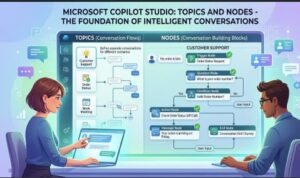
Artificial intelligence is changing the way businesses communicate with customers and employees. From automating support requests to handling internal workflows, conversational AI tools are becoming an essential part of modern digital transformation. One platform leading this evolution is Microsoft Copilot Studio.
Copilot Studio allows organizations to build intelligent copilots without needing extensive coding skills. Whether you are creating a customer support assistant, an HR helpdesk bot, or an internal automation tool, understanding topics and nodes is critical. These two concepts form the backbone of every conversation created inside the platform.
In this blog, we will explore what topics and nodes are, how they work together, why they matter, and best practices for designing effective conversational experiences in Microsoft Copilot Studio.
What Is Microsoft Copilot Studio?
Microsoft Copilot Studio Official Website
Microsoft Copilot Studio is a low-code platform that enables users to create AI-powered conversational agents called copilots. It integrates seamlessly with Microsoft technologies such as Power Platform, Dynamics 365, Microsoft Teams, and Azure services.
The platform provides a visual interface where makers can design conversations using drag-and-drop components instead of writing large amounts of code. This approach makes AI chatbot development more accessible to business analysts, citizen developers, and enterprise teams.
At the center of this experience are two building blocks:
- Topics
- Nodes
Understanding these elements is the key to building smart, organized, and scalable copilots.
What Are Topics in Copilot Studio?
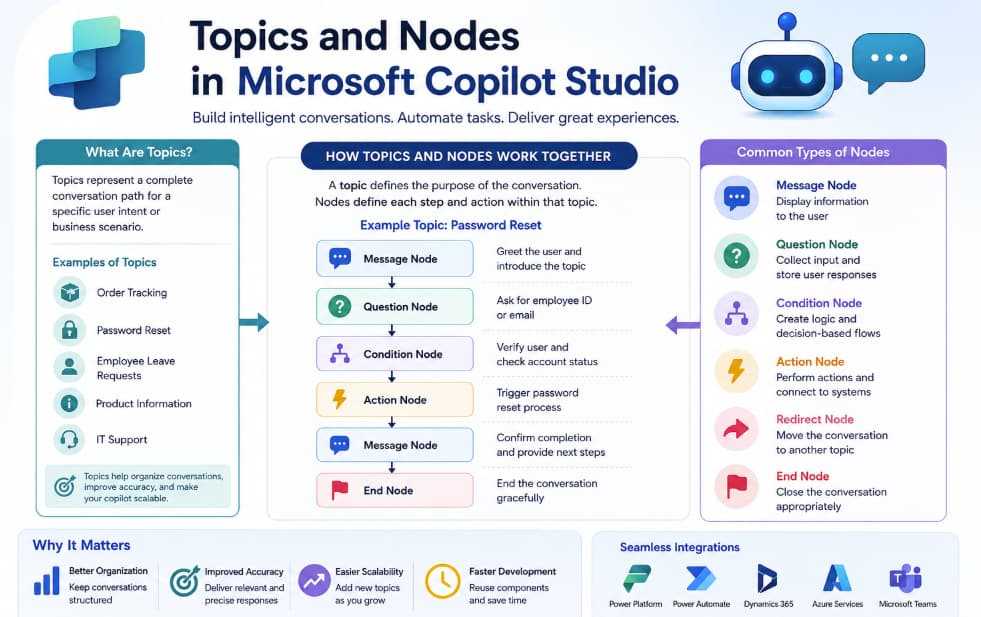
A topic in Copilot Studio represents a conversation pathway. Think of it as a complete dialogue flow designed to handle a specific user intent or business scenario.
For example, you might create topics such as:
- Order Tracking
- Password Reset
- Employee Leave Requests
- Product Information
- IT Support
Each topic focuses on solving one particular problem or answering one category of questions.
When a user interacts with the copilot, the AI analyzes the message and matches it with the most relevant topic based on trigger phrases, AI understanding, and conversational context.
How Topics Work
A topic usually includes:
- Trigger Phrases
- Conversation Flow
- Questions and Responses
- Conditions and Logic
- Actions or Automations
- Escalation Paths
For instance, if a customer types:
“Where is my order?”
The copilot may trigger an “Order Tracking” topic. The topic then guides the user through steps such as entering an order number, checking status details, and displaying shipping updates.
Topics essentially define the structure and purpose of a conversation.
Why Topics Are Important
Topics help organize conversational experiences into manageable sections. Instead of building one massive chatbot flow, makers can separate conversations into focused modules.
Here are some benefits of using topics effectively:
Better Organization
Topics keep conversations structured and easier to maintain. Teams can update one topic without affecting others.
Improved User Experience
Users receive more accurate and relevant responses because each topic focuses on a specific intent.
Easier Scalability
As business requirements grow, new topics can be added without redesigning the entire copilot.
Faster Development
Reusable conversational patterns reduce development time and simplify testing.
What Are Nodes in Copilot Studio?
If topics are the overall conversation paths, nodes are the individual steps inside those paths.
A node represents a single action, message, question, condition, or operation within a topic.
You can think of nodes as building blocks that define how the conversation progresses from one step to another.
Common Types of Nodes
Copilot Studio includes several node types that help create dynamic and interactive conversations.
Message Nodes
These display information to users.
Example:
“Welcome to customer support. How can I assist you today?”
Message nodes are typically used to greet users, provide instructions, or deliver answers.
Question Nodes
Question nodes collect information from users.
For example:
- “What is your order number?”
- “Which department do you work in?”
- “Would you like email or phone support?”
These nodes can validate responses and store user inputs for later use.
Condition Nodes
Condition nodes create decision-based flows.
For example:
- If the order status is “Delivered,” show delivery confirmation.
- If the user is a premium customer, route to priority support.
This allows copilots to deliver personalized experiences.
Action Nodes
Action nodes connect the copilot with external systems and automations.
These nodes can:
- Trigger Power Automate flows
- Retrieve data from databases
- Update CRM systems
- Send emails
- Create tickets
This transforms a chatbot from a simple Q&A tool into a business automation assistant.
Redirect Nodes
Redirect nodes transfer users to another topic when needed.
For example:
A billing conversation may redirect users to a payment support topic if payment issues are detected.
This improves conversation flow and reduces duplication.
End Conversation Nodes
These nodes close the interaction gracefully.
Example:
“Thank you for contacting support. Have a great day!”
Ending conversations properly improves user satisfaction and professionalism.
How Topics and Nodes Work Together
Topics and nodes work together to create complete conversational experiences.
Here’s a simple example:
Topic: Password Reset
Nodes Inside the Topic
- Greeting message
- Ask for employee ID
- Verify identity
- Check account status
- Send password reset link
- Confirm completion
- End conversation
The topic defines the overall purpose, while the nodes define each step of the interaction.
Without topics, conversations become disorganized. Without nodes, there is no detailed logic controlling the user experience.
Together, they form the core architecture of every copilot.
Best Practices for Designing Topics and Nodes
Creating effective copilots requires thoughtful planning. Here are some best practices to follow.
Keep Topics Focused
Each topic should address a single business goal or user intent. Avoid combining unrelated processes into one topic.
Good example:
- “Refund Request”
Poor example:
- “Refunds, Shipping, Product Questions, and Technical Support”
Focused topics improve AI recognition and maintainability.
Use Clear Trigger Phrases
Trigger phrases help the AI identify user intent.
Include variations such as:
- “Track my package”
- “Where is my order?”
- “Order status”
The more realistic phrases you include, the better the copilot understands users.
Design Simple Conversation Flows
Avoid overly complicated flows with too many branches. Simpler conversations are easier for users to follow and easier for teams to maintain.
Reuse Topics with Redirects
Instead of repeating the same flow in multiple places, use redirect nodes to connect reusable topics.
This keeps your copilot efficient and scalable.
Validate User Inputs
Always validate critical information such as email addresses, IDs, or phone numbers.
This reduces errors and improves automation reliability.
Add Human Escalation Options
Not every issue can be solved automatically. Provide users with an option to connect with a live agent when needed.
A balanced approach improves customer trust.
Real-World Use Cases of Topics and Nodes
Businesses across industries use topics and nodes to automate processes and improve user engagement.
Customer Support
Topics:
- Returns
- Order Tracking
- Billing Questions
Nodes:
- Ask for order number
- Retrieve account details
- Process refunds
Human Resources
Topics:
- Leave Requests
- Payroll Questions
- Benefits Enrollment
Nodes:
- Collect employee information
- Check leave balance
- Submit approval request
IT Helpdesk
Topics:
- Password Reset
- Software Installation
- Device Troubleshooting
Nodes:
- Verify identity
- Run diagnostic actions
- Escalate unresolved issues
The Future of Conversational AI with Copilot Studio
As AI continues evolving, platforms like Microsoft Copilot Studio are becoming more intelligent and easier to use. Features such as generative AI, natural language understanding, and automated workflow integration are transforming how organizations build conversational experiences.
Topics and nodes remain essential because they provide structure, control, and flexibility within AI interactions.
Businesses that master these concepts can create copilots that are not only functional but also engaging, scalable, and efficient.
Topics and nodes are the foundation of every successful copilot built in Microsoft Copilot Studio.
Topics define the purpose of a conversation, while nodes define the step-by-step logic that guides users through the experience. Together, they enable organizations to create intelligent assistants capable of handling customer service, internal operations, workflow automation, and much more.
Whether you are a beginner exploring conversational AI or an enterprise developer building advanced automation systems, understanding topics and nodes will help you design better copilots and deliver more meaningful user experiences.
As organizations continue investing in AI-driven communication, mastering these core concepts will become an increasingly valuable skill in the modern digital workplace.
Extra posts:
 Multi-Turn Conversations and Context Management in Copilot Studio
  What Is Microsoft Copilot Studio? A Beginner’s Guide
  How Microsoft Copilot Studio Fits Into the Power Platform Ecosystem
  The Architecture of Copilot Agents: Building Intelligent Assistants for the Modern Era
  Copilot Studio vs Azure AI Agents: What Should You Use?
  Top 5 Use Cases for Copilot Studio in Your Business