
As a solution architect, I’ve seen a recurring pattern in enterprise AI discussions: teams jump into building “AI agents” without first deciding what kind of platform they actually need. That’s where confusion often begins especially when comparing Microsoft Copilot Studio and Azure-based custom AI agents (via Azure AI Foundry / Azure AI Studio).
Both are powerful. Both can build AI agents. But they solve very different problems.
This guide is designed to help decision-makers CTOs, architects, and enterprise leaders choose the right path based on business goals, technical maturity, and scale requirements.
The Core Difference
At a high level:
- Copilot Studio = Low-code, business-friendly AI agent builder
- Azure AI Agents = Full-control, developer-driven AI platform
Microsoft itself positions them for different audiences: Copilot Studio is ideal for business users and quick deployments, while Azure AI platforms target developers building complex, scalable AI systems .
Think of it this way:
- Copilot Studio helps you automate conversations and workflows quickly
- Azure AI helps you build AI-powered systems as part of your architecture
When Enterprises Start Evaluating
Most organizations reach this decision point when they ask:
- “Can we build a chatbot for internal support?”
- “How do we scale AI across multiple systems?”
- “Do we need customization, or just automation?”
The mistake is assuming both tools are interchangeable. They are not.
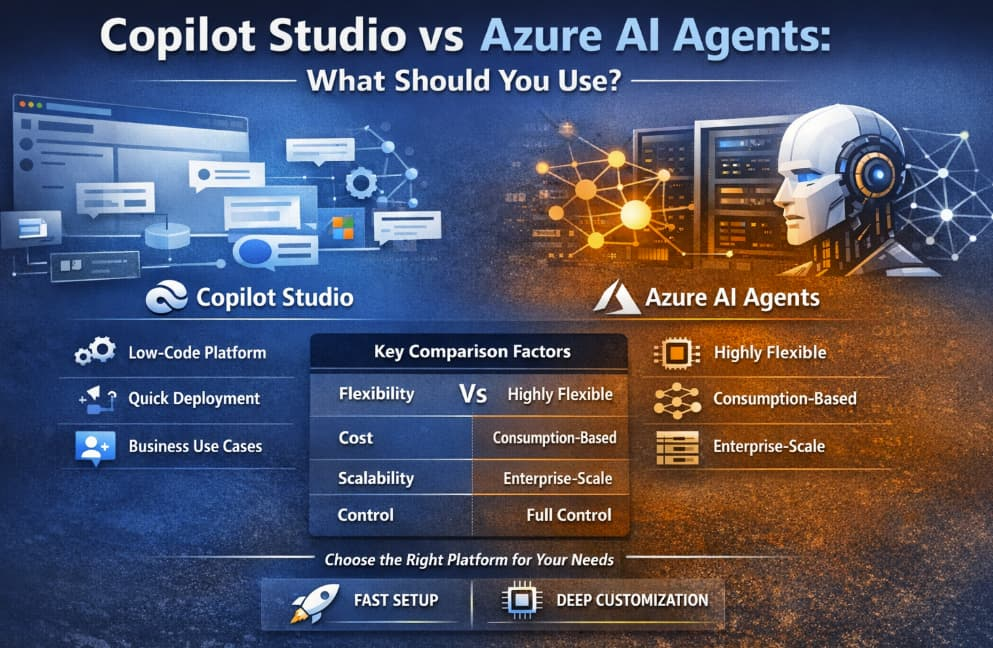
Side-by-Side Comparison
Here’s a structured comparison based on real enterprise criteria:
Criteria | Copilot Studio | Azure AI Agents (Azure AI Foundry / Studio) |
|---|---|---|
| Flexibility | Limited (pre-built connectors, guided flows) | Very high (custom models, APIs, orchestration) |
| Cost Model | Subscription / per-user / per-message (predictable) | Consumption-based (compute, tokens, storage) |
| Scalability | Suitable for team-level and mid-scale solutions | Enterprise-grade, global scale |
| Control | Low-code, limited deep customization | Full control (models, pipelines, infrastructure) |
1. Flexibility:
Copilot Studio
- Built for speed
- Drag-and-drop, low-code environment
- Prebuilt integrations (Microsoft 365, Teams, etc.)
- Great for HR bots, customer support, internal assistants
Azure AI Agents
- Full control over:
- Models (GPT, fine-tuned, open-source)
- Retrieval-Augmented Generation (RAG)
- Multi-agent orchestration
- Supports advanced use cases like:
- Fraud detection
- Predictive analytics
- AI-driven workflows across systems
Architect’s take:
If your use case is defined and conversational, use Copilot Studio.
If your use case is open-ended and evolving, go Azure.
2. Cost: Predictability vs Optimization
Copilot Studio
- Easier to budget
- Works well if you’re already in Microsoft 365 ecosystem
- Lower entry barrier
Azure AI Agents
- Pay-as-you-go (tokens, compute, storage)
- Can scale efficiently—but costs can spike if not governed
- Requires FinOps discipline
Reality check:
Many enterprises start with Copilot Studio for cost simplicity, then move to Azure when usage grows or complexity increases.
3. Scalability: Department Tool vs Enterprise Platform
Copilot Studio
- Scales across departments
- Best suited for:
- Internal automation
- Customer interaction layers
- Can become limiting when:
- Integrating multiple backend systems
- Handling complex orchestration
Azure AI Agents
- Designed for:
- Enterprise-wide AI platforms
- High-volume workloads
- Multi-region deployments
- Integrates deeply with broader cloud services and data ecosystems
Architect’s insight:
Copilot Studio scales across use cases.
Azure scales into your core architecture.
4. Control: Convenience vs Engineering Power
Copilot Studio
- Abstracts complexity
- Limited control over:
- Model behavior
- Data pipelines
- Best for “configure, not build” scenarios
Azure AI Agents
- Full lifecycle control:
- Model tuning and evaluation
- Prompt engineering strategies
- Monitoring and observability
- Requires engineering expertise
Key distinction:
Copilot Studio = Productized AI
Azure AI = Platform for AI
Real-World Decision Patterns
Use Copilot Studio if:
- You want fast time-to-value
- Your team is non-technical or mixed
- You’re building:
- Helpdesk bots
- Employee assistants
- Workflow automation tools
Use Azure AI Agents if:
- You need deep customization
- You have dedicated engineering teams
- You’re building:
- AI-powered applications
- Data-driven systems
- Scalable AI platforms
The Hybrid Reality (What Most Enterprises Actually Do)
In practice, this is rarely an either-or decision.
A common architecture pattern looks like this:
- Copilot Studio → Frontend interaction layer (chat, Teams, UI)
- Azure AI Agents → Backend intelligence (models, data retrieval, orchestration)
This approach allows organizations to move quickly while still building for long-term scale.
Decision Framework (Architect’s Cheat Sheet)
Ask these five questions before choosing:
- Who is building this?
- Business team → Copilot Studio
- Engineering team → Azure AI
- How complex is the use case?
- Simple workflows → Copilot
- Multi-system AI → Azure
- Do you need custom models?
- No → Copilot
- Yes → Azure
- What’s the timeline?
- Weeks → Copilot
- Months → Azure
- Is AI core to your product or just a feature?
- Feature → Copilot
- Core capability → Azure
If you’re still unsure, here’s a pragmatic approach I recommend:
- Start with Copilot Studio to validate use cases quickly
- Move critical workloads to Azure AI Agents as complexity grows
- Build a hybrid architecture for long-term scalability
Because ultimately, this is not just a tooling decision—it’s an architecture decision.
The biggest mistake organizations make is over-engineering too early—or under-engineering something that needs to scale.
- Copilot Studio helps you start fast
- Azure AI helps you scale right
The best architects don’t just choose tools—they design systems that evolve with the business.
Extra posts:
 The Difference Between Declarative Agents and Autonomous Agents in Copilot Studio
  Cost Optimization for Copilot and AI Agents on Azure
  Copilot Studio vs. Power Virtual Agents What’s Changed?
  Best Copilot Studio Agents for HR Teams: Transforming the Future of Human Resources
  From Draft to Decision: How to Integrate Copilot Studio Agents with Power Automate for Smart Email Approval Workflows
  Azure AI Studio / Azure AI Foundry A Powerful Platform for Generative AI