
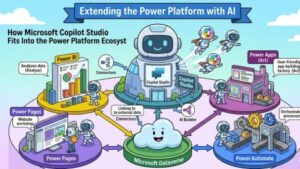
Artificial intelligence is no longer just a futuristic concept reserved for large enterprises with deep technical teams. Today, businesses of all sizes are searching for practical ways to automate repetitive tasks, improve customer experiences, and empower employees with smarter tools. This shift is exactly where Microsoft Copilot Studio enters the picture.
As organizations increasingly adopt low-code technologies, Microsoft has positioned Copilot Studio as a major component of the Power Platform ecosystem. But many professionals still wonder: What exactly is Copilot Studio, and how does it connect with Power Apps, Power Automate, Power BI, and Power Virtual Agents?
The answer lies in Microsoft’s broader vision for AI-powered business automation.
In this article, we’ll explore how Microsoft Copilot Studio fits into the Power Platform ecosystem, why it matters, and how businesses can use it to build intelligent, scalable solutions without heavy coding.
Understanding Microsoft Copilot Studio
Microsoft Copilot Studio is a low-code AI platform designed to help organizations create intelligent copilots, conversational agents, and AI-powered experiences. It enables users to build custom AI assistants that can answer questions, automate workflows, retrieve business data, and support employees or customers.
Previously known as Power Virtual Agents, Microsoft evolved the platform into Copilot Studio to align with the growing demand for generative AI and AI-powered business applications.
Instead of building chatbots with rigid scripted flows, businesses can now create smarter conversational experiences using generative AI, Microsoft Graph, Dataverse, and integrations across the Microsoft ecosystem.
Copilot Studio allows users to:
- Build AI copilots without extensive coding
- Connect copilots to enterprise data
- Automate business processes
- Create conversational AI experiences
- Extend Microsoft 365 Copilot capabilities
- Integrate with external applications and APIs
What makes it powerful is how naturally it fits into the existing Power Platform environment.
What Is the Microsoft Power Platform?
Before understanding Copilot Studio’s role, it helps to look at the Power Platform itself.
Microsoft Power Platform is a suite of low-code and no-code tools designed to help organizations analyze data, automate processes, build apps, and create virtual agents.
The core components include:
- Power Apps
- Power Automate
- Power BI
- Power Pages
- Microsoft Dataverse
- Copilot Studio
Together, these tools help businesses modernize operations without relying entirely on traditional software development.
Each product has a specific role, but they become far more valuable when connected.
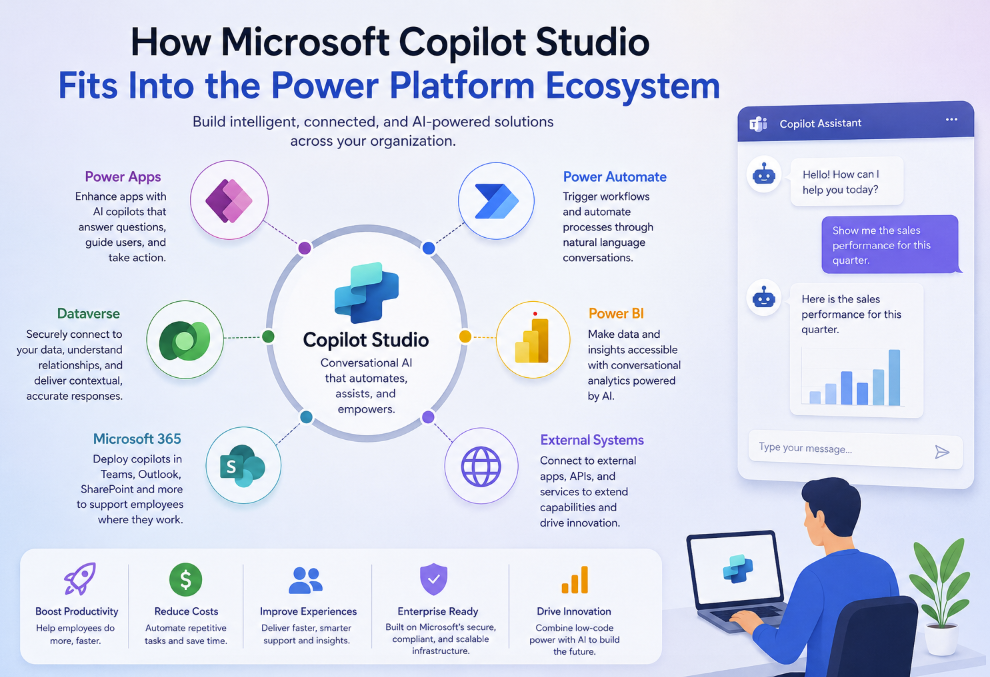
How Copilot Studio Connects With Power Apps
Power Apps allows users to create custom business applications with minimal coding. These apps are commonly used for inventory management, HR requests, inspections, approvals, and customer service workflows.
Copilot Studio enhances Power Apps by adding conversational AI capabilities directly into applications.
For example:
Imagine an employee using a procurement app built with Power Apps. Instead of navigating through multiple menus, they could simply ask:
“Show me pending purchase approvals from this week.”
The copilot can retrieve the information instantly and even initiate actions.
This integration creates a more natural user experience because employees interact with business systems through conversation rather than complex interfaces.
Copilot Studio can also:
- Help users complete forms faster
- Answer questions inside apps
- Trigger workflows
- Retrieve contextual business information
- Guide users through processes
The result is improved productivity and reduced training time.
How Copilot Studio Works With Power Automate
Power Automate focuses on workflow automation. Businesses use it to automate repetitive tasks like approvals, notifications, document processing, and integrations between systems.
Copilot Studio becomes even more powerful when paired with Power Automate because conversations can trigger automated actions.
For example, a customer might ask:
“Can you reset my password?”
The copilot can:
- Verify the user
- Launch a Power Automate workflow
- Reset the password
- Send confirmation automatically
This combination transforms AI from a simple chatbot into an intelligent automation assistant.
Organizations can automate:
- HR onboarding
- IT service desk requests
- Invoice approvals
- Leave requests
- Customer support tasks
- CRM updates
Instead of employees manually navigating systems, copilots can orchestrate workflows behind the scenes.
This is one of the biggest reasons Microsoft Copilot Studio is becoming a central part of digital transformation strategies.
The Role of Dataverse in Copilot Studio
Microsoft Dataverse acts as the secure data backbone of the Power Platform.
Copilot Studio relies heavily on Dataverse because AI experiences need structured, connected business data to provide meaningful responses.
Dataverse enables copilots to:
- Access business records securely
- Understand relationships between data
- Deliver contextual answers
- Store conversation data
- Maintain compliance and governance
For example, a sales copilot connected to Dataverse could answer questions like:
- “Which deals are closing this month?”
- “Show overdue opportunities.”
- “What’s the status of Contoso’s contract?”
Without Dataverse, copilots would lack business context.
This integration makes Copilot Studio enterprise-ready instead of just a basic conversational AI tool.
How Copilot Studio Supports Power BI
Power BI is Microsoft’s business intelligence and analytics platform. It helps organizations visualize data and uncover insights through dashboards and reports.
Copilot Studio enhances Power BI by making analytics more conversational.
Instead of requiring users to navigate dashboards manually, a copilot can answer natural language questions such as:
- “What were our sales last quarter?”
- “Which region performed best this month?”
- “Why did customer churn increase?”
This conversational layer makes data more accessible to non-technical users.
Executives, managers, and frontline employees can interact with analytics using plain language rather than complex filters or reports.
The integration ultimately improves decision-making speed across the organization
Copilot Studio and Microsoft 365 Integration
Another major advantage is Copilot Studio’s connection to Microsoft 365 applications like Teams, Outlook, Word, and SharePoint.
Organizations can deploy copilots directly inside Microsoft Teams, where employees already collaborate daily.
This means users can:
- Ask HR questions inside Teams
- Request IT support
- Retrieve documents
- Generate summaries
- Automate approvals
- Access organizational knowledge
Businesses no longer need separate interfaces for AI interactions.
The AI becomes embedded into existing workflows.
This seamless integration significantly improves user adoption because employees interact with copilots in familiar environments.
Why Copilot Studio Matters for Businesses
Many businesses struggle with disconnected systems, repetitive tasks, and overloaded support teams.
Copilot Studio addresses these challenges by combining:
- AI
- Automation
- Low-code development
- Enterprise data access
- Conversational experiences
Its biggest strengths include:
Faster Automation
Businesses can automate processes without building complex custom AI systems from scratch.
Improved Employee Productivity
Employees spend less time searching for information and more time completing meaningful work.
Better Customer Experiences
Customers receive faster and more accurate responses through AI-powered support.
Reduced Development Costs
Low-code tools lower the barrier to building intelligent solutions.
Scalable AI Adoption
Organizations can start small and expand AI capabilities gradually.
Real-World Use Cases of Copilot Studio
Organizations across industries are already using Copilot Studio for:
Customer Service
AI agents handle FAQs, order tracking, and support requests.
IT Help Desks
Employees can troubleshoot issues and request services automatically.
HR Support
Copilots answer policy questions, manage onboarding, and assist employees.
Sales Assistance
Sales teams can retrieve CRM insights and automate follow-ups.
Finance Operations
AI assistants help with invoice processing and approvals.
The flexibility of Copilot Studio makes it suitable for nearly every department.
The Future of AI in the Power Platform
Microsoft is clearly positioning Copilot Studio as the AI layer across the entire Power Platform ecosystem.
Rather than treating AI as a standalone feature, Microsoft is embedding intelligence directly into:
- Apps
- Workflows
- Data analytics
- Collaboration tools
- Business processes
This strategy allows organizations to create unified, AI-driven digital workplaces.
As generative AI continues evolving, Copilot Studio will likely become even more integrated with enterprise systems and business operations.
For companies already using Microsoft technologies, adopting Copilot Studio can feel like a natural next step rather than a disruptive change.
Microsoft Copilot Studio is much more than a chatbot builder. It acts as the conversational AI engine within the broader Power Platform ecosystem.
By integrating deeply with Power Apps, Power Automate, Power BI, Dataverse, and Microsoft 365, Copilot Studio enables organizations to build intelligent business experiences without requiring advanced AI expertise.
The real value comes from how these tools work together.
Businesses can create applications, automate workflows, analyze data, and deliver AI-powered interactions through one connected ecosystem.
As AI adoption accelerates, organizations that embrace integrated low-code AI platforms like Microsoft Copilot Studio will be better positioned to improve efficiency, enhance customer experiences, and stay competitive in a rapidly changing digital landscape.
Extra posts:
 Copilot Studio vs. Power Virtual Agents What’s Changed?
  Integrating Copilot Studio with Power Automate for End-to-End Workflows
  Unlocking the Future Exploring the Microsoft Device Ecosystem Platform
  Comparing Copilot Studio with Dialogflow and IBM Watson Assistant: Which Conversational AI Platform Is Best in 2025?
  What Is Microsoft Copilot Studio? A Beginner’s Guide
  Topics and Nodes in Microsoft Copilot Studio: The Foundation of Intelligent Conversations