
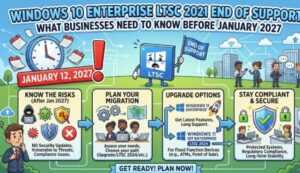
Organizations around the world are preparing for another major milestone in Microsoft’s operating system lifecycle. Microsoft has officially announced that Windows 10 Enterprise LTSC 2021 will reach its end of support on January 12, 2027, marking the end of security updates, bug fixes, technical assistance, and online support content for devices running this edition.
For enterprises that continue to rely on Windows 10 Enterprise LTSC 2021 in critical environments, this announcement serves as an important reminder that planning for migration should begin now. Businesses that are not ready to move immediately can also take advantage of Extended Security Updates (ESU), which will become available for purchase starting September 1, 2026.
As cyber threats continue to evolve and compliance requirements become more demanding, organizations must carefully evaluate their IT roadmap to ensure systems remain secure, supported, and efficient.
Understanding Windows 10 Enterprise LTSC 2021
Windows 10 Enterprise LTSC (Long-Term Servicing Channel) is designed for specialized devices and environments where feature stability is more important than receiving frequent updates. Industries such as manufacturing, healthcare, retail, government, and financial services often use LTSC editions on systems that power medical devices, industrial equipment, kiosks, and mission-critical applications.
Unlike standard Windows editions, LTSC versions receive long-term support and avoid frequent feature changes, making them suitable for environments that require consistent performance and minimal disruption.
However, even long-term support products eventually reach the end of their lifecycle, and Windows 10 Enterprise LTSC 2021 is now approaching that stage.
Key Dates Organizations Should Know
Microsoft has outlined two important dates for enterprises:
- September 1, 2026: Extended Security Updates (ESU) become available for purchase.
- January 12, 2027: Windows 10 Enterprise LTSC 2021 officially reaches end of support.
After January 12, 2027, devices that continue running Windows 10 Enterprise LTSC 2021 without ESU coverage will no longer receive:
- Security updates
- Non-security updates
- Bug fixes
- Technical support
- Updated online documentation
This means businesses that fail to upgrade or purchase ESU may expose their systems to increased cybersecurity risks.
Why End of Support Matters
Many organizations underestimate the impact of operating unsupported software. While systems may continue functioning after support ends, they become increasingly vulnerable to emerging threats.
Cybercriminals often target unsupported platforms because newly discovered vulnerabilities remain unpatched. In sectors where sensitive customer, financial, or operational data is involved, unsupported devices can create significant business risks.
Potential consequences include:
- Increased cybersecurity exposure
- Higher risk of ransomware attacks
- Compliance challenges
- Increased maintenance costs
- Reduced compatibility with modern applications
- Difficulty obtaining vendor support
For organizations operating in regulated industries, maintaining supported systems is often a critical component of security and governance strategies.
Extended Security Updates: A Temporary Solution
Recognizing that large-scale migrations require time, Microsoft is offering Extended Security Updates (ESU) for organizations that need additional transition periods.
Available from September 2026, ESU provides access to critical security updates after the official end-of-support date. This option is particularly useful for enterprises with complex environments, legacy applications, or specialized hardware that cannot be upgraded immediately.
However, ESU should be viewed as a temporary bridge rather than a long-term strategy.
While ESU helps reduce security risks during migration, it does not provide feature enhancements, product innovation, or full technical support. Organizations should continue developing and executing modernization plans even if they choose to purchase ESU.
The Recommended Upgrade Path: Windows 11 Enterprise LTSC 2024
Microsoft recommends upgrading eligible devices to Windows 11 Enterprise LTSC 2024.
This latest LTSC edition introduces improved security capabilities, modern management features, and enhanced performance while maintaining the long-term servicing model that enterprises value.
Key benefits include:
Advanced Security Features
Windows 11 offers stronger protection against modern cyber threats through hardware-based security, enhanced identity protection, and built-in defenses against ransomware and malware.
Improved Device Management
Organizations can streamline endpoint management using modern tools and cloud-based administration capabilities.
Better Performance
Optimized system efficiency and support for newer hardware can improve employee productivity and reduce operational overhead.
Long-Term Support
Windows 11 Enterprise LTSC 2024 continues the LTSC approach, providing stability for specialized and mission-critical environments.
Steps Organizations Should Take Now
Although the end-of-support date is still months away, proactive planning is essential. IT leaders should begin assessing their environments and creating migration strategies.
Recommended actions include:
- Inventory all devices running Windows 10 Enterprise LTSC 2021.
- Evaluate hardware compatibility with Windows 11 Enterprise LTSC 2024.
- Test business applications for compatibility.
- Develop a phased migration plan.
- Identify systems that may require ESU coverage.
- Allocate budget for upgrades and modernization initiatives.
- Train IT teams and end users on new technologies.
Starting early can help avoid rushed deployments, unexpected costs, and business disruption.
A Strategic Opportunity for Modernization
The end of support for Windows 10 Enterprise LTSC 2021 is not simply an IT maintenance event—it is an opportunity for organizations to modernize their digital infrastructure.
Businesses that invest in newer platforms can improve security, increase operational efficiency, and better prepare for future technology requirements. In an era where cyber resilience and digital transformation are top priorities, keeping systems current is increasingly becoming a business necessity rather than an option.
With January 12, 2027, approaching, organizations should begin planning now to ensure a smooth transition. Whether through direct migration to Windows 11 Enterprise LTSC 2024 or by using Extended Security Updates as a temporary measure, early action will help minimize risks and maintain a secure, supported IT environment.
As enterprises continue navigating evolving technology landscapes, proactive lifecycle management remains one of the most effective ways to strengthen security, ensure compliance, and support long-term business success.
Extra posts:
 Comparing Windows 11 Editions: Home vs Pro vs Enterprise vs SE
  Windows 10 Mobile support is ending soon
  Preparing for the Future How to Switch to Another OS as Windows 10 Nears End of Support
  Windows 10 Extended Security Updates: A Bridge to Your Windows 11 Experience
  Microsoft Defender for Endpoint End of Support for Android 8, 8.1, and 9 on April 30, 2025
  Microsoft Announces End of Support for Standalone Power Automate Mobile App by August 31, 2026