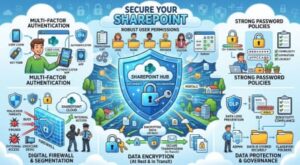
SharePoint has become an important part of how modern organizations store documents, share information, collaborate on projects, and manage business processes. But as more sensitive information moves into SharePoint, security needs to become a priority rather than an afterthought.
A secure SharePoint environment is not simply about turning on a few settings. It involves controlling who can access information, understanding what users are doing, protecting accounts, managing external sharing, and regularly reviewing the environment for potential risks.
The good news is that many SharePoint security best practices are straightforward to implement. The key is to take a structured approach and make security part of everyday SharePoint administration.
1. Start With the Principle of Least Privilege
One of the most important SharePoint security practices is giving users only the access they actually need.
It can be tempting to give broad permissions because it makes collaboration easier. However, excessive permissions can create significant security risks. If a user only needs to read documents in a particular library, there is little reason to give them editing or full-control permissions.
The principle of least privilege means users should receive the minimum level of access necessary to perform their jobs.
Instead of assigning permissions individually whenever possible, use well-managed security groups or Microsoft 365 groups. This makes access easier to understand, maintain, and review when employees change roles.
It is also worth paying attention to SharePoint site owners. Too many users with administrative or owner-level permissions can make it difficult to maintain proper control over a site.
2. Use Microsoft Entra ID and Strong Authentication
SharePoint security is closely connected to identity security because users typically access SharePoint through their Microsoft 365 identities.
For this reason, organizations should strengthen authentication wherever possible. Multi-factor authentication (MFA) is one of the most effective measures for reducing the risk associated with compromised passwords.
MFA adds another layer of verification beyond a password. Even if an attacker manages to obtain a user’s password, they may still be unable to access the account without the additional authentication factor.
Organizations should also use appropriate identity policies through Microsoft Entra ID, including conditional access policies where suitable. These policies can help organizations apply additional controls based on factors such as user, device, application, location, or risk.
Identity security should be treated as a fundamental part of SharePoint security rather than as a separate issue.
3. Be Careful With External Sharing
External sharing is one of SharePoint’s most useful features, but it can also introduce risk if it is not controlled properly.
Before enabling broad external sharing, organizations should decide who needs to share information outside the company, what types of information can be shared, and how external users should be managed.
Avoid creating a situation where every user can freely share sensitive documents with anyone on the internet.
Where appropriate, limit external sharing to authenticated guests and trusted domains. Organizations should also regularly review guest accounts and remove access that is no longer required.
Another important practice is educating employees about the difference between sharing a document with a specific person and creating a broadly accessible link. A simple sharing mistake can expose information to far more people than intended.
4. Review SharePoint Permissions Regularly
Permissions tend to become complicated over time.
An employee changes departments. A contractor finishes a project. A new team is created. A temporary access requirement becomes permanent. Eventually, an environment that started with a simple permission structure can become difficult to manage.
Regular permission reviews help prevent this problem.
Organizations should periodically examine:
- Who has access to important sites?
- Who has owner or administrator permissions?
- Are former employees still associated with groups or sites?
- Are guest users still required?
- Are sensitive libraries accessible to the right people?
- Are there unnecessary unique permissions?
- Are users receiving access through multiple groups?
A regular access review can reveal security gaps that are difficult to notice during everyday administration.
5. Protect Sensitive Information With Microsoft Purview
Not every document stored in SharePoint has the same level of sensitivity.
A public marketing document and a confidential financial report should not necessarily receive identical security controls.
Organizations can use Microsoft Purview capabilities to classify and protect sensitive information across Microsoft 365. Sensitivity labels, data loss prevention policies, retention controls, and other information governance features can help organizations manage information according to its sensitivity and business requirements.
The important point is to create a clear information classification strategy first. Technology works much better when employees understand what different information classifications mean and what they are expected to do with sensitive content.
6. Keep Audit Logging and Monitoring Enabled
You cannot effectively secure what you cannot monitor.
Microsoft 365 provides auditing capabilities that can help organizations investigate activities involving SharePoint and other services. Audit information can provide valuable insight into activities such as file access, sharing, changes, and other user actions.
Security teams should establish a process for reviewing relevant events and investigating suspicious behavior.
Monitoring becomes particularly important for sensitive sites and information. Unusual downloads, unexpected sharing activity, or access from unusual locations may warrant further investigation depending on the organization’s security policies.
The goal is not necessarily to monitor every action manually. Instead, organizations should use appropriate auditing, alerts, and automated security capabilities to identify meaningful risks.
7. Secure Devices That Access SharePoint
SharePoint can be secure while the devices used to access it remain vulnerable.
Employees frequently access SharePoint from laptops, desktops, tablets, and mobile devices. If one of those devices is compromised, attackers may potentially gain access to corporate resources through the user’s account.
Organizations should therefore establish device security requirements. Depending on the environment, this may include managed devices, endpoint protection, encryption, security updates, and compliance policies.
Microsoft Intune and Microsoft Defender capabilities can also play an important role in securing devices and identifying potential threats across the Microsoft 365 environment.
A strong SharePoint security strategy should consider the entire access chain: identity, device, application, network, and data.
8. Avoid Using SharePoint as an Uncontrolled File Dump
SharePoint can easily become a digital filing cabinet where everything gets stored without a clear structure.
This creates more than an organizational problem. Poor information architecture can also create security problems.
When users cannot easily understand where information belongs, they may store sensitive documents in general-purpose sites or libraries with broader access.
Create clear site structures, document libraries, permission boundaries, naming conventions, and ownership responsibilities. Sensitive information should have a clear home with appropriate security controls.
Good governance makes security easier because people know where information belongs and who is responsible for it.
9. Manage Site Owners Carefully
Every SharePoint site should have clearly identified owners who understand their responsibilities.
Site owners can play an important role in managing membership, permissions, content, and sharing. However, giving ownership to people who are not prepared to manage these responsibilities can create security issues.
Organizations should define what site owners are expected to do and provide appropriate training.
It is also a good idea to have more than one responsible owner for important sites so that access and administration do not depend on a single person.
10. Remove Access When It Is No Longer Needed
One of the simplest security practices is also one of the easiest to overlook: remove unnecessary access.
When employees leave the organization, their accounts should be handled through a well-defined offboarding process. When contractors finish assignments, their access should be reviewed. When projects end, temporary groups and permissions should not remain indefinitely.
Automating identity lifecycle processes where possible can reduce the chance of human error.
Access should have a lifecycle, just like the information it protects.
11. Train Users to Recognize Security Risks
Technology alone cannot solve every SharePoint security problem.
Users can accidentally share confidential information, download suspicious files, approve malicious requests, or give access to the wrong person.
Regular security awareness training can reduce these risks.
Training should be practical rather than purely theoretical. Show employees how to share documents securely, recognize suspicious requests, understand sensitivity labels, report unusual activity, and handle external collaboration.
When employees understand why SharePoint security controls exist, they are much more likely to use them correctly.
12. Create a SharePoint Security and Governance Policy
Finally, document your approach.
A SharePoint security policy should clearly explain how the organization handles permissions, external sharing, sensitive information, guest users, site ownership, auditing, data retention, and user access reviews.
The policy does not have to be hundreds of pages long. What matters is that it is understandable, practical, and consistently applied.
It should also be reviewed periodically because business requirements, Microsoft 365 capabilities, and security threats continue to evolve.

Securing SharePoint is not a one-time configuration exercise. It is an ongoing process involving people, technology, permissions, identity, data, and governance.
The strongest approach is to begin with the basics: apply least-privilege access, protect user identities with MFA, control external sharing, review permissions regularly, classify sensitive information, monitor activity, secure devices, and remove unnecessary access.
Organizations should also remember that security and productivity do not have to work against each other. When SharePoint is properly structured and governed, employees can collaborate confidently without unnecessarily exposing business information.
The ultimate goal is not to make SharePoint difficult to use. It is to create an environment where the right people can access the right information at the right time and where sensitive information remains protected when it matters most.