
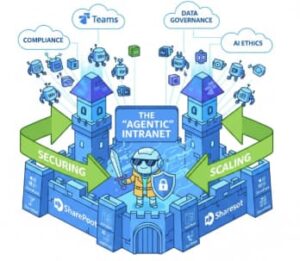
Microsoft 365 Copilot has crossed an important threshold. It is no longer just a clever chat interface that summarizes documents or drafts emails. In 2025, Copilot is becoming agentic—capable of acting, orchestrating tasks, and reasoning across your organization’s knowledge landscape.
And that’s exactly why many IT leaders are nervous.
The Real Problem: Copilot Is Too Good at Finding Data
Copilot doesn’t invent access. It respects permissions. But if your SharePoint and Teams permissions are chaotic—and let’s be honest, most tenants that grew organically over five to ten years are—Copilot becomes something far more dangerous than a productivity tool.
It becomes a corporate data leak machine.
Overshared SharePoint sites, broken inheritance, “Everyone Except External Users,” abandoned Teams, and legacy access models mean Copilot can surface information users technically can access, but absolutely should not see in context.
The Shift: From Generative AI to Agentic AI
Early Copilot adoption was about asking questions:
- “Summarize this document”
- “Draft a response”
- “Explain this spreadsheet”
Agentic AI changes the model:
- “Prepare the weekly project update”
- “Monitor risks across Project Alpha”
- “Answer HR questions using approved policies only”
This shift demands intentional architecture.
The Goal: A Secure, AI-Powered Knowledge Brain
This blog lays out a practical, four-phase blueprint to transform a standard Microsoft 365 tenant into a secure, compliant, and scalable Agentic Intranet—one where Copilot agents operate with precision, context, and guardrails.
Phase 1: Hardening the Foundation (SharePoint & Purview)
Before you deploy Copilot at scale—or build agents—you must confront oversharing. This is not optional. This is existential.
Audit Before You Deploy: Finding Oversharing at Scale
Manual permission reviews do not work in large tenants. You need automation.
SharePoint Advanced Management (SAM) is the unsung hero here. It allows you to:
- Identify sites with Restricted Access Control gaps
- Detect broken inheritance patterns
- Flag anonymous or “anyone with the link” sharing
- Report on high-risk permission sprawl across OneDrive and SharePoint
The key insight: Do this before Copilot becomes business-critical. Once users rely on Copilot, tightening permissions feels like a productivity regression—even when it’s a security win.
The “5×5” Labeling Strategy (Purview Without Pain)
Most organizations fail at sensitivity labels not because the technology is bad, but because the taxonomy is unusable.
The 5×5 strategy works:
- 5 parent labels max (e.g., Public, Internal, Confidential, Highly Confidential, Regulated)
- 5 sub-labels per parent for business nuance
Why this matters:
- Reduces user fatigue
- Improves label accuracy
- Makes Copilot grounding more reliable
Pair this with auto-labeling policies in Microsoft Purview:
- Detect financial data, PII, contracts, or IP
- Apply labels automatically
- Reduce human error
Copilot respects these labels. Agents inherit these boundaries. This is foundational.
Just-in-Time Access: Ending “Open by Default”
The old intranet model assumed discoverability was always good. The agentic intranet assumes intentional discovery.
Adopt:
- Restricted Content Discovery
- Time-bound access for sensitive libraries
- Approval-based sharing for high-risk sites
This doesn’t slow users down—it protects them from accidental exposure amplified by AI.
Phase 2: Teams as the AI Work Hub
Teams is no longer just a collaboration tool. It is becoming the primary UI for AI in Microsoft 365.
Teams as the Control Plane for Agents
With Agent 365 (the unified control plane announced for 2025), IT now has a centralized way to manage:
- Which Copilot agents exist
- Which Teams, channels, or chats they can operate in
- What data scopes they can access
This is a major governance shift.
Instead of Copilot floating everywhere, you can:
- Limit financial agents to Finance channels
- Restrict HR agents to labeled policy libraries
- Prevent agents from responding in unmanaged chats
Think of Teams as the air traffic control tower for AI.
Copilot in Meetings—Without Permanent Recordings
One of the most impactful updates is Copilot in meetings without requiring stored transcripts or recordings.
Why this matters:
- Reduced privacy risk
- Lower compliance overhead
- No long-term storage of sensitive conversations
Copilot can:
- Generate live summaries
- Track action items
- Answer contextual questions
…all without creating a permanent compliance artifact unless you choose to.
This is privacy-first AI done right.
Integration Patterns: Teams-First vs Hybrid
Two dominant patterns are emerging:
Teams-First Model
- Internal helpdesks
- HR and IT support
- Knowledge-based Q&A
Hybrid Model
- External systems (ServiceNow, Jira, Salesforce)
- Teams as the conversational interface
- Data remains in source systems
Choosing the right model depends on data sensitivity and workflow maturity—but Teams remains the front door.
Phase 3: Declarative Agents Built on SharePoint Knowledge
This is the real “secret sauce” of the agentic intranet.
What Are Declarative Agents?
Declarative agents are purpose-built Copilot agents scoped to:
- Specific SharePoint sites
- Document libraries
- Folders or labeled content
Unlike generic Copilot, they:
- Don’t hallucinate across the tenant
- Operate within explicit knowledge boundaries
- Deliver consistent, auditable answers
This is how you make Copilot understand your business.
The 5-Minute Agent: A Practical Walkthrough
Using Copilot Studio Lite, you can:
- Select a SharePoint library (e.g., “Project Alpha”)
- Define the agent’s role (e.g., Project Analyst)
- Restrict responses to approved documents only
- Publish directly into Teams
Result:
- An agent that answers questions like:
- “What are the current risks?”
- “What changed since last week?”
- “Which milestones are overdue?”
No code. No plugins. Just clean SharePoint architecture.
Graph Connectors: Completing the Knowledge Picture
Most businesses don’t live entirely in M365.
Microsoft Graph Connectors allow Copilot to safely ingest:
- Salesforce opportunities
- Jira issues
- ServiceNow tickets
- Custom line-of-business systems
The key is governance:
- Map external data to sensitivity labels
- Control which agents can see it
- Maintain audit trails
When done correctly, Copilot doesn’t just answer questions—it understands context across systems.
Phase 4: Measuring ROI and Enforcing Governance
AI without metrics is hype. AI with governance is sustainable.
Proving Value with the Copilot Dashboard
The Copilot Dashboard in the M365 Admin Center gives you:
- Minutes saved per user
- Feature adoption trends
- Agent usage analytics
This enables real business math:
- License cost vs. productivity gain
- High-impact roles vs. low-value use cases
- Data to justify expansion—or restraint
Baseline Security Mode: Reducing Legacy Risk
Finally, apply Microsoft’s Baseline Security Mode across:
- Office apps
- SharePoint
- Teams
This eliminates:
- Legacy authentication risks
- Inconsistent tenant configurations
- Hidden exposure that AI can amplify
Agentic AI magnifies both good and bad architecture. Baselines ensure the amplification works in your favor.
The modern intranet is no longer a collection of pages. It is a living, reasoning system.
Organizations that rush Copilot without cleaning permissions will struggle with trust, compliance, and fear. Organizations that embrace the agentic intranet—securely, intentionally, and measurably—will unlock something far more powerful than chatbots.
Extra posts:
 SharePoint Gets an AI Upgrade: New Copilot Citation Analytics Show Which Content Matters Most
  What Are Some Best Practices for Securing SharePoint?
  Agentic AI in Microsoft Teams: The Future of Workplace Automation (Technical Deep Dive)
  The Future of SharePoint AI, Agents, and Smarter Collaboration (2025 Update)
  Pre-Flight Check The 5 Non-Negotiable SharePoint Cleanups Before Deploying Copilot
  How to Prevent Copilot from Indexing Sensitive HR Folders in SharePoint Using Purview DLP and SAM