
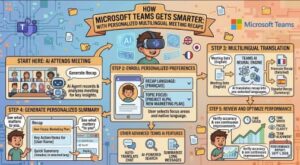
Microsoft is making it easier for people around the world to work together across language barriers with a new improvement to Microsoft Teams meeting recaps. The company is rolling out personalized recap translation, allowing each participant to initially see a meeting recap in the same translation or interpretation language they selected during the meeting.
The update is particularly relevant for organizations with international teams, multilingual workforces and global customers. Instead of forcing everyone to review a recap in one common language, Teams will personalize the experience for individual participants.
According to Microsoft’s updated announcement, the feature is rolling out globally from early August through early September 2026, with General Availability beginning in mid-August and expected to finish by early September. Microsoft also confirmed that no administrator action is required because the feature will be enabled automatically as the rollout reaches an organization.
A more personalized meeting recap experience
Meetings have become increasingly multilingual as companies hire across countries and collaborate with international customers and partners. While Microsoft Teams already offers translated captions and Teams Interpreter capabilities, the experience after a meeting has traditionally presented another opportunity for improvement.
The new update connects the meeting experience with the recap experience.
When a participant uses translated captions or Teams Interpreter and selects a language during a meeting, Teams can use that selection to determine the language in which that person’s meeting recap is initially displayed.
For example, imagine an international company holding an English-language meeting with employees in Japan, France and Brazil. A participant who selected Japanese as their interpretation or translation language during the meeting could see the resulting meeting recap in Japanese.
Another participant in the same meeting could see the recap in French, while someone who selected Portuguese could initially see it in Portuguese.
That means there is no longer a requirement for every participant to consume the recap in exactly the same language.
One meeting, different recap languages
One of the most interesting aspects of the update is that different participants can see the same meeting recap in different languages.
This personalization happens at the individual-user level rather than changing the underlying meeting content for everyone.
Microsoft says users can also change the recap language after the recap has been generated, provided the desired language is supported.
This gives users flexibility. Someone might initially review a recap in their preferred interpretation language and later switch to another supported language when they need to compare terminology or communicate the information with colleagues.
The distinction between translation and original meeting content is also important.
Changing the recap language does not modify the original transcript, recording or source meeting content. Instead, it changes how the recap is presented to that particular user.
For organizations that rely heavily on meeting recordings and transcripts, this separation can make the feature easier to understand and manage.
Why the update matters for global businesses
At first glance, personalized recap translation may look like a relatively small Teams enhancement. In practice, it addresses a common challenge for global organizations: making sure important information from meetings remains accessible after the call ends.
A meeting can involve people who are comfortable speaking English but prefer reading detailed information in another language. Others may participate through interpretation because they are communicating in a language that is not their primary working language.
Meeting recaps can contain important details, including decisions, action items, discussions and follow-ups. If those details are available in a participant’s preferred language, reviewing them can become more accessible and less demanding.
The update could therefore be particularly useful for multinational businesses, international project teams, educational institutions and organizations with multilingual customer or partner relationships.
It also supports accessibility by extending the language experience beyond the live meeting itself.
Teams Interpreter and translated captions play a key role
The new recap experience is closely connected to two existing Teams capabilities: translated captions and Teams Interpreter.
Translated captions help participants follow spoken conversations in a selected language, while Teams Interpreter is designed to support more natural multilingual conversations.
With the new recap functionality, the language selected during that live interaction can carry over into the post-meeting recap experience.
This creates a more continuous workflow.
Instead of having a participant use one language during the meeting and then manually find another way to translate the recap afterward, Teams can start the recap in the language already selected during the meeting.
For users, that could make the transition from meeting participation to meeting follow-up much smoother.
Rollout timeline updated by Microsoft
Microsoft has updated the rollout schedule for this feature.
The Targeted Release began in early August 2026 and was expected to complete by mid-August.
For General Availability, including Worldwide, GCC and GCC High environments, Microsoft says the rollout began in mid-August and is expected to complete by early September 2026. This represents an updated timeline, with the completion date moved from the previously expected late August timeframe.
Because the rollout is happening progressively, organizations may not see the capability at exactly the same time.
Microsoft’s announcement identifies the feature under Microsoft 365 Roadmap ID 567458.
Which Teams users are affected?
The update is aimed at users who access Teams meeting recaps and who use multilingual meeting features.
That includes people who:
- Use translated captions during Teams meetings
- Use Teams Interpreter
- Access meeting recaps
- Have the appropriate licensing and access for Teams meeting recap capabilities
Microsoft says the experience applies across major Teams platforms, including Windows and Mac desktop applications, the web, iOS and Android, as well as the Teams meeting recap experience.
Availability can still depend on supported languages, licensing and meeting configuration.
No administrator action is required
One of the more straightforward aspects of the announcement is that IT administrators do not need to manually activate the feature.
Microsoft says the capability will be enabled automatically as the rollout reaches each organization.
However, that does not mean IT teams should ignore the change.
Microsoft recommends that organizations inform help desk and support teams about the updated multilingual recap experience. Internal documentation covering translated captions, Teams Interpreter and meeting recaps may also need to be updated.
Organizations should also confirm that eligible users have the necessary licenses and review existing policies covering transcription, recording, captions, Teams Interpreter and meeting recap functionality.
That preparation could help prevent confusion when employees suddenly notice that a recap is displayed in a different language from the one used by their colleagues.
What employees should expect
For everyday Teams users, the biggest change is simple: the language of your recap may reflect the language you selected during the meeting.
If you selected Japanese through translation or interpretation during an English meeting, your recap may initially appear in Japanese.
If you selected another supported language, Teams can use that language for your initial recap experience instead.
And if you would rather read the recap in another supported language, you can change the language after the recap is generated.
Importantly, this personalization applies to the individual user’s view. It does not rewrite the meeting’s original transcript or recording.
A small feature with a bigger collaboration impact
Microsoft Teams has increasingly evolved beyond being a video-conferencing application into a broader collaboration platform. Features such as intelligent recaps, transcription, translation and interpretation are designed to help people get more value from meetings before, during and after they happen.
Personalized multilingual recaps fit naturally into that direction.
The feature does not eliminate the need for human communication or professional interpretation in situations where accuracy is critical. But for everyday collaboration, it can reduce friction and make meeting information easier to consume.
For global organizations, that matters.
A successful multilingual meeting is not simply about helping everyone understand the conversation while it is happening. The decisions made during that meeting still need to be reviewed, shared and acted upon afterward.
By connecting a participant’s language preference to their meeting recap, Microsoft is making that post-meeting stage more personalized.
The bottom line
Microsoft’s new multilingual meeting recap capability is a practical improvement for organizations working across languages.
Participants can initially receive their Teams meeting recap in the language they selected for translated captions or Teams Interpreter, while retaining the ability to switch to another supported language later. Different people in the same meeting can therefore have different recap-language experiences without changing the original meeting content.
The rollout is already underway, with General Availability expected to continue through early September 2026.
For administrators, there is no activation process to complete. For users, the main thing to understand is that their recap language may now follow their meeting language preference.
As businesses become increasingly global, features like this demonstrate how collaboration software is moving toward a more personalized and inclusive experience where language preferences follow users throughout the entire meeting lifecycle, not just during the live conversation.
Extra posts:
 Microsoft Teams Is Getting a Smarter Meeting Assistant: Facilitator Can Now Join Channel Meetings
  Microsoft Teams Rooms Gets Smarter: AI-Powered Facilitator Brings Real-Time Meeting Notes to Physical Meeting Rooms
  Microsoft Teams Adds In-Meeting AI Toggle: Users Gain More Control Over Copilot and Facilitator