
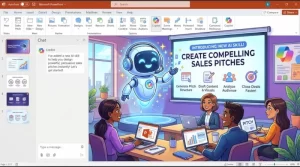
Microsoft is preparing to introduce a new Copilot skill in PowerPoint designed to help sales teams create more structured, customer-focused sales pitch presentations. The feature is scheduled for a worldwide rollout beginning in mid-October 2026, with completion expected by late October, across PowerPoint for Windows (Win32), Mac, and the web.
The update aims to reduce the manual work involved in preparing sales presentations by helping users organize customer context, commercial opportunities, key messages, supporting evidence, and recommended next steps into a coherent presentation draft. The feature will be available to users who already have access to Copilot in PowerPoint.
For sales professionals, account managers, and other customer-facing teams, the announcement signals another step toward integrating AI into everyday business communication. Rather than starting with a blank slide deck, users will be able to draw on a scenario-specific skill to shape a sales narrative around a particular customer or business opportunity.
What Is the New Copilot Sales Pitch Feature in PowerPoint?
The new capability introduces a dedicated Copilot skill for creating customer-facing sales pitch presentations. Its purpose is to help users build a more structured commercial story rather than simply assemble slides around a collection of product details.
According to Microsoft’s announcement, the feature is intended to support different sales situations, giving teams a way to adapt their presentation drafts to the audience, opportunity, and purpose of a meeting.
Potential use cases include:
- First customer meetings: Prepare an introductory presentation that establishes the business context, highlights relevant offerings, and identifies potential areas of value.
- Warm-lead product introductions: Develop a pitch for prospective customers who have already shown interest in a product or service.
- Industry-specific sales pitches: Organize messages around the challenges, priorities, and opportunities associated with a particular industry.
- Internal sales enablement: Create presentations that help sales teams communicate product positioning, commercial priorities, and recommended approaches.
The central idea is to help users organize the story behind the sale. By focusing on the intended audience, business opportunity, key messages, supporting proof points, and next steps, the skill can help teams produce presentation drafts with a clearer purpose.
The announcement describes the capability as a new skill within Copilot in PowerPoint. It does not establish that every presentation will be generated automatically or that users will no longer need to review and edit the resulting slides.
When Will the New Feature Be Available?
Microsoft’s planned rollout window runs from mid-October through late October 2026, with worldwide general availability targeted for that period.
The feature is expected to reach the following versions of PowerPoint:
- PowerPoint for Windows (Win32)
- PowerPoint for Mac
- PowerPoint for the web
The intended audience is users who have access to Copilot in PowerPoint. Availability may therefore depend on an organization’s existing Microsoft 365 subscriptions, Copilot access, and the progress of the rollout.
As of October 26, 2026, the announced rollout window is nearing its scheduled end. However, a planned completion date should not be treated as confirmation that the feature is already available to every eligible user.
Organizations and individuals can check their available Copilot capabilities in PowerPoint as the rollout progresses. Microsoft’s announcement does not specify a separate release date for each platform or provide a guarantee that all users will receive the feature simultaneously.
How AI-Generated Sales Pitches Could Help Sales Teams
Creating a persuasive sales presentation involves more than placing product information on slides. Sales professionals need to understand the customer, identify the opportunity, select relevant evidence, communicate a compelling value proposition, and establish a logical next step.
That preparation can take considerable time, especially when teams need to tailor presentations for different industries, customer segments, or stages of the sales process.
The new Copilot skill is designed to help organize these elements into a more structured first draft.
1. Less time spent organizing presentations
Sales teams frequently reuse existing material, adapt previous decks, and reorganize product information for new prospects. While those activities remain important, they can consume time that might otherwise be spent preparing for customer conversations.
A scenario-specific Copilot skill could help users establish the presentation’s structure more quickly, reducing the effort required to move from an initial idea to an editable draft.
The practical benefit will depend on how much preparation a particular pitch requires and how closely the generated structure matches the team’s needs.
2. More relevant customer conversations
A general product presentation may not address the priorities of a specific buyer. An industry-focused pitch, for example, may need to emphasize different business challenges and supporting evidence than a presentation for a customer in another sector.
By helping users shape a commercial story around the audience and opportunity, the new skill could make it easier to tailor the presentation to its intended purpose.
Sales professionals will still need to supply accurate customer context and verify that the proposed messages reflect the prospect’s actual needs.
3. Clearer commercial messaging
A strong sales pitch typically connects a customer’s problem with a proposed solution and explains why the solution deserves consideration.
The feature’s focus on key messages, supporting evidence, and recommended next steps could help users create a more coherent narrative. This is particularly useful when a presentation needs to explain not just what a product does, but why it matters to a particular customer.
The quality of that narrative will still depend on the information provided and the judgment of the person preparing the presentation.
4. A more repeatable approach to sales enablement
Sales organizations often need consistent messaging across teams while allowing individual representatives to adapt presentations to their customers.
A structured drafting process could help establish a repeatable starting point for introductory meetings, product pitches, and industry-specific presentations. Sales enablement teams may also find the approach useful when developing internal materials.
However, a standardized starting structure should not replace established brand guidelines, approved product claims, or organization-specific sales processes.
What Makes This Update Relevant to the Microsoft 365 AI Strategy?
The announcement reflects a practical approach to workplace AI: embedding task-oriented assistance within the applications employees already use.
PowerPoint is a familiar tool for sales teams, marketing departments, consultants, and business leaders. Introducing a dedicated sales pitch skill within the application brings AI assistance closer to an established business workflow rather than requiring users to create a presentation strategy entirely outside their usual tools.
The distinction is important. A general-purpose AI assistant can help brainstorm a sales pitch, but a skill designed specifically for presentations can focus on the structure and components of that deliverable.
In this case, the intended workflow centers on five elements:
- Audience and customer context
- The commercial opportunity
- Key messages
- Supporting evidence
- A recommended next step
Together, these elements provide a framework for organizing a sales conversation into a presentation.
The update also illustrates a broader shift in workplace AI adoption. The emphasis is not only on generating text or automating repetitive actions, but also on helping employees structure complex knowledge work into usable business outputs.
Still, the announcement does not establish that the new skill will independently research customers, verify sales claims, access every relevant company document, or guarantee better sales results. Those capabilities should not be assumed without additional product documentation.
What Should Businesses Consider Before Using the Feature?
Although Microsoft says no administrator action is required for this rollout, organizations can take practical steps to help employees use the capability effectively.
Inform eligible users
IT administrators and Microsoft 365 adoption teams may want to notify employees that the new skill is becoming available. A short internal announcement can explain its intended use cases and direct users to check whether the feature appears in their version of PowerPoint.
Establish review expectations
AI-generated presentations should be treated as drafts that require human review. Sales representatives should verify product specifications, pricing, customer details, performance claims, and any supporting evidence before presenting information externally.
This is especially important when a presentation contains commitments, regulated claims, confidential information, or statements about a customer’s business.
Maintain brand and messaging standards
Organizations can encourage sales teams to check AI-assisted presentations against approved templates, brand guidelines, product positioning, and sales messaging.
A consistent review process can help preserve a professional presentation style while allowing teams to adapt their content to individual customers.
Measure practical outcomes
Businesses interested in the value of AI-assisted presentation creation can compare the preparation process before and after adoption.
Useful measures may include:
- Time required to produce a first draft
- Time spent editing and validating content
- Consistency of messaging across presentations
- Feedback from sales representatives
- Feedback from customers and sales managers
These measures can help organizations determine whether the new capability improves their workflows rather than assuming that faster drafting automatically leads to better commercial outcomes.
Is Any Administrative Action Required?
Microsoft’s announcement states that no administrator action is required for the rollout.
The recommended step is to inform users about the new Copilot skill and its availability across PowerPoint for Windows, Mac, and the web.
The announcement also identifies no specific compliance considerations for this change, while advising organizations to review the update as appropriate for their own environments.
That does not eliminate the need to follow existing organizational policies for confidential information, approved customer-facing claims, data handling, and human review of AI-generated content.
Organizations should continue to apply their normal governance practices when employees use Copilot to prepare external presentations.
What Happens Next for AI-Powered Sales Presentations?
The immediate next step is the completion of Microsoft’s planned October 2026 rollout and the availability of the new skill to eligible Copilot users across the supported PowerPoint platforms.
For sales teams, the more significant question will be how effectively the feature fits into day-to-day preparation. A useful first draft can reduce administrative work, but the commercial value of a sales pitch ultimately depends on the accuracy of its claims, the relevance of its message, and the quality of the conversation it supports.
Businesses adopting the capability should therefore focus on practical use cases, reliable source material, and clear review procedures. Teams that combine AI-assisted drafting with strong customer knowledge and human judgment may be better positioned to make their presentation workflows more efficient without sacrificing quality.
As Microsoft continues to develop AI capabilities within Microsoft 365, task-specific assistance such as this could become an increasingly familiar part of sales preparation. The feature’s real impact will become clearer as organizations gain access to it and evaluate how well it supports their existing sales processes.
For now, the message is straightforward: Copilot in PowerPoint is introducing a more structured way to draft sales pitches, with a worldwide rollout planned for October 2026 and no additional administrator action required.
Extra posts:
 Microsoft 365 Copilot in PowerPoint Adds Clarify My Thinking Skill for Desktop Users
  PowerPoint Copilot Gets “Record a Skill” to Make Repetitive Tasks Easier
  Microsoft 365 Copilot Gets a Faster Way to Work in Word, Excel and PowerPoint
  Microsoft 365 Copilot in PowerPoint Gets Stricter Brand Control With Notes Steering
  Microsoft Brand Kit Adds Custom Presentation Skills for Copilot in PowerPoint
 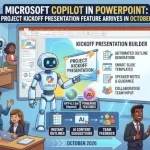 Microsoft Copilot in PowerPoint: New Project Kickoff Presentation Feature Arrives in October 2026