
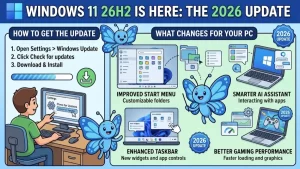
Microsoft has officially released Windows 11, version 26H2, also known as the Windows 11 2026 Update, beginning a new annual feature-update cycle for the operating system.
The update became generally available on September 29, 2026, with Microsoft using a controlled rollout rather than making it immediately available to every compatible PC. Eligible devices running Windows 11 version 24H2 or 25H2 can receive 26H2, while Microsoft may temporarily hold the update on devices where compatibility problems have been identified.
For many existing Windows 11 PCs, the upgrade is also considerably smaller and faster than a traditional feature upgrade. That’s because Windows 11 versions 24H2, 25H2 and 26H2 share a common servicing foundation, allowing Microsoft to activate the new release through an enablement package rather than replacing the entire operating system.
How to Get Windows 11 26H2
For eligible consumer PCs, the simplest route is through Windows Update.
Microsoft says users who want to be among the first to receive the update should open:
Settings → Windows Update
Then enable “Get the latest updates as soon as they’re available.”
If the PC is eligible and Microsoft has made the update available to that device, Windows Update will present Windows 11, version 26H2 as an option to download and install.
The important point is that availability is controlled by Microsoft’s rollout system. An eligible PC may not immediately show the feature update even after the general release has begun.
Microsoft uses safeguard holds when it detects a compatibility issue that could negatively affect the upgrade experience. Rollout information, known issues and safeguard details are published through Windows Release Health.
Quick checklist for individual users
- Open Settings.
- Select Windows Update.
- Turn on Get the latest updates as soon as they’re available.
- Check for updates.
- If Windows 11 26H2 is offered, select Download & install.
- Restart the PC when prompted.
If 26H2 is not offered, that does not necessarily mean the PC is incompatible. The device may simply not yet be included in Microsoft’s controlled rollout.
Why the 26H2 Upgrade Can Be Smaller
One of the more important technical details behind Windows 11 26H2 is the use of an enablement package.
Microsoft says Windows 11 versions 24H2, 25H2 and 26H2 share the same core operating system and underlying system files. The newer 26H2 features can therefore be included in previous servicing updates in an inactive state and then switched on through the enablement package.
For eligible systems, this means users do not need a complete operating-system swap.
Instead, the enablement package acts much like a small activation mechanism for the new feature release. Microsoft says the process can involve a small download, a quick installation and a single restart.
That approach also gives IT departments a more familiar deployment model because existing update rings and management practices can continue to be used.
What’s New in Windows 11 26H2?
Windows 11 26H2 is not simply a collection of features created from scratch for one launch day.
Microsoft describes the release as bringing together features and enhancements that were introduced through monthly servicing updates during the Windows 11 24H2 and 25H2 lifecycle. The changes cover areas including security, accessibility, management and productivity.
For commercial customers, several experiences that were previously subject to temporary controls in 25H2 become enabled by default in 26H2.
These include:
- Windows settings backup, which can help preserve supported Windows settings and Microsoft Store app lists for recovery or device-replacement scenarios.
- App-specific taskbar actions, providing access to common application actions through Windows taskbar experiences.
- File Explorer improvements, aimed at navigation and usability.
Existing administrator-configured policies for Windows settings backup continue to be respected, according to Microsoft.
The practical impact will therefore depend partly on how an organization already manages Windows features and policies.
What Businesses and IT Administrators Should Do
Organizations running Windows 11 24H2 or 25H2 can use their existing deployment infrastructure for 26H2.
Microsoft says commercial and education customers can obtain the update through established Windows management channels, including Windows Autopatch and the Microsoft 365 admin center. The company also recommends beginning with targeted deployments before expanding the update across an organization.
A sensible deployment sequence includes:
- Select a representative pilot group.
Include different hardware models, user profiles and business functions. - Test critical applications.
Pay particular attention to software that depends on drivers, security components, VPNs, peripherals or specialized hardware. - Review existing policies.
Check whether newly enabled features affect current configuration, privacy, backup or management policies. - Validate business workflows.
Testing should cover the tasks employees actually perform rather than simply confirming that Windows boots successfully. - Expand through existing update rings.
Once the pilot is stable, organizations can broaden deployment using their established Windows update processes. - Monitor Windows Release Health.
Known issues and safeguard holds can change as Microsoft’s rollout progresses.
Windows 11 26H2 Also Resets the Support Clock
For organizations planning their Windows lifecycle, the release has another important consequence: installing a new supported feature version resets the support lifecycle.
Microsoft’s current Windows servicing documentation specifies 24 months of support for Home and Pro editions and 36 months for Enterprise and Education editions.
That makes 26H2 relevant beyond its feature list.
An organization approaching the end of support for an older Windows release may use the new version as part of a broader operating-system lifecycle plan, while IT teams need to account for application testing, hardware compatibility and support requirements before expanding deployment.
This is particularly relevant for Windows 11 24H2 users. Microsoft says Home and Pro editions of 24H2 reach the end of updates on October 13, 2026, making the transition timeline an immediate consideration for affected systems.
Security and Compliance Need to Be Part of the Rollout
A feature update should not be treated solely as an end-user software installation in managed environments.
Before broad deployment, organizations should compare Windows 11 26H2 against their existing security controls, compliance requirements and configuration standards.
Microsoft has published a dedicated Windows 11 version 26H2 security baseline, along with updated deployment and management resources for IT professionals.
That gives security and endpoint teams an opportunity to review configuration changes alongside the operating-system rollout rather than treating security validation as a separate exercise.
For organizations with strict regulatory or internal security requirements, the pilot phase is particularly important. It provides a controlled environment for testing authentication, endpoint protection, application controls, network access and other security-dependent workflows.
What If Windows 11 26H2 Doesn’t Appear?
The most important thing for users who don’t immediately see 26H2 is not to assume something is wrong.
Microsoft is deliberately using a controlled rollout. Eligibility alone does not guarantee that the update will appear on every device on the first day.
Potential reasons include:
- The rollout has not yet reached the device.
- Microsoft has identified a compatibility concern.
- A safeguard hold is affecting the device.
- The PC is not running the required Windows version.
- Device or organizational update policies are controlling feature-update availability.
Microsoft’s release-health resources are the appropriate place to check for known problems and rollout restrictions.
What Comes Next for Windows 11 26H2?
The September 29 release is the beginning of Microsoft’s rollout rather than the end of the process.
Microsoft says availability will expand in the coming weeks while it monitors installation data, compatibility and known issues. The company will continue publishing rollout information through Windows Release Health and its official Windows communications channels.
For individual users, the immediate takeaway is straightforward: check Windows Update, but don’t assume that a missing 26H2 offer means the PC cannot run it.
For businesses, the release represents a more structured planning exercise. The shared servicing foundation means the technical installation can be relatively lightweight, but application validation, policy review, security testing and staged deployment remain important before a company-wide rollout.
The Windows 11 2026 Update is therefore less about a dramatic operating-system replacement and more about the next stage of Microsoft’s ongoing servicing model. For organizations already managing 24H2 or 25H2, the next few weeks will be about turning that technical simplicity into a controlled and well-tested deployment.
Extra posts:
 Windows August 2026 Security Update Is Here: What You Need to Know Before You Restart
  Microsoft Windows Autopatch Breaks the No-Reboot Rhythm: September 2026 Hotpatch Update Will Require a Restart
  Windows Update Connections at Risk: Microsoft Urges Organizations to Check Firewalls and Proxies
  Can I Rollback a Windows 11 Update? A Complete Guide to Reverting Windows Updates Safely
 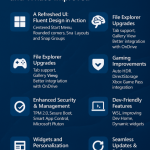 What’s New in Windows 11May 2025 Update Overview
  Fixing Common Windows 11 Update Errors