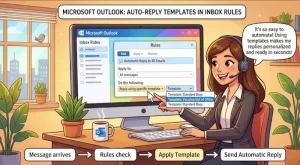
Microsoft is preparing to introduce a new email automation capability that will let users of the new Outlook for Windows and Outlook on the web automatically reply to incoming messages using saved templates. The feature, announced in Microsoft 365 Roadmap ID 567318, is scheduled to begin rolling out in October 2026, with general availability expected by the end of December.
The update will allow users to create inbox rules based on specific conditions and select a saved template as the response. When an incoming email matches those conditions, Outlook will automatically send the configured reply, helping users handle repetitive messages without manually composing the same responses throughout the day.
For businesses and individuals managing high volumes of email, the change could simplify routine communication, improve response consistency, and free up time for more complex work.
When Will Outlook’s Automatic Template Replies Arrive?
Microsoft has outlined a two-stage worldwide rollout for the new capability, starting with Targeted Release customers before expanding to general availability.
The published schedule is as follows:
- Targeted Release: Begins in mid-October 2026 and is expected to finish in early November 2026.
- General Availability: Begins in early December 2026 and is expected to finish in late December 2026.
These dates are Microsoft’s planned rollout windows, rather than a guarantee that every eligible user will receive the feature on a particular day. Availability may depend on the rollout reaching an individual account or organization.
The feature applies to the new Outlook for Windows and Outlook on the web. Microsoft’s announcement does not identify classic Outlook for Windows as a supported platform for this specific capability.
Organizations that rely on the desktop application should therefore distinguish between the new Outlook experience and the classic version when communicating the change to employees.
How Will Automatic Replies Through Inbox Rules Work?
The central idea is straightforward: instead of manually responding to every routine message, users will be able to define when Outlook should send a prepared response.
According to Microsoft’s announcement, the workflow will involve three main elements:
- Define the conditions. Create an inbox rule that identifies which incoming messages should trigger an automatic response.
- Select a saved template. Choose the prepared message that Outlook should send when the rule’s conditions are met.
- Let Outlook handle matching messages. When an incoming email satisfies the configured conditions, Outlook automatically sends the selected template response.
This approach builds on the familiar concept of inbox rules while adding a way to connect those rules to reusable reply content.
For example, a support team could prepare a standard acknowledgment for certain incoming requests. A sales professional might use a predefined response for a specific category of inquiry, while an administrative employee could automate replies to recurring internal requests.
These are illustrative use cases, not confirmed details about the final interface or available rule conditions. Microsoft has not specified every supported condition, template limitation, or exception-handling behavior in the announcement.
Users should consult the updated Outlook documentation when the feature becomes available to confirm the precise configuration options.
Why This Outlook Update Matters for Productivity
Email automation can offer meaningful benefits when employees spend a significant portion of their day answering predictable questions.
Many business messages require a timely acknowledgment but do not necessarily require a unique response. Repeatedly writing those replies consumes time that could otherwise go toward customer issues, project work, or decisions requiring human judgment.
Template-based inbox rules could help organizations address three common challenges.
Less time spent on repetitive email
Employees will have a way to automate eligible responses rather than repeatedly opening messages and composing similar replies.
The potential time savings will depend on the volume of matching messages, how accurately rules are configured, and how much manual work the templates replace.
More consistent communication
Saved templates can help employees use approved wording for routine interactions. This may be particularly useful for teams that need to communicate standard information, acknowledge requests, or direct senders toward the appropriate next step.
Consistency is especially valuable when several employees handle similar types of correspondence. A shared approach to approved messaging can reduce differences in tone and the risk of omitting routine information.
However, Microsoft’s announcement specifically describes selecting a saved template; it does not confirm whether templates will be shared across teams or centrally managed by administrators.
A more manageable inbox
Rules that handle predictable messages can reduce the number of routine tasks that require manual attention.
That does not mean the feature will eliminate inbox management. Employees will still need to review messages that require judgment, handle exceptions, and ensure automated responses remain relevant as business processes change.
The practical benefit will come from using automation selectively rather than attempting to automate every conversation.
What Businesses and IT Administrators Should Do Now
Microsoft says no administrator action is required before the feature rolls out. Eligible users will receive the capability through the scheduled deployment.
Even so, organizations can take a few practical steps to prepare.
Inform the help desk. Support teams should know that template-based automatic replies are planned for the new Outlook experience. This will help them answer employee questions as the feature becomes available.
Update internal documentation. Organizations that maintain guidance on Outlook inbox rules, email templates, or automated responses should review those materials and update them when the new workflow is documented.
Review communication policies. Automatic replies can send messages without an employee reviewing each individual email first. Businesses should consider which types of correspondence are appropriate for automation and which require a personalized response.
Test rules carefully. Once the feature becomes available, users should verify that their conditions target the intended messages and that the selected template contains accurate information. Testing can help prevent unnecessary or inappropriate replies.
Monitor Microsoft’s documentation. Implementation details may become clearer as the rollout progresses. IT teams should use updated official guidance to confirm the supported platforms, configuration steps, and any limitations.
Microsoft’s announcement identifies no specific compliance considerations for this change. Organizations should still assess the feature against their own information-handling requirements and internal policies.
Automatic Replies Need Guardrails, Not Just Convenience
Although template-based automation can save time, an automatic response is only useful when it reaches the right recipient at the right moment.
A poorly configured rule could send an irrelevant acknowledgment, repeat information a sender has already received, or respond to messages that need immediate human attention. The exact risks will depend on the conditions and templates users configure.
Organizations can reduce these risks by following a few basic practices:
- Keep templates accurate, concise, and easy to understand.
- Avoid including confidential information that should not be sent automatically.
- Use narrowly defined conditions where possible.
- Review templates whenever contact details, procedures, or service expectations change.
- Identify messages that require individual assessment rather than a standard response.
Teams should also avoid assuming that this feature replaces existing out-of-office settings or other specialized response mechanisms. Microsoft’s announcement describes automatic replies triggered by inbox rules, and the precise interaction with other Outlook features has not been detailed.
The distinction matters because a rule-based response is designed around matching incoming messages, whereas a conventional absence message serves a different purpose.
What the Feature Could Mean for the Future of Outlook
Microsoft’s planned update reflects a practical direction for workplace software: making everyday tasks easier to automate within the tools employees already use.
Rather than requiring users to adopt a separate automation service for every repetitive task, rule-based template replies bring another potential time-saving workflow into Outlook itself.
For small businesses, the capability could help individuals manage recurring correspondence without building a complicated process. For larger organizations, it could provide another option for standardizing routine communication, provided the available configuration and organizational policies support that approach.
The feature’s ultimate value will depend on implementation details that Microsoft has not yet fully disclosed, including the available rule conditions, template behavior, and any restrictions on automated sending.
The rollout schedule also means organizations should plan around staged availability rather than assume all employees will receive the feature simultaneously.
As Targeted Release begins in October 2026 and general availability follows in December, the next important step will be seeing how the feature works in practice. Updated documentation and real-world testing should help users determine which email tasks are suitable for automation—and where a personal response remains essential.