
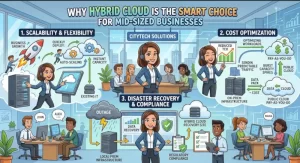
Mid-sized businesses face a familiar technology challenge: they need enterprise-level security, reliable performance, and room to grow, but they rarely have unlimited budgets or large infrastructure teams. Moving everything to the public cloud can introduce concerns about data control, recurring costs, and compliance. Keeping every workload on-premises, meanwhile, can limit agility and require expensive hardware upgrades.
Hybrid cloud offers a practical middle ground. By combining on-premises infrastructure with public cloud services, businesses can keep sensitive workloads under tighter control while using cloud resources for scalability, backup, disaster recovery, and application development. The result is an IT environment designed around business requirements rather than a one-size-fits-all infrastructure strategy.
What Is Hybrid Cloud, and Why Does It Matter?
A hybrid cloud environment connects private infrastructure—such as on-premises servers or a private cloud—with public cloud platforms such as Microsoft Azure, Amazon Web Services (AWS), or Google Cloud.
The goal is not simply to use two environments. It is to make them work together through appropriate networking, identity management, security policies, and workload orchestration.
For example, a mid-sized financial services company might keep customer records and regulated applications in a controlled private environment while running its customer-facing website and analytics workloads in the public cloud. A manufacturing business could retain production systems locally while using cloud infrastructure to process operational data and support remote teams.
This flexibility makes hybrid cloud particularly valuable for businesses that need to modernize without replacing everything they already own.
1. Balance Data Security With Cloud Flexibility
Security is often one of the biggest concerns when businesses evaluate cloud adoption. Sensitive customer information, financial records, intellectual property, and regulated data may require specific access controls, retention policies, or residency arrangements.
Hybrid cloud allows IT teams to place workloads according to their risk profile.
Keep sensitive workloads under control
On-premises infrastructure or a suitably designed private cloud can provide direct control over physical access, network segmentation, system configuration, and data handling. This can be useful for legacy applications, sensitive databases, and workloads subject to contractual or regulatory requirements.
However, on-premises infrastructure is not automatically more secure. It still requires timely patching, monitoring, backups, access reviews, and tested recovery procedures.
Use public cloud services where they add value
Public cloud platforms provide managed security capabilities, scalable infrastructure, monitoring tools, and automation services. Teams can use these capabilities to support applications without purchasing and maintaining every underlying component themselves.
A sound hybrid cloud security strategy includes:
- Identity and access management: Apply least-privilege access and multifactor authentication across both environments.
- Encryption: Protect data in transit and at rest, with appropriate key-management controls.
- Network segmentation: Restrict communication between systems and separate critical workloads from less-sensitive services.
- Centralized monitoring: Collect logs and security events from on-premises systems and cloud services.
- Consistent governance: Define policies for data classification, access, retention, and incident response across the entire environment.
The key is consistency. A hybrid architecture should not create separate security standards for each environment.
2. Scale Infrastructure Without Overspending
Mid-sized businesses often experience uneven demand. An e-commerce company might need extra computing capacity during seasonal promotions, while a professional services firm may see temporary spikes during major client projects.
Building on-premises infrastructure to handle peak demand can leave expensive resources underused for much of the year. Public cloud services allow organizations to provision additional capacity when required and reduce it when demand falls.
Hybrid cloud makes it possible to combine these approaches.
Match workloads to the right environment
A practical workload placement strategy might look like this:
- On-premises: Applications requiring predictable low-latency access to local equipment, specialized hardware, or tightly controlled environments.
- Public cloud: Development and testing environments, variable workloads, web applications, and short-term processing jobs.
- Hybrid workloads: Applications that need local data access but also rely on cloud-based analytics, reporting, or backup services.
For example, a company can maintain its core database locally while temporarily scaling cloud-based reporting services during month-end processing.
Cost control still requires discipline. Cloud resources can become expensive when teams leave virtual machines running, overprovision storage, transfer large volumes of data, or maintain duplicate environments. Use budgets, tagging, usage alerts, rightsizing, and regular cost reviews to keep spending predictable.
The objective is not to move every workload to the cheapest environment. It is to understand the total cost of running each workload reliably and securely.
3. Improve Business Continuity and Disaster Recovery
A hardware failure, ransomware incident, power outage, or site-level disruption can interrupt operations and put revenue at risk. For a mid-sized business without a secondary data center, building a complete disaster recovery facility may be prohibitively expensive.
Hybrid cloud can make recovery capabilities more accessible.
Organizations can replicate selected systems or data to cloud storage, maintain recovery images, and provision replacement infrastructure when a disruption occurs. Depending on the architecture, cloud resources can also support backup retention and recovery testing without requiring a permanently active secondary environment.
A reliable plan starts with two measures:
- Recovery Time Objective (RTO): How long the business can tolerate a service being unavailable.
- Recovery Point Objective (RPO): How much data loss, measured in time, the business can accept.
A customer-facing application might require an RTO of one hour, while an internal reporting system might tolerate a longer interruption. These requirements determine replication frequency, recovery architecture, and cost.
Remember that cloud backup is not a complete disaster recovery strategy by itself. Protect backup credentials, isolate recovery copies where appropriate, test restoration procedures, and verify that critical application dependencies can be recovered in the correct order.
4. Modernize Legacy Applications at Your Own Pace
Many mid-sized businesses rely on applications that have supported operations for years. Replacing them all at once can be risky, expensive, and disruptive.
Hybrid cloud supports incremental modernization.
A business might keep a legacy enterprise resource planning (ERP) system on-premises while moving its reporting interface, customer portal, or new application services to the cloud. Integration services and secure APIs can connect the components where appropriate.
This approach allows development teams to adopt cloud-native technologies, automate deployments, and experiment with new services without forcing an immediate replacement of established systems.
For infrastructure teams, platforms such as Azure Arc and AWS hybrid services can help extend selected management capabilities across environments. The right choice depends on the existing technology stack, operational skills, licensing, and required integrations.
Before migrating a workload, assess its dependencies, performance requirements, licensing restrictions, data flows, and recovery needs. Some applications are good candidates for relocation; others benefit more from refactoring or remaining on existing infrastructure.
5. Build a Hybrid Cloud Architecture That IT Teams Can Manage
Hybrid cloud creates flexibility, but it also introduces operational complexity. Teams must manage connectivity, security policies, monitoring, access permissions, and configuration across multiple environments.
A manageable architecture begins with a few core capabilities.
Reliable connectivity: Use secure site-to-site VPNs or dedicated private connectivity where justified. Design for redundancy if losing the connection would disrupt critical services.
Unified identity and access: Integrate identity systems where practical and apply consistent authentication, authorization, and privileged-access controls.
Infrastructure as code: Tools such as Terraform or cloud-native templates can make infrastructure deployments repeatable, reviewable, and easier to audit.
Centralized observability: Aggregate relevant metrics, logs, and alerts so teams can identify issues across infrastructure boundaries.
Clear ownership: Assign responsibility for patching, backup verification, incident response, cost management, and compliance reporting.
Automation is particularly important for mid-sized teams. Standardized deployment templates and policy-based configuration reduce manual work and help prevent configuration drift between environments.
A Practical Roadmap for Hybrid Cloud Adoption
Businesses do not need to redesign their entire IT estate to get started. A phased approach reduces risk and provides measurable results.
- Inventory existing workloads. Document application dependencies, data sensitivity, infrastructure costs, performance needs, and recovery requirements.
- Classify workloads by suitability. Decide which systems should remain on-premises, move to the public cloud, or operate across both.
- Choose a manageable pilot. Start with a development environment, backup workflow, or non-critical application that delivers clear value without creating excessive operational risk.
- Establish security and governance. Define identity policies, encryption requirements, network boundaries, monitoring, and cost controls before expanding.
- Measure the outcome. Track deployment time, monthly operating costs, recovery performance, availability, and administrative effort.
- Expand based on evidence. Use the pilot results to refine the architecture and prioritize the next workloads.
This approach helps decision-makers validate assumptions before committing to larger investments.
Is Hybrid Cloud the Right Choice for Your Business?
Hybrid cloud is particularly useful when a business has existing infrastructure worth retaining, needs greater capacity during demand spikes, faces data-handling requirements, or wants to modernize applications gradually.
It is not automatically the best option for every organization. Businesses with straightforward workloads and minimal legacy dependencies may find a public-cloud-first approach simpler. Others may benefit from retaining most systems on-premises.
The right decision depends on application requirements, security obligations, staffing, connectivity, and total cost of ownership—not on the popularity of a particular platform.
Turn Infrastructure Flexibility Into a Business Advantage
For mid-sized businesses, hybrid cloud offers a way to balance control with agility. It preserves options for sensitive and specialized workloads while making scalable cloud services available where they deliver measurable value.
The smartest next step is to assess your current infrastructure, identify the workloads causing the most pressure, and select one practical use case for a controlled pilot. Establish clear security requirements, cost limits, and recovery targets before implementation.
With a deliberate workload strategy and consistent management practices, hybrid cloud can help your business improve resilience, control spending, and modernize technology without taking unnecessary risks.
Extra posts:
 Lightweight Governance Models for Small-to-Mid-Sized Organizations in Microsoft 365
  The Hybrid Cloud Playbook Mastering Azure Stack
  CapEx vs OpEx in Cloud Computing — Why It Matters for Businesses
  Public vs Private vs Hybrid Cloud Models Explained
  Microsoft FastTrack – Helping Businesses Adopt the Cloud
  Why Businesses Are Moving to the Cloud Top 5 Benefits Driving Digital Transformation