
If you’ve spent any time coding with GitHub Copilot, you probably already think of it as a trusty sidekick — an AI pair programmer that helps you write code faster, suggests smarter solutions, and even saves you from some of the repetitive grunt work. But GitHub recently introduced a feature that takes Copilot to the next level: memory.
This isn’t just about helping you in the moment. Copilot’s memory allows it to remember things about you, your coding habits, and your projects over time. In other words, it’s starting to act less like a generic AI assistant and more like a collaborator who knows your style and preferences. Let’s unpack what this new memory feature means, why it matters, and how you can control it to make your coding life smoother.
What Is Copilot’s Memory?
At its core, Copilot’s memory is exactly what it sounds like: a way for the AI to remember information about you across sessions, projects, and repositories. Until now, Copilot mostly worked in the “here and now.” It could analyze the file you were working on and give you suggestions based on the context within that file, but it didn’t really know you as a developer.
With memory, that changes. Copilot can now retain useful details like:
- Your name or preferred coding style — whether you favor concise or verbose code, for instance.
- Frameworks or libraries you frequently use — so suggestions can align with your usual stack.
- Projects you’ve worked on — making it easier to pick up where you left off.
- Repositories you often contribute to — helping Copilot understand patterns or conventions specific to those projects.
This persistent memory helps Copilot provide suggestions that feel more personal, intuitive, and consistent. Over time, it’s not just reacting to your code — it’s anticipating your needs and adapting to your workflow.
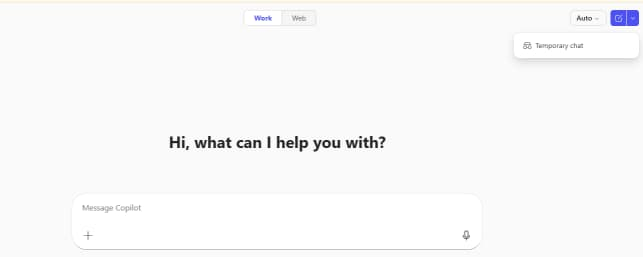
Note: you can select Temporary chat if you do not want the memory option
Memory vs. Context
You might be thinking, “Wait, doesn’t Copilot already look at my code? Isn’t that enough?” The short answer is yes, but there’s a subtle difference between context and memory.
- Context is short-term. Copilot uses it to understand the code you’re actively working on — the current file, function, or repo. It’s like having someone glance over your shoulder while you type.
- Memory is long-term. It remembers your preferences, coding habits, and repeated patterns across sessions and projects. Think of it as the difference between a colleague who knows what you’re doing right now versus a teammate who knows how you work in general, your quirks, and your preferred tools.
This distinction might seem small, but it’s a game-changer for anyone who wants AI coding assistance that actually grows with them rather than starting fresh every time.
What Can Copilot Remember?
Copilot’s memory isn’t some mysterious black box — GitHub has made it fairly transparent about what can be stored. Some examples include:
- Your preferred frameworks and languages — for instance, if you always use React with TypeScript, Copilot can suggest code in that style automatically.
- Naming conventions — whether you prefer
snake_case,camelCase, or PascalCase. - Patterns you use frequently — like always using
async/awaitinstead of.then()chains. - Your favorite tools or APIs — so suggestions fit the libraries and services you typically rely on.
Currently, this memory mainly improves code completions, making them feel tailored to your habits and style. Over time, as Copilot learns more about you, it could even help with bigger-picture tasks like suggesting project structures, boilerplate code, or reusable functions that match your style.
How Is Memory Managed?
One of the biggest concerns with AI tools is control. GitHub has made memory fully user-controllable, which is a huge plus for privacy-conscious developers. Here’s what you can do:
- See what’s stored — GitHub lets you review the items Copilot has remembered.
- Delete anything — if Copilot remembers something incorrectly or you just want it gone, you can remove individual items or clear your memory entirely.
- Privacy and security — your memory is tied to your GitHub account and is private. No one else can see it.
Managing memory is simple: just go to your Copilot settings on GitHub and look for the Memory section. From there, you can review, edit, or delete items as needed.
What About Privacy?
GitHub is clear that memory is not about tracking or surveillance — it’s about improving the AI’s usefulness while keeping you in control. Whenever Copilot adds a new item to your memory, you’re notified, and you can remove anything at any time.
This transparency and control are crucial because it ensures that Copilot’s memory is a tool for convenience, not a mechanism for monitoring your coding activity. Essentially, it’s there to remember the helpful stuff and forget the rest.
Why Memory Matters
The real impact of memory is in how it changes your relationship with Copilot. A Copilot that remembers you:
- Adapts to your coding style — suggestions match your habits rather than generic patterns.
- Reduces repetitive work — you don’t have to repeatedly teach it your preferences.
- Improves workflow consistency — even when switching projects or taking breaks, Copilot picks up where you left off.
Imagine pair programming with a new teammate every day versus working with someone who knows how you think, your preferred approach, and the tools you rely on. That’s the difference Copilot memory brings. It’s not just code assistance; it’s a form of collaboration that grows more effective over time.
Even though GitHub Copilot’s memory is still evolving, it’s a significant step toward making AI-assisted development more personalized, efficient, and human-friendly. For frequent users, exploring memory features can lead to a smoother, faster, and more intuitive coding experience. You’re not just using AI; you’re training an assistant that understands you.
In short, Copilot’s memory transforms it from a reactive tool into a proactive partner. It’s like upgrading from a generic code autocomplete to an AI collaborator who actually gets you. If you haven’t explored it yet, taking control of your Copilot memory could be one of the smartest moves you make this year for improving your workflow, saving time, and coding smarter.
Extra posts:
 Copilot Gets Smarter Now Remembers You for More Personalized Help
  What Is the GitHub Copilot Certification and Why It Matters for Developers
  Comparing Copilot in Microsoft 365 vs. GitHub Copilot: Key Differences
  Why Software Architecture Matters More Than Ever
  Telemetry in Windows 11: What It Is and Why It Matters for Your PC
  Governance in Solution Architecture: Why It Matters and How to Get It Right