
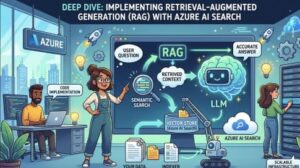
Artificial Intelligence has changed the way businesses handle information, automate tasks, and interact with users. Large Language Models (LLMs) such as GPT-based systems can generate impressive responses, but they have one major limitation: they do not automatically know your private business data, internal documents, or the latest information.
This is where Retrieval-Augmented Generation (RAG) becomes a powerful solution.
RAG combines the reasoning ability of an AI language model with a search system that can retrieve relevant information from trusted sources. Instead of relying only on the model’s training data, RAG allows AI applications to search, find, and use external knowledge before generating an answer.
Microsoft Azure provides a strong foundation for building RAG applications through Azure AI Search. It enables developers to create intelligent search experiences, connect enterprise data, and deliver more accurate AI-generated responses.
In this deep dive, we will explore how Retrieval-Augmented Generation works, why Azure AI Search is important, and how to implement a production-ready RAG architecture.
What is Retrieval-Augmented Generation (RAG)?
Retrieval-Augmented Generation is an AI architecture that combines two major components:
- Retrieval system
- Generative AI model
The retrieval system searches a collection of documents and finds information related to a user’s question. The generative model then uses that retrieved information as context to create a meaningful response.
For example, imagine an employee asking:
“According to our company policy, how many vacation days can I take?”
A traditional AI model may not know the company’s internal policy. A RAG-powered application will:
- Search company documents
- Find the vacation policy file
- Extract the relevant section
- Send the information to the AI model
- Generate a response based on the actual policy
This makes AI responses more accurate, reliable, and connected to real-world data.
Why Use Azure AI Search for RAG?
Azure AI Search is designed to help developers build intelligent search and AI-powered applications. It provides indexing, querying, filtering, and semantic search capabilities that make it ideal for RAG workflows.
Some key benefits include:
1. Enterprise Data Integration
Modern organizations store information across many sources:
- PDFs
- Word documents
- Databases
- Websites
- Knowledge bases
- Customer records
Azure AI Search can index this information and make it searchable for AI applications.
2. Semantic Search Capabilities
Traditional keyword search depends on exact word matches. Semantic search understands meaning and intent.
For example:
A user searches:
“Ways to reduce cloud expenses”
The search engine can understand related content such as:
“Cost optimization strategies for cloud infrastructure”
This improves the quality of retrieved information.
3. Vector Search Support
RAG applications often use embeddings, which convert text into numerical representations called vectors.
Azure AI Search supports vector search, allowing the system to find content based on similarity rather than only keywords.
This means the AI can retrieve documents that are conceptually related, even if they use different wording.
Understanding the Azure RAG Architecture
A typical RAG system built with Azure AI Search includes several components:
1. Data Sources
Your knowledge starts with data.
Examples include:
- Business documents
- Product manuals
- Support articles
- Internal reports
- Customer FAQs
This information is collected and prepared for indexing.
2. Data Processing and Chunking
Large documents are usually divided into smaller sections called chunks.
Why?
Because AI models have limits on how much text they can process at once.
A good chunking strategy helps the system:
- Retrieve precise information
- Reduce unnecessary context
- Improve response quality
For example, a 100-page document might be split into hundreds of smaller searchable sections.
3. Creating Embeddings
Each text chunk is converted into an embedding using an AI embedding model.
The embedding represents the meaning of the text.
Similar concepts create similar vector representations.
4. Indexing in Azure AI Search
The processed chunks and embeddings are stored inside an Azure AI Search index.
The index can contain:
- Document text
- Metadata
- Vector embeddings
- Access permissions
- Document sources
This allows fast and intelligent retrieval.
5. User Query Processing
When a user asks a question:
- The question is converted into an embedding
- Azure AI Search finds the most relevant content
- Retrieved information is added to the AI prompt
- The language model generates the final answer
Implementing a Basic RAG Workflow
A simple RAG implementation usually follows these steps:
Step 1: Prepare Your Data
Collect your documents and clean unnecessary content.
Remove:
- Duplicate information
- Broken formatting
- Irrelevant sections
High-quality data creates better AI responses.
Step 2: Create an Azure AI Search Index
The index acts as your searchable knowledge layer.
You define fields such as:
- Document ID
- Content
- Title
- Category
- Vector fields
This structure helps organize your information.
Step 3: Generate Embeddings
Use an embedding model to convert your document chunks and user questions into vectors.
The system compares these vectors to find similar content.
Step 4: Retrieve Relevant Information
The search layer returns the best matching chunks.
A strong retrieval process is important because the AI model can only answer based on the information it receives.
Step 5: Generate the Response
The retrieved content is added to the prompt:
“Answer this question using the following information…”
The AI model then produces a grounded response.
Improving RAG Performance
Building a RAG system is only the beginning. Performance depends on several factors.
Better Document Chunking
Large chunks may contain too much irrelevant information.
Small chunks may lose context.
Finding the right balance improves retrieval accuracy.
Hybrid Search
Combining keyword search and vector search often produces better results.
Keyword search handles exact terms, while vector search understands meaning.
Together, they create a stronger search experience.
Metadata Filtering
Adding metadata helps narrow results.
Examples:
- Department
- Date
- Product category
- User permissions
This prevents irrelevant information from reaching the AI model.
Monitoring and Evaluation
A production RAG system needs continuous improvement.
Track:
- Search accuracy
- Response quality
- User feedback
- Failed queries
Regular evaluation helps identify weak areas.
Common Use Cases for Azure AI Search + RAG
RAG solutions are becoming popular across many industries.
Customer Support
AI assistants can answer questions using updated product documentation and support resources.
Healthcare Knowledge Systems
Professionals can search large collections of research papers and medical documents.
Financial Services
Companies can build assistants that understand policies, reports, and regulations.
Internal Enterprise Assistants
Employees can ask questions about company processes, HR policies, and technical documentation.
Challenges When Building RAG Applications
Although RAG is powerful, it requires careful design.
Data Quality
Poor or outdated documents lead to poor answers.
Retrieval Accuracy
If the search system retrieves incorrect information, the AI response will also suffer.
Security
Enterprise applications must control who can access specific documents.
Cost Management
Large-scale AI systems require optimization of:
- Storage
- Search operations
- Model usage
The Future of RAG with Azure
RAG is becoming one of the most important patterns in modern AI development.
As organizations continue adopting generative AI, the ability to connect AI models with trusted business knowledge will become essential.
Azure AI Search provides the infrastructure needed to build these applications securely and at scale.
The combination of intelligent search, vector retrieval, and powerful AI models allows businesses to move beyond simple chatbots and create truly useful AI assistants.

Retrieval-Augmented Generation solves one of the biggest challenges in generative AI: connecting AI models with accurate, real-world information.
By using Azure AI Search, developers can build AI applications that understand company data, retrieve relevant knowledge, and generate trustworthy answers.
Whether you are creating an enterprise chatbot, knowledge assistant, or intelligent search platform, Azure AI Search and RAG provide a practical foundation for the next generation of AI solutions.
Extra posts:
 Retrieval-Augmented Generation (RAG) in Azure AI A Step-by-Step Guide
  Unlocking Smarter Search How to Use Azure AI Search & Azure OpenAI Service Together
  Implementing Zero Trust Architecture in an Azure Environment
  Agentic AI in Microsoft Teams: The Future of Workplace Automation (Technical Deep Dive)
  How Microsoft Keeps Your Data Safe in the Cloud – A Deep Dive into Cloud Security Practices
  Unlocking Productivity A Deep Dive into Notepad and Copilot in Windows 11