

The AI landscape is rapidly evolving, and one of the most exciting advancements is the emergence of agentic AI — AI systems that demonstrate autonomous decision-making, planning, and goal execution capabilities. With Microsoft’s Azure AI platform, you can build powerful agentic systems by leveraging tools like Azure OpenAI, Azure Functions, Logic Apps, and more.
In this post, we’ll explore:
- What agentic AI is
- How Azure supports its development
- Architecture patterns
- Step-by-step guide to building an agentic AI agent
🧠 What is Agentic AI?
Agentic AI refers to AI systems that operate with a degree of autonomy, able to:
- Understand goals
- Plan tasks or subtasks
- Invoke tools and services
- React and adapt to changes in the environment
- Learn from feedback
Unlike traditional AI models that passively respond to prompts, agentic AI can take initiative, chain reasoning steps, and orchestrate complex behaviors — much like a virtual assistant with real-world capabilities.
🔧 Azure Tools for Agentic AI
Microsoft Azure offers a robust ecosystem to build and scale agentic systems:
| Azure Service | Role in Agentic AI |
|---|---|
| Azure OpenAI | Natural language understanding and generation (GPT models) |
| Azure Functions | Serverless execution of task-specific code |
| Azure Logic Apps | Workflow orchestration for calling APIs or services |
| Azure Cognitive Search | Retrieving external knowledge or documents |
| Azure Cosmos DB | Agent memory or state storage |
| Azure Machine Learning | Custom model training or evaluation |
| Azure AI Studio | Prompt engineering, orchestration, and agent setup |
🏗️ Designing an Agentic AI System in Azure
Here’s a typical high-level architecture of an agentic AI:
sqlCopyEditUser Input → Azure OpenAI (GPT) → Planning Module
                  ↓
          Task Breakdown (Chain-of-Thought / Tree-of-Thought)
                  ↓
     Tool Selector → Call Azure Function / Logic App
                  ↓
      Result Interpretation & Next Steps
                  ↓
             Final Output to User
Core Components:
- Prompt Orchestrator
Using Azure AI Studio, define system messages to simulate agent behavior (e.g., goal-oriented, step-by-step planner). - Memory Management
Use Azure Cosmos DB or Azure Blob Storage to store:- Previous conversations
- Goals and intermediate states
- Retrieved documents
- Tool Use / Function Calling
Integrate with Azure Functions to allow the agent to:- Send emails
- Query databases
- Perform calculations
- Retrieve real-time data
- Planning and Execution
Implement a recursive reasoning loop (e.g., ReAct, AutoGPT, or BabyAGI patterns) using the Azure OpenAI function-calling interface.
🛠️ Step-by-Step: Creating an Agentic AI in Azure
1. Set Up Azure OpenAI
- Go to Azure Portal → Create a new Azure OpenAI resource.
- Deploy a GPT-4 or GPT-4-turbo model.
- Enable function calling in the playground or via API.
2. Define Agent Prompts
Use Azure AI Studio or a prompt engineering tool:
yamlCopyEditSystem Prompt:
You are a task-solving agent. When a user provides a goal, break it down into steps.
You may call tools to complete steps. Always reason step-by-step.

User:
I want to organize a meeting with my team next week.
3. Enable Function Calling
Define a JSON schema for tools:
jsonCopyEdit{
  "name": "schedule_meeting",
  "description": "Schedules a meeting using Outlook calendar",
  "parameters": {
    "type": "object",
    "properties": {
      "date": { "type": "string" },
      "time": { "type": "string" },
      "attendees": { "type": "array", "items": { "type": "string" } }
    },
    "required": ["date", "time", "attendees"]
  }
}
Bind this schema to an Azure Function that integrates with Microsoft Graph API.
4. Create Function or Logic App
Use Azure Functions to create custom logic like:
pythonCopyEdit# Example Azure Function to schedule a meeting
import requests
def main(req):
    data = req.get_json()
    # Call Microsoft Graph API to schedule a meeting
    return {
        "status": "success",
        "details": f"Meeting scheduled for {data['date']} at {data['time']}"
    }
5. Loop and Plan
For multi-step tasks:
- Let GPT plan the steps
- Execute one tool per step
- Reinvoke GPT with the updated state
You can use Logic Apps to orchestrate the loop or maintain it in code.
6. Add Long-Term Memory (Optional)
- Use Cosmos DB to store:
- Goals
- Outcomes
- Lessons learned
- Retrieve relevant memory with semantic search
🤖 Example Use Case: Enterprise Assistant
Goal: Build a corporate assistant that can:
- Answer questions using company documentation
- Schedule meetings
- Summarize emails
- Generate reports
Architecture:
- Azure OpenAI (GPT-4-turbo)
- Azure Cognitive Search (retrieval)
- Azure Functions (scheduling/reporting)
- Azure Logic App (workflow management)
- Cosmos DB (memory)
🧩 Best Practices
- Tool Validation: Always validate function inputs from GPT before execution.
- Feedback Loops: Add “did this work?” prompts to improve planning quality.
- Observability: Use Azure Monitor for tracing, logs, and cost control.
- Security: Apply RBAC and secure APIs to prevent unintended actions.
- Prompt Evaluation: Test with promptflow or Azure ML evaluation pipelines.
Extra posts:
 Designing Safe Agentic Workflows with Microsoft Copilot
 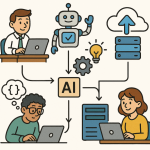 How Agentic AI Works and How to Build It in Azure
  Designing Multi-Agent Systems in Copilot Studio
  Creating Custom Plugins and Connectors in Copilot Studio
  Sensitivity Labels vs. Copilot Creating an AI Policy That Honors Information Protection (MIP)
  Agentic AI The Next Evolution Beyond Generative AI for Solution Architects