
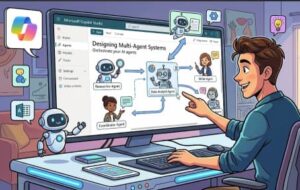
Modern organizations rarely solve complex business problems with a single AI assistant. Customer support, IT operations, sales, HR, and analytics teams all have different goals, data sources, and workflows. This is where multi-agent systems become valuable. Instead of relying on one large, general-purpose agent, a multi-agent architecture uses several specialized agents that collaborate to complete tasks efficiently.
What Is a Multi-Agent System?
A multi-agent system consists of multiple AI agents that work together while maintaining distinct responsibilities. Think of it like a team of specialists:
Customer Service Agent
Handles user inquiries and FAQs.
IT Support Agent
Troubleshoots technical issues.
Sales Agent
Qualifies leads and provides product information.
Analytics Agent
Retrieves reports and business insights.
In Microsoft Copilot Studio, these agents can be designed as separate copilots that communicate through orchestration, APIs, Power Automate flows, or shared data services. The result is a modular architecture that is easier to maintain, scale, and improve over time.
Why Use Copilot Studio for Multi-Agent Design?
Copilot Studio provides a low-code environment for building conversational AI solutions. Its strengths include:
- Visual conversation design.
- Integration with Microsoft 365, Dataverse, Power Automate, and external APIs.
- Generative AI capabilities for natural language understanding.
- Governance and security controls suitable for enterprise environments.
When designing multi-agent systems, these capabilities reduce development complexity while allowing each agent to focus on a specific business function.
Core Design Principles
1. Define Clear Responsibilities
Each agent should have a well-defined purpose. Overlapping responsibilities create confusion and increase maintenance effort.
Good example
The HR agent handles leave requests and policy questions, while the IT agent manages password resets and software access.
Poor example
Both agents attempt to answer general employee questions, leading to inconsistent responses.
2. Use an Orchestrator Agent
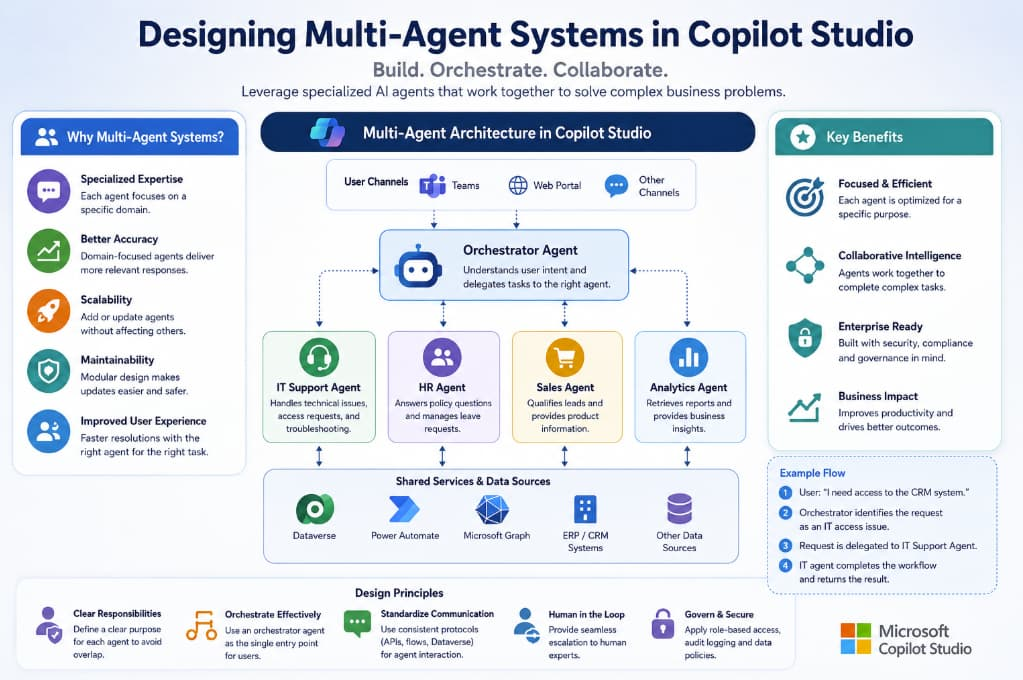
A common pattern is to create a primary orchestrator copilot that receives user requests and routes them to specialized agents. This approach provides a single entry point for users while keeping domain logic separated.
Example flow
- User asks: “I need access to the CRM system.”
- Orchestrator identifies the request as an IT access issue.
- Request is delegated to the IT Support Agent.
- IT agent executes the workflow and returns the result.
3. Establish Communication Protocols
Agents need a reliable way to exchange information. In Copilot Studio, communication can occur through:
- Power Automate flows.
- Dataverse tables.
- REST APIs.
- Custom connectors.
Standardizing message formats helps ensure interoperability between agents.
4. Design for Human Handoff
No AI system should operate in isolation. Complex or sensitive cases should escalate to human experts. Multi-agent systems should include clear escalation paths and context transfer mechanisms.
5. Implement Governance and Security
Enterprise deployments require role-based access control, audit logging, data classification policies, and compliance with organizational standards. Copilot Studio integrates with Microsoft security and governance features, making it easier to manage permissions across multiple agents.
Example Architecture
User Interface
Employees interact through Teams, a web portal, or another supported channel.
Orchestrator Agent
Classifies intent and delegates work to the appropriate specialist agent.
Specialized Agents
IT Support Agent
Handles access requests, password resets, and technical troubleshooting.
HR Agent
Answers policy questions and processes leave requests.
Sales Agent
Qualifies leads and shares product information.
Analytics Agent
Retrieves reports and business insights.
Shared Services
Dataverse, Microsoft Graph, ERP systems, CRM platforms, and other enterprise data sources.
Best Practices for Scaling
Keep Agents Small and Focused
Large monolithic agents become difficult to test and update. Smaller agents are easier to optimize and can be reused across different workflows.
Monitor Performance
Track metrics such as resolution rate, escalation rate, response time, and user satisfaction. These insights help identify which agents need improvement
Use Shared Knowledge Sources
If multiple agents need access to the same documentation or policies, maintain a centralized knowledge repository. This reduces duplication and ensures consistency.
Version and Test Independently
Treat each agent as an independent component. Version updates, test changes in isolation, and deploy gradually to minimize risk.
Common Challenges
| Challenge | Mitigation |
|---|---|
| Intent misclassification | Improve training data and routing rules. |
| Duplicate functionality | Define clear ownership boundaries. |
| Data silos | Use shared services and standardized APIs. |
| Security concerns | Apply least-privilege access and governance policies. |
| User confusion | Provide a unified entry point through an orchestrator agent. |
The Future of Multi-Agent AI
As AI capabilities continue to evolve, multi-agent systems are becoming increasingly important for enterprise automation. Future solutions will likely feature more autonomous collaboration between agents, dynamic task delegation, and deeper integration with business processes.
Copilot Studio is well positioned for this evolution because it combines conversational AI, workflow automation, and enterprise integration within a single platform. Organizations that adopt a modular multi-agent approach today will be better prepared to scale their AI initiatives tomorrow.
Designing multi-agent systems in Copilot Studio is not simply about creating multiple chatbots. It is about building a coordinated network of specialized agents that can work together to solve complex business problems. By defining clear responsibilities, using orchestration patterns, implementing strong governance, and designing for scalability, organizations can create AI solutions that are more reliable, maintainable, and effective than single-agent alternatives.
Whether you are supporting employees, serving customers, or automating internal operations, a well-designed multi-agent architecture can transform Copilot Studio into a powerful enterprise AI platform.
Extra posts:
 Multi-Turn Conversations and Context Management in Copilot Studio
  How to Build Your First AI Agent in Copilot Studio in 15 Minutes
  Enterprise AI Agent Architecture Patterns Using Copilot Studio
  Single Agent vs Multi-Agent Architectures: When Do You Need Each? (With Microsoft Technologies Explained)
  Multi-Agent Orchestration in Copilot Redefining Intelligent Workflows
  Designing Safe Agentic Workflows with Microsoft Copilot