
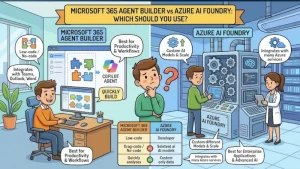
Choosing between Microsoft 365 Agent Builder and Azure AI Foundry can look like a simple product comparison. It isn’t.
Both can help teams build AI agents, but they sit at very different levels of the Microsoft ecosystem. One is designed to let Microsoft 365 users create focused agents quickly, often without writing code. The other is a developer-oriented platform for building, deploying, scaling, and operating sophisticated AI agents.
That distinction matters.
If your goal is to create an internal agent that answers questions from SharePoint content, helps employees navigate company processes, or provides team-specific guidance, Microsoft 365 Agent Builder may be all you need. If you’re building an application that needs custom tools, multiple models, programmatic control, observability, enterprise identity, or a dedicated agent runtime, Microsoft Foundry is the more appropriate architecture.
Microsoft’s current documentation refers to Azure AI Foundry as Microsoft Foundry, including its managed Foundry Agent Service. The underlying architectural distinction remains useful when comparing the two approaches.
Microsoft 365 Agent Builder: Fast, Focused, and Microsoft 365-Centric
Microsoft 365 Agent Builder is built around a straightforward idea: let users create scenario-specific agents directly within Microsoft 365 Copilot.
You don’t need to start by provisioning an Azure resource, selecting an AI model, writing an agent runtime, and building an application around it. Instead, you can describe the agent in natural language, configure its instructions and knowledge, test it, and share it through supported Microsoft 365 experiences.
This makes Agent Builder particularly attractive to IT teams, business users, knowledge managers, and developers working on relatively contained use cases.
For example, imagine an HR team wants an agent that answers questions about:
- Company policies
- Employee onboarding documentation
- Benefits information
- Internal procedures
- Approved SharePoint content
Agent Builder can use knowledge sources such as SharePoint, OneDrive, Teams-related content, Microsoft 365 connectors, web search, and other supported Microsoft 365 sources, depending on licensing and configuration.
The important point is that the agent can operate close to the data and applications employees already use.
Where Agent Builder fits best
Agent Builder is a strong choice when you need:
- A quick internal productivity agent
- A knowledge-based assistant
- SharePoint or Microsoft 365 content as the primary knowledge source
- Natural-language configuration
- Minimal or no traditional coding
- An agent intended to live within Microsoft 365 Copilot
Microsoft explicitly positions Agent Builder for quick and straightforward projects. It also provides a guided authoring experience rather than expecting teams to build an entire application architecture around the agent.
That simplicity is its biggest strength—and also its main limitation.
Azure AI Foundry: Built for Developers and Production Agent Architectures
Microsoft Foundry takes a fundamentally different approach.
Foundry Agent Service is a managed platform for building, deploying, and scaling AI agents. Microsoft describes it as supporting the spectrum from declarative prompt-based agents through hosted agents and API-based development.
That makes Foundry much more suitable when the agent is part of a larger software system rather than simply an assistant inside Microsoft 365.
A development team might use Foundry when an agent needs to:
- Call custom business APIs
- Execute functions
- Search external systems
- Use code execution
- Work with multiple AI models
- Integrate with application-specific services
- Run behind an application or API
- Require detailed monitoring and evaluation
- Scale as part of a production workload
Foundry’s architecture includes an agent runtime, toolboxes, model integration, observability, identity and security controls, and publishing capabilities. It can work with models available through the Foundry model catalog and supports tools such as web search, file search, code interpreter, MCP servers, and custom functions.
This is a much broader development surface than Microsoft 365 Agent Builder.
The Biggest Difference: Who Is Building the Agent?
This is probably the most useful way to think about the comparison.
Agent Builder is optimized for the Microsoft 365 user.
Foundry is optimized for the software development team.
That doesn’t mean developers can’t use Agent Builder or that business users can’t interact with Foundry agents. It means the primary design assumptions are different.
With Agent Builder, you can describe an agent using natural language and configure its knowledge and behavior from the Microsoft 365 experience.
With Foundry, developers can choose how much control they need—from managed prompt agents to code-based hosted agents—and build an application architecture around that agent.
For a solution architect, the question therefore shouldn’t be “Which product has more AI features?”
A better question is:
How much control does this workload actually require?
Actions and Integrations Change the Decision
Here’s where the distinction becomes especially important.
Microsoft 365 Agent Builder does not support authoring actions that integrate external services. Microsoft’s guidance points users toward Copilot Studio when they need low-code actions, connectors, or workflows.
Suppose you want an employee-facing agent to answer a question and then perform an operation in another system:
“Check my service request and reschedule the appointment for Friday.”
Answering a question from internal documentation is one problem. Authenticating against an external system, invoking an API, handling an operation, checking its result, and returning a trustworthy response is another.
That second scenario needs a more capable integration architecture.
Depending on the requirements, the appropriate path could involve Copilot Studio, Foundry Agent Service, Azure Functions, Logic Apps, APIs, or other application components.
Foundry is designed with this type of extensibility in mind. Its tool ecosystem can include custom functions, MCP servers, code interpreter, and other managed tools.
Model Flexibility Is Another Major Difference
Agent Builder is closely tied to the Microsoft 365 Copilot experience. Its value comes partly from that integration.
Foundry gives developers substantially more control over the model layer. Microsoft documents support for multiple models available through the Foundry model catalog, allowing teams to select and change models as their requirements evolve.
That flexibility matters in production.
A prototype might prioritize response quality. A high-volume application might care more about latency and cost. Another workload might require a particular model because of its reasoning, multimodal, coding, or language capabilities.
With a dedicated AI development platform, model selection becomes an architectural decision rather than an incidental configuration.
Governance and Operations: Don’t Stop at the Prototype
A demo agent can be built in minutes. An enterprise agent needs much more.
Solution architects should consider:
- Identity and access control
- Data boundaries
- Monitoring
- Evaluation
- Versioning
- Tool permissions
- Network isolation
- Application integration
- Deployment strategy
- Cost management
Foundry provides enterprise-oriented capabilities including Microsoft Entra identity, role-based access control, content filtering, virtual network isolation, tracing, metrics, evaluations, and Application Insights integration.
Agent Builder also has important administrative and governance controls because it operates within the Microsoft 365 and Power Platform ecosystem. Administrators can control whether users have access to Agent Builder, and Microsoft documents specific data, compliance, network, and sharing considerations.
The difference is that Foundry gives engineering teams a much deeper operational surface for production AI workloads.
Microsoft 365 Agent Builder vs Azure AI Foundry: Quick Comparison
| Capability | Microsoft 365 Agent Builder | Azure AI Foundry / Microsoft Foundry |
|---|---|---|
| Primary audience | Microsoft 365 users and makers | Developers, architects, engineering teams |
| Typical complexity | Simple to moderate | Moderate to highly complex |
| Coding requirement | Minimal for core scenarios | Can range from declarative to full-code |
| Microsoft 365 integration | Excellent | Available through publishing/integration options |
| SharePoint knowledge | Strong | Supported through broader integration options |
| External actions | Limited; use Copilot Studio for many scenarios | Strong tool and API integration capabilities |
| Model flexibility | More constrained by Microsoft 365 Copilot experience | Broad model catalog and model choice |
| Custom application architecture | Limited | Strong |
| Observability | Microsoft 365/related platform controls | Deep tracing, metrics, evaluations, Application Insights |
| Agent runtime | Microsoft 365 experience | Managed Foundry Agent Service |
| Best use case | Employee productivity and knowledge agents | Production applications and sophisticated agents |
The exact capabilities available to users can also depend on licensing, tenant configuration, region, and whether features are generally available or in preview.
Which Platform Should You Choose?
Use Microsoft 365 Agent Builder when the problem is primarily a Microsoft 365 productivity problem.
For example:
“Employees need an assistant that answers questions using our internal SharePoint documentation.”
Start with Agent Builder.
Use Microsoft Foundry when the problem is primarily an application engineering problem.
For example:
“We need an AI agent that can reason over customer data, call several APIs, use specialized tools, select between models, expose an application endpoint, and provide production-grade monitoring.”
That is much closer to a Foundry workload.
There is also a middle ground. You don’t necessarily have to force every use case into one platform. Microsoft provides integration paths that allow agents built on different Microsoft platforms to participate in a broader agent ecosystem.
A Practical Decision Framework for Architects
Before selecting a platform, answer five questions.
1. Where does the agent need to live?
If the natural home is Microsoft 365 Copilot, Agent Builder is a strong starting point.
2. What data does it need?
If most knowledge lives in SharePoint, OneDrive, Teams, or other Microsoft 365 sources, Agent Builder has an obvious advantage.
3. Does it need to take actions?
If the agent must interact with external systems, look beyond basic Agent Builder capabilities.
4. How much control do developers need?
Custom runtimes, APIs, tools, model selection, deployment pipelines, and application-level behavior push the decision toward Foundry.
5. How will you operate it in production?
If tracing, evaluation, versioning, application integration, identity, and infrastructure controls are central requirements, Foundry deserves serious consideration.
The Practical Takeaway: Start With the Workload, Not the Product
The Microsoft 365 Agent Builder vs Azure AI Foundry decision becomes much easier when you stop treating the platforms as direct substitutes.
Agent Builder is about fast, contextual Microsoft 365 agents.
Foundry is about engineering, deploying, and operating production-grade AI agents.
For a simple internal knowledge assistant, choosing Foundry could introduce unnecessary engineering complexity. For a customer-facing application with custom tools and APIs, choosing Agent Builder could leave your architecture constrained before you reach production.
The next step is therefore to map the workload—not the product checklist.
Define the agent’s users, data sources, required actions, model requirements, security boundaries, deployment target, and operational requirements. If the answers stay within the Microsoft 365 productivity boundary, start with Agent Builder. If they extend into application engineering and custom AI infrastructure, evaluate Microsoft Foundry.
That distinction can save a team weeks of building the wrong foundation.
Extra posts:
 What Is Microsoft 365 Agent Builder? A Beginner’s Guide
  Troubleshooting Microsoft 365 Agent Builder
  Unlocking Innovation with Azure AI Foundry Agent Service
  Microsoft 365 Copilot Agent Builder Gets a Major Usability Update: What’s Changing in August 2026
  When to Choose Agent Builder Instead of Power Apps: A Practical Guide for Modern Businesses
  Agent Optimizer in Foundry Agent Service: Building Smarter and More Efficient AI Agents