Microsoft is preparing a significant update to Audio Overview in Microsoft 365 Copilot, introducing topic-based audio episodes, broader support for Microsoft 365 content, and sensitivity label inheritance for files saved to OneDrive. Announced on October 9, 2026, the changes are scheduled to roll out worldwide from late October through late November.
The update aims to make AI-generated audio summaries easier to navigate, more useful across everyday workplace content, and better aligned with organizations’ existing information protection policies. Microsoft says administrators will not need to take action to prepare for the rollout.
The announcement, documented in Microsoft 365 message MC1492959, is particularly relevant to organizations that use Copilot to work with information spread across OneNote, Loop, Outlook email, Teams, and other Microsoft 365 services.
What Is Changing in Microsoft 365 Copilot Audio Overview?
Audio Overview uses AI to turn source material into an audio-based discussion, giving users another way to absorb information without reading every document in full.
With this update, Microsoft is expanding the experience in three main areas: navigation, content compatibility, and information protection.
The key changes include:
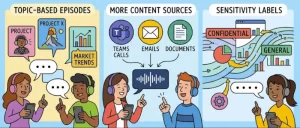
- Topic-based episodes: Longer Audio Overviews can be organized into separate episodes based on topics within the content.
- More supported sources: Users can generate Audio Overviews using additional material, including OneNote pages, Loop pages, plain-text files, emails, Teams meetings, and Teams chats.
- Sensitivity label inheritance: When an Audio Overview is saved to OneDrive from labeled source content, the saved file inherits the most restrictive sensitivity label among its sources.
Together, these changes extend Audio Overview beyond a simple way to listen to summarized information. They also address practical challenges that arise when employees need to navigate lengthy content and handle potentially sensitive business information.
Topic-Based Episodes Make Longer Audio Summaries Easier to Navigate
One of the most noticeable improvements is the introduction of topic-based episodes for longer, content-rich notebooks.
Previously, a lengthy audio discussion could be difficult to navigate when users wanted to revisit a particular subject. Breaking the experience into topic-based episodes gives listeners a more structured way to move between different parts of the material.
For employees reviewing extensive research, project documentation, or collections of meeting notes, this could make Audio Overview more practical for targeted listening.
Instead of replaying an entire discussion to find a particular point, users can focus on the relevant topic. This is especially useful when the underlying material covers several related but distinct subjects.
The change may also help teams fit AI-generated audio summaries into existing work routines. Employees could use topic-based navigation to review relevant sections before a meeting, revisit a project decision, or refresh their understanding of a longer notebook.
However, Microsoft has not specified in the supplied announcement how episodes will be generated, whether users can manually reorganize them, or what navigation controls will be available. Those details will determine how much flexibility the feature offers in day-to-day use.
Audio Overview Expands to OneNote, Loop, Emails, and Teams
Another important part of the Microsoft Audio Overview update is its expanded ability to work with different types of content added to a notebook.
Microsoft identifies six additional supported content types:
- OneNote pages
- Microsoft Loop pages
- Plain-text (.txt) files
- Emails
- Teams meetings
- Teams chats
This broader compatibility could make Audio Overview more useful for employees whose information is distributed across multiple applications rather than stored in a single document.
OneNote and Loop pages
OneNote and Loop often contain working notes, project information, planning material, and evolving documentation.
Bringing these sources into Audio Overview gives users another way to review that information. Teams working on complex projects may be able to use audio summaries to revisit key themes across their notes without manually reading every page.
Emails and Teams conversations
Email threads and Teams chats can contain important decisions, updates, questions, and action items scattered across lengthy exchanges.
Support for these sources could help users review conversational information in a more accessible format. For example, an employee preparing for a project meeting might benefit from an audio overview grounded in relevant email correspondence and Teams discussions.
Teams meetings are also included among the newly supported content types, potentially making it easier to work with meeting-related information alongside other project materials.
Plain-text files
Support for .txt files adds a straightforward option for content that does not originate in a rich document format.
This may help users incorporate simple notes and text-based reference material into their Audio Overview workflows.
The practical benefit will depend on how users organize source material within notebooks and which content types are available in their specific Microsoft 365 environment.
Importantly, the announcement identifies these content types as sources for Audio Overview. It does not establish that the feature automatically searches every mailbox, chat, meeting, or notebook across an organization. Users should understand the distinction between supported content and unrestricted access to organizational information.
OneDrive Adds Sensitivity Label Inheritance for Saved Audio Overviews
For organizations concerned about information security and regulatory compliance, the sensitivity labeling change may be the most consequential part of the release.
Microsoft says Audio Overviews saved to OneDrive will inherit the most restrictive Microsoft Purview sensitivity label from their source content when those sources carry sensitivity labels.
Sensitivity labels help organizations classify and protect information according to its level of confidentiality. Depending on an organization’s configuration, labels can support controls governing how information is handled and shared.
The new inheritance behavior is designed to help ensure that a saved audio file reflects the protection requirements of the material used to create it.
How the new labeling behavior works
Consider a notebook containing information from sources with different sensitivity labels. If the resulting Audio Overview is saved to OneDrive, the saved file inherits the most restrictive label among those sources.
This matters because an audio summary can contain information derived from several documents or conversations. Treating the resulting file according to the strictest applicable source label can help reduce the risk of the summary being handled under a less protective classification.
For organizations using Microsoft Purview, the change also brings Audio Overview into closer alignment with existing information protection practices.
Microsoft says no additional configuration is required as part of this feature rollout.
An important limitation: Notebook-based Audio Overviews remain unlabeled
There is a significant distinction between saving an Audio Overview to OneDrive and keeping it inside a notebook.
According to the announcement, sensitivity labels apply to the saved file in OneDrive. Audio Overviews that remain within the notebook are not yet sensitivity labeled.
This means organizations should not interpret the new inheritance behavior as universal sensitivity labeling for every Audio Overview.
Security teams should continue to review their existing information protection policies, access controls, and procedures for handling AI-generated content. They should also communicate the difference between a labeled file saved to OneDrive and an Audio Overview that remains within its notebook.
The feature improves protection for a specific saved-file workflow, but it does not eliminate every information governance consideration associated with AI-generated summaries.
What the Update Means for Businesses and IT Administrators
The changes affect users who create or listen to Audio Overviews, as well as organizations that use Microsoft 365 Copilot and OneDrive to manage business information.
For employees, the expanded content support could reduce the effort required to review information scattered across different applications. Topic-based episodes may also make lengthy audio summaries easier to revisit.
For IT administrators and compliance teams, the sensitivity label inheritance behavior is especially relevant because it connects saved Audio Overviews with established Microsoft Purview classification practices.
Organizations may want to consider the following steps as the update rolls out:
- Review information protection policies: Confirm that existing sensitivity labels and associated handling requirements are appropriate for the content employees use with Audio Overview.
- Clarify storage practices: Explain when a saved OneDrive Audio Overview inherits a sensitivity label and why notebook-based versions have a different status.
- Prepare user guidance: Show employees how to use topic-based episodes and incorporate the additional supported content types into their workflows.
- Reinforce responsible AI use: Remind users to follow organizational policies when generating, saving, accessing, and sharing AI-produced summaries.
- Validate the experience after rollout: Check feature availability and behavior in the organization’s Microsoft 365 environment as deployment progresses.
These are recommended preparation and validation steps rather than mandatory configuration changes. Microsoft explicitly states that no administrator action is required to prepare for the release.
Microsoft Audio Overview Update: Global Rollout Timeline
Microsoft plans to begin the worldwide rollout in late October 2026 and expects it to finish by late November 2026.
The announcement, published on October 9, places the update within a relatively short deployment window, although individual users and organizations may not receive every change at precisely the same time.
The release affects Microsoft 365 Apps, Microsoft 365 Copilot, the wider Microsoft 365 suite, OneDrive, and Microsoft Purview sensitivity labeling in the context described by the announcement.
Organizations should monitor their Microsoft 365 service communications for deployment progress and confirm availability in their own environments rather than assuming that all users will see the changes immediately.
Because the rollout is scheduled to occur over several weeks, help desk teams and Microsoft 365 administrators may also want to prepare for questions about the new navigation experience, newly supported sources, and sensitivity labels on saved audio files.
What Businesses Should Watch Next
The update reflects a broader workplace AI challenge: making generated content convenient to consume without losing sight of the information protection requirements attached to its sources.
Audio summaries can make large volumes of business information easier to review, but their usefulness depends on more than the quality of the generated discussion. Navigation, source compatibility, and the treatment of sensitive information all influence whether organizations can incorporate these tools into everyday work.
Microsoft’s expanded content support could make Audio Overview relevant to a wider range of workflows, particularly those built around meeting discussions, email correspondence, collaborative notes, and project documentation.
The sensitivity label change is a useful step toward consistent protection for saved outputs, although the distinction between OneDrive files and notebook-based Audio Overviews remains important.
As the worldwide rollout progresses through November 2026, the next questions for organizations will be how reliably the new experience handles their content, how users adopt topic-based navigation, and whether future updates extend sensitivity labeling to Audio Overviews that remain within notebooks.
For now, the practical approach is to prepare users, reinforce existing information protection practices, and evaluate the new capabilities as they become available—without treating the update as a replacement for established governance controls.