
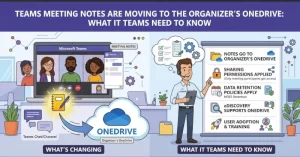
Microsoft is changing how collaborative meeting notes are stored in Microsoft Teams, shifting ownership of newly created notes for non-channel meetings to the meeting organizer’s OneDrive for Business. The worldwide rollout is scheduled to begin in mid-November 2026 and is expected to finish by late November 2026.
The change covers Loop-powered meeting notes and Facilitator notes, with the aim of creating more consistent ownership and simplifying the management of meeting content. Although users will continue to collaborate on notes through Teams as they do today, IT administrators and compliance teams should review internal processes that assume meeting notes belong to the person who starts them.
Existing notes will remain in their current storage locations, and channel meeting notes will not be affected.
What Is Changing in Microsoft Teams Meeting Notes Storage?
Under the updated arrangement, newly created collaborative meeting notes for non-channel Microsoft Teams meetings will be stored in the meeting organizer’s OneDrive for Business, specifically in the Meetings folder.
Previously, the storage location depended on the person who initiated the note-taking process. For example, if a participant started collaborative notes during a meeting, the notes could be stored in that participant’s OneDrive rather than the organizer’s.
Microsoft is changing this behavior so that the meeting organizer becomes the owner of the notes file, regardless of which participant starts taking notes or launches Facilitator.
The update applies to two key types of meeting content:
- Loop-powered meeting notes: Collaborative notes that meeting participants can access and edit together.
- Facilitator notes: Notes associated with the Facilitator experience in Microsoft Teams.
The objective is to make ownership and management more consistent without changing the familiar note-taking experience for meeting participants.
When Will the Microsoft Teams Update Roll Out?
Microsoft plans to introduce the change globally during November 2026.
The published rollout schedule is as follows:
- Rollout begins: Mid-November 2026.
- Expected completion: Late November 2026.
- Availability: General availability worldwide.
Organizations should plan for the update to arrive during this window rather than assume that every user will experience the change on the same day.
IT administrators can use the rollout period to communicate the change to employees, review documentation, and identify any internal workflows that depend on the current storage arrangement.
No configuration changes are required to enable the new behavior. However, organizations with formal Microsoft 365 governance procedures may still need to make administrative and policy adjustments around how meeting notes are managed.
How the Change Will Affect Employees and Meeting Organizers
For most employees, the day-to-day impact should be minimal. Participants will continue to open and collaborate on meeting notes through Teams, subject to their organization’s existing sharing policies.
The main difference concerns file ownership and storage location.
Consider a meeting in which one employee organizes the session and another participant starts taking notes. Under the new arrangement, the notes file will be stored in the organizer’s OneDrive for Business, rather than the note-taker’s OneDrive.
This distinction matters because the person who creates or initiates notes will no longer determine where newly created collaborative notes are stored.
The practical implications include:
- Meeting organizers: They will own the notes file created for their non-channel meetings.
- Note-takers: They can continue to initiate collaborative notes without becoming the default storage owner.
- Meeting participants: They can continue accessing and editing notes through Teams, subject to existing permissions.
- IT administrators: They should account for organizer-owned storage in internal support documentation and governance processes.
For employees, this should be a relatively straightforward transition. For organizations managing large numbers of meetings, however, the change could affect established assumptions about where files reside and who is responsible for them.
What Happens to Existing Meeting Notes?
One important detail is that Microsoft will not automatically move previously created meeting notes into the organizer’s OneDrive.
Notes created before the change will remain in their existing storage locations. The new storage arrangement applies to newly created collaborative meeting notes after the update takes effect.
This means organizations may have two different storage patterns to account for when managing historical and future meeting records.
Older notes may remain in the OneDrive of the person who originally started them, while newly created notes will be stored in the meeting organizer’s OneDrive for Business.
That distinction could matter when employees search for historical discussions, when administrators investigate access issues, or when teams maintain records of decisions and action items.
Organizations should avoid assuming that all meeting notes will be consolidated into a single location following the rollout. The update changes the destination for new content; it does not constitute a migration of existing files.
Why the Change Matters for Microsoft 365 Governance
Although the update does not require configuration changes, storage ownership is an important consideration for organizations that rely on Microsoft 365 for business records and internal collaboration.
OneDrive ownership can influence how files are discovered, accessed, managed, and handled under an organization’s established policies. Moving meeting notes from the note-taker’s OneDrive to the organizer’s OneDrive therefore deserves attention beyond the immediate user experience.
For example, an organization might have internal guidance instructing employees to locate meeting notes in the OneDrive of the person who created them. That guidance could become inaccurate once the new behavior takes effect.
Similarly, support teams may need to revise procedures for locating notes, troubleshooting access problems, and identifying the appropriate file owner.
Compliance teams should also evaluate whether the new storage arrangement aligns with existing retention, access, and data governance requirements.
Key questions for administrators include:
- Do internal policies specify where collaborative meeting notes must be stored?
- Do employees know how to locate notes when the organizer and note-taker are different people?
- Are retention and access policies appropriate for files stored in meeting organizers’ OneDrive accounts?
- Do support teams have updated instructions for resolving meeting-note ownership and access issues?
- Could any existing reporting, documentation, or operational workflows be affected by the change?
These questions do not mean the update creates a compliance problem by itself. Rather, they help organizations verify that their existing controls continue to work as intended under the revised storage model.
What IT Administrators Should Do Before the Rollout
Microsoft has indicated that no configuration change is required. Organizations do not need to enable a new setting simply to adopt the updated storage behavior.
Nevertheless, a small amount of preparation can help prevent confusion when the rollout reaches employees.
1. Review internal documentation. Identify instructions that say meeting notes are stored in the OneDrive of the person who starts them. Update those references to reflect organizer-owned storage for newly created non-channel meeting notes.
2. Inform employees and meeting organizers. Explain that the organizer will own the notes file even when another participant starts notes or Facilitator. This is particularly useful for teams that regularly share note-taking responsibilities.
3. Check governance and retention processes. Review the policies that apply to meeting notes stored in OneDrive for Business. Confirm that the updated ownership model is consistent with organizational requirements.
4. Prepare support teams. Give help desk and Microsoft 365 support staff clear guidance on the new storage location and the distinction between existing and newly created notes.
5. Keep channel meetings separate in your guidance. Channel meeting notes storage is not changing. Documentation should clearly distinguish non-channel meetings from channel meetings to avoid applying the new behavior too broadly.
These steps should help organizations adapt without introducing unnecessary technical changes or disrupting existing collaboration habits.
Channel Meeting Notes Will Remain Unchanged
The update specifically concerns non-channel Microsoft Teams meetings. Storage for channel meeting notes will remain unchanged.
This is an important distinction for organizations that use Teams for different types of collaboration, including project channels, departmental workspaces, and individual or group meetings outside channels.
Administrators should not assume that every meeting-note file across Microsoft Teams will follow the new OneDrive ownership rule.
Instead, internal guidance should explain which meeting types are affected and which remain under their current storage arrangements. Clear communication will be especially valuable for employees who participate in both channel-based and non-channel meetings throughout the working week.
What Organizations Should Expect Next
As the November 2026 rollout approaches, the main priority for Microsoft 365 administrators is to prepare for a change in file ownership rather than a change in how users take notes.
The update is designed to preserve the existing collaboration experience while making storage ownership more consistent. Its practical success will depend partly on whether organizations understand the distinction between the meeting organizer, the person who starts notes, and the location where the resulting file is stored.
The rollout also highlights a broader operational consideration for cloud collaboration platforms: seemingly small changes to default storage behavior can affect documentation, support procedures, and compliance assumptions even when users notice little difference in their daily work.
Organizations should monitor the rollout through late November, verify the behavior in their own environments as the update becomes available, and address any gaps in internal guidance.
The key takeaway: Newly created collaborative notes for non-channel Microsoft Teams meetings will be stored in the meeting organizer’s OneDrive for Business, while existing notes and channel meeting notes will retain their current locations. No configuration change is needed, but reviewing governance policies and updating employee guidance before the rollout can help ensure a smooth transition.
Extra posts:
 Microsoft Teams Rooms Gets Smarter: AI-Powered Facilitator Brings Real-Time Meeting Notes to Physical Meeting Rooms
  Microsoft 365 Copilot Pages Are Moving to OneDrive: What Organizations Need to Know
  Microsoft Teams Gets Smarter With Personalized Multilingual Meeting Recaps
  Microsoft Teams Is Getting a Smarter Meeting Assistant: Facilitator Can Now Join Channel Meetings
  Microsoft Teams Adds In-Meeting AI Toggle: Users Gain More Control Over Copilot and Facilitator
  Microsoft Teams to Add Deepfake Detection as AI Meeting Scams Raise Security Concerns