
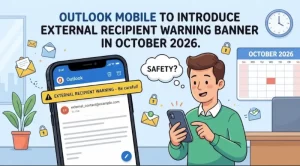
Microsoft is preparing to introduce a new external recipient warning in Outlook Mobile, giving users a clearer indication when meeting invitations include people from outside their organization. The worldwide rollout is scheduled to begin in late October 2026 and is expected to finish by late November 2026.
The update aims to help employees avoid accidentally inviting external attendees to meetings where sensitive business information may be discussed. By displaying a warning banner when external recipients are included, Outlook Mobile will provide an additional visual reminder before users proceed with their meeting arrangements.
Microsoft says organizations will not need to take any action to enable the change, and no compliance changes have been identified as part of the update.
What Is Changing in Outlook Mobile?
The new feature focuses on one common workplace task: adding attendees to a meeting.
When a user adds someone from outside their organization to a meeting in Outlook Mobile, the application will display a banner indicating that external recipients are included. This gives the organizer a visible cue that the invitation is not limited to internal participants.
The change is designed to make external attendees easier to identify during the meeting-creation process. Rather than relying entirely on users to recognize every recipient’s organizational affiliation, Outlook Mobile will provide an additional warning directly within the application.
According to the announced update, the feature is intended to reduce accidental invitations and help users make more informed decisions about who receives meeting invitations.
The announcement does not specify additional changes to meeting permissions, recipient management, or the process for approving external attendees. Its stated purpose is to improve awareness through a warning banner.
When Will the External Recipient Warning Roll Out?
Microsoft plans to introduce the Outlook Mobile update through a worldwide rollout spanning approximately one month.
The announced schedule is:
- Rollout begins: Late October 2026.
- Expected completion: Late November 2026.
- Geographic availability: Worldwide.
- Required administrator action: None.
- Identified compliance changes: None.
The rollout window means users may not all see the banner at the same time. Availability is expected to expand during the rollout period, so organizations should avoid assuming that every employee will receive the feature immediately when deployment begins.
The announcement does not provide a specific release date for individual regions, platforms, or organizational tenants. Users who do not see the warning immediately should therefore consider the published rollout window before treating its absence as a technical issue.
Why External Meeting Warnings Matter for Businesses
External meetings are a routine part of modern business operations. Employees regularly coordinate with customers, vendors, consultants, contractors, business partners, and other people outside their organizations.
However, the same convenience that makes digital meeting tools useful can create opportunities for mistakes. A meeting invitation intended for an internal team may inadvertently include an external contact, particularly when organizers manage multiple meetings and recipient lists throughout the day.
A warning banner can help address this risk by making the presence of external attendees more visible at the point when the organizer is preparing a meeting.
1. An additional safeguard against accidental invitations
Employees often work under time pressure, and recipient lists can include a mixture of internal and external contacts. A visible warning introduces another opportunity to notice an unintended recipient before the invitation is sent.
This may be particularly useful for meetings involving confidential project updates, internal planning, commercial discussions, or other information that should reach only the intended audience.
2. Greater awareness of meeting participants
The presence of an external attendee can change the context of a meeting. Organizers may need to reconsider the agenda, the documents they plan to share, or the information they intend to discuss.
A clear visual reminder helps bring that consideration into the meeting-creation workflow instead of leaving it entirely to memory.
3. Support for everyday security practices
Many information security incidents begin with ordinary mistakes rather than sophisticated attacks. Sending information to the wrong recipient is one example of an error that can have consequences for confidentiality and business operations.
The new Outlook Mobile banner is intended to support more careful recipient selection. It should be viewed as an additional awareness measure, not a replacement for established security policies, employee training, or appropriate access controls.
What the Update Means for IT Administrators
For IT teams, the announcement is relatively straightforward: Microsoft does not require organizations to take action to prepare for the feature.
No configuration changes or compliance updates have been identified as necessary for this rollout. Administrators can therefore treat the change as an application-level improvement to recipient awareness rather than a new policy implementation requirement.
Even so, organizations may want to communicate the change to employees, especially those who frequently organize external meetings or use Outlook Mobile while away from their desks.
A short internal notice could explain three points:
- Outlook Mobile will display a banner when external attendees are included in a meeting.
- The warning is intended to help users identify external recipients before proceeding.
- Employees should continue to check recipient lists and follow existing rules for sharing confidential information.
IT support teams may also wish to incorporate the feature into their routine user guidance. Doing so can help employees understand why the banner appears and how it fits into the organization’s broader approach to information security.
These steps are optional recommendations, not requirements stated in Microsoft’s announcement.
Does the New Banner Introduce Compliance Changes?
Microsoft’s announcement identifies no compliance considerations associated with the update, while advising organizations to review the change as appropriate for their own circumstances.
That distinction is important. The banner is intended to increase awareness of external participants, but its introduction does not establish that an organization is compliant with its confidentiality, privacy, or information-handling obligations.
Organizations should continue to apply their existing requirements for sensitive meetings, external collaboration, and the distribution of confidential material. Where internal policies require additional approval or restrictions for external participants, those requirements remain relevant.
The announcement also does not indicate that the banner automatically blocks external attendees, prevents invitations from being sent, or evaluates whether a particular recipient is authorized to attend. Users should not interpret the visual warning as an automated security approval or enforcement mechanism.
For businesses operating in regulated environments, the appropriate approach is to treat the feature as a supplementary user-awareness measure while retaining existing governance and risk-management processes.
What the Update Does—and Does Not—Promise
The announced functionality has a defined scope. Understanding that scope will help organizations set realistic expectations.
What users can expect:
- A visible banner when external attendees are included in a meeting in Outlook Mobile.
- An additional reminder to review meeting recipients.
- A worldwide rollout beginning in late October 2026 and expected to finish by late November 2026.
- No required organizational action, according to the announcement.
What has not been established by the announcement:
- Automatic blocking of external meeting invitations.
- Automatic removal of unintended recipients.
- Changes to meeting access permissions or information-sharing controls.
- New compliance obligations.
- A guarantee that accidental information disclosure will be prevented.
This distinction matters because warning-based controls depend partly on user behavior. A reminder can help someone notice a potential mistake, but it cannot guarantee that every recipient list will be reviewed correctly.
The greatest benefit is likely to come when users combine the banner with careful meeting preparation and established organizational security practices.
How Organizations Can Prepare for the Rollout
Although no action is required, organizations can take a few low-effort steps to help employees get familiar with the update.
First, IT administrators can share the expected rollout dates with relevant teams. This is especially useful for organizations that rely heavily on Outlook Mobile for customer meetings, supplier coordination, and mobile work.
Second, security and communications teams can remind employees to verify attendees before sending invitations involving confidential discussions. That message reinforces the purpose of the banner without suggesting that the feature replaces existing controls.
Third, support teams can monitor user questions during the rollout. If employees ask why a warning appears when they add an external participant, a short explanation can help them understand the feature and respond appropriately.
Organizations do not need to create a new compliance process solely because of this update. Any additional preparation should reflect their existing operational needs and internal policies.
What Happens Next?
The next milestone is the start of the worldwide rollout in late October 2026, followed by expected completion in late November. During this period, Outlook Mobile users should begin seeing the external recipient warning as the feature becomes available to them.
For employees, the practical change is small: a new visual reminder when a meeting includes people outside their organization. For businesses, its significance lies in adding another opportunity to catch an unintended invitation before it creates a confidentiality concern.
The longer-term value will depend on how users respond to the warning and how effectively organizations reinforce responsible meeting practices. The banner cannot eliminate every risk associated with external collaboration, but it can make an important detail harder to overlook.
As the rollout progresses, organizations can assess whether the new reminder improves awareness among employees who regularly schedule external meetings. For now, Microsoft has indicated that no action is required, leaving businesses free to adopt optional communications and training that complement their existing security procedures.
Extra posts:
 Microsoft Outlook for Android Adds Multi-Select and Bulk Email Actions in October 2026
  Why Isn’t My Outlook Email Banner Showing?
  Microsoft Teams Mobile Calendar to Require Latest App Update by October 2026: Microsoft Announces Critical Change for iOS and Android Users
  Outlook Mobile Is Getting Smarter: Emails Will Automatically Inherit Sensitivity Labels From Attachments
  Microsoft 365 Copilot Gets an Outlook Upgrade: Draft Emails Right Inside Copilot Chat on Mobile
  Microsoft 365 Apps October 2026 Updates: What Organizations Need to Know