

Modern work isn’t just fast—it’s fluid. Ideas evolve mid-conversation, documents are never truly “final,” and collaboration happens across time zones and tools. In this environment, traditional content creation draft, review, revise, approve feels too linear. Enter the “Copilot Loop”: a new way of working where AI-assisted creation and human collaboration happen simultaneously, continuously, and contextually inside Microsoft Loop.
This isn’t just about using AI to generate text. It’s about embedding AI into the flow of work, where teams co-create, refine, and decide together in real time. Let’s take a deep dive into what the Copilot Loop really means, how it works inside Loop components, and why it’s reshaping how teams think, write, and act.
What Is the “Copilot Loop”?
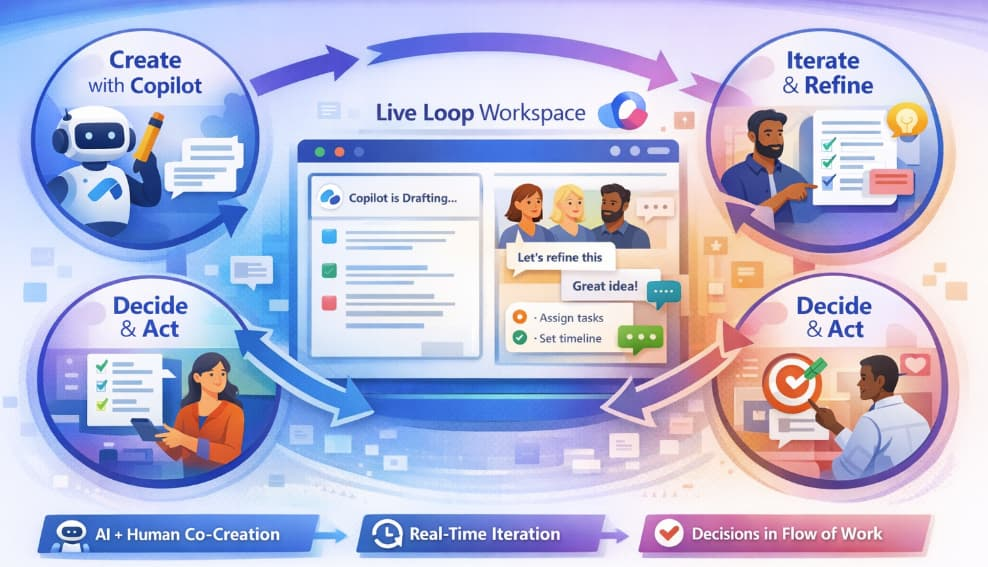
At its core, the Copilot Loop is a continuous cycle:
Create → Share → Iterate → Decide → Refine → Repeat
Instead of working in silos and passing documents back and forth, teams collaborate within live Loop components dynamic blocks of content (tables, lists, paragraphs, task boards) that stay synced across apps like Teams, Outlook, and Word.
Now, layer Copilot (AI) into that experience.
You’re no longer staring at a blank page. You’re co-creating with AI and your team at the same time. Copilot helps you draft, summarize, brainstorm, and restructure—while your teammates comment, edit, and react in real time.
The result? A living, breathing workflow where content evolves naturally within the context of actual work.
Why the Copilot Loop Matters
Traditional workflows are fragmented:
- Ideas happen in meetings
- Notes live in documents
- Tasks go into separate tools
- Feedback comes via email threads
The Copilot Loop collapses all of that into a single collaborative surface.
Here’s why that’s powerful:
1. Context Never Gets Lost
Copilot works within the Loop component, meaning it understands the surrounding discussion, content, and intent. You don’t need to re-explain things or switch tools.
2. Real-Time Co-Creation
Multiple people can edit the same content while Copilot assists. It’s not “AI vs human” it’s AI with humans, synchronously.
3. Faster Decision-Making
Because content, feedback, and summaries happen in one place, teams move from idea to decision much faster.
4. Continuous Iteration
There’s no “final version.” The Copilot Loop encourages ongoing refinement, making content more accurate, relevant, and actionable over time.
How Copilot Works Inside Loop Components
Let’s break down what actually happens inside a Loop workspace.
Drafting in Real Time
Start with a simple prompt like:
- “Create a project kickoff outline”
- “Summarize this discussion”
- “Draft a product announcement”
Copilot generates content instantly inside the Loop component. But here’s the difference: your team can immediately jump in—editing, commenting, and reshaping the output.
Iteration Without Friction
Instead of rewriting manually, you can ask Copilot to:
- Simplify the language
- Expand on key points
- Adjust tone for a specific audience
- Turn notes into structured action items
All of this happens inline, without breaking the flow.
Shared Intelligence
As team members contribute, Copilot can:
- Summarize evolving discussions
- Highlight decisions or unresolved questions
- Extract tasks and next steps
This transforms messy collaboration into structured, actionable insight.
Embedded Decision-Making
Loop components aren’t just for writing—they’re for deciding. Teams can:
- Vote on options
- Refine proposals
- Align on next steps
Copilot helps by synthesizing input and presenting clear summaries, making decisions easier and faster.
A Real-World Example: From Meeting to Execution
Imagine a product team planning a feature launch.
Step 1: Meeting Notes in Loop
A Loop component captures live notes during a Teams meeting.
Step 2: Copilot Summarizes
Copilot generates a concise summary and identifies key themes.
Step 3: Team Iterates
Team members add comments, refine messaging, and clarify priorities.
Step 4: Copilot Extracts Actions
Tasks are automatically generated: timelines, owners, deliverables.
Step 5: Shared Across Apps
The same Loop component appears in Teams chat and Outlook, always up to date.
Step 6: Continuous Refinement
As the project evolves, the content updates—no version confusion, no duplication.
That’s the Copilot Loop in action: seamless, collaborative, and always current.
Key Benefits of the Copilot Loop
Speed Without Sacrificing Quality
AI accelerates drafting, while human collaboration ensures accuracy and relevance.
Better Thinking, Not Just Faster Writing
Copilot doesn’t replace thinking—it enhances it by helping teams explore ideas more deeply and quickly.
Unified Workflow
No more jumping between tools. Everything happens within the same collaborative space.
Improved Alignment
With shared visibility and real-time updates, everyone stays on the same page.
Best Practices for Using the Copilot Loop Effectively
To get the most out of this approach, teams should adopt a few key habits:
1. Start with Clear Prompts
The better your prompt, the better Copilot’s output. Be specific about tone, audience, and purpose.
2. Treat AI Output as a First Draft
Copilot gives you momentum—not perfection. Use it as a starting point for collaboration.
3. Collaborate Actively
Encourage team members to edit, comment, and iterate in real time.
4. Use Copilot for Summarization Frequently
Regular summaries keep everyone aligned, especially in fast-moving projects.
5. Keep Everything in Loop Components
Avoid copying content into static documents. Let the Loop component remain the single source of truth.
Challenges to Watch Out For
While powerful, the Copilot Loop isn’t without challenges:
- Over-reliance on AI: Teams must still validate and refine AI-generated content.
- Prompt quality matters: Poor prompts lead to generic results.
- Change management: Teams need to adapt to a more dynamic, less linear workflow.
The key is balance—using AI as a collaborator, not a replacement.
The Future of Work: Continuous Co-Creation
The Copilot Loop represents a shift from document-based work to flow-based work.
Instead of producing static outputs, teams continuously evolve ideas together—with AI as a real-time partner.
This changes how we:
- Write (collaboratively, not individually)
- Decide (quickly, with shared context)
- Execute (with clarity and alignment)
In a world where speed and adaptability matter more than ever, the Copilot Loop isn’t just a feature—it’s a new operating model for knowledge work.
Extra posts:
 Copilot for SysAdmins Automating PowerShell Script Generation from Plain English Prompts
  Human-in-the-Loop: Where Copilot Agents Should (and Shouldn’t) Act Alone
  Work Smarter, Not Harder Automating Repetitive Tasks with Microsoft 365 Copilot
  Using Copilot in Loop Components for Seamless Collaboration
  Copilot Limitations and How to Work Around Them
  Measuring the Un-Done Work Calculating the ROI of Microsoft 365 Copilot