
In today’s digital-first world, cloud storage has become the backbone of productivity and collaboration. Among the most trusted solutions available, Microsoft OneDrive stands out for its seamless integration with Windows and Microsoft 365. However, many users often wonder about the difference between OneDrive for Business and OneDrive Personal — and which one is right for them.
This comprehensive guide explores both versions in detail — their features, benefits, limitations, and best practices for using them effectively in 2025.
What Is Microsoft OneDrive?
Microsoft OneDrive is a cloud-based storage service that allows users to store, sync, and share files across devices. Whether you’re saving photos, documents, or work projects, OneDrive ensures your data is accessible from anywhere, on any device, with an internet connection.
OneDrive comes in two primary versions:
- OneDrive Personal – designed for individual use and linked to a personal Microsoft account (e.g., Outlook.com or Hotmail.com).
- OneDrive for Business – designed for organizations and integrated with Microsoft 365 (formerly Office 365) for enterprise-level collaboration and management.
Both share a similar interface but serve distinct purposes and offer different levels of control, storage, and security.
OneDrive Personal: Simplicity and Accessibility
OneDrive Personal is ideal for individuals who want to back up their files, photos, and documents safely in the cloud.
Key Features
- Storage Space: Comes with 5 GB of free storage by default. Users can upgrade to Microsoft 365 Personal or Family plans, which offer up to 1 TB per user.
- Seamless Integration: Automatically integrates with Windows 10 and 11, as well as Office apps like Word, Excel, and PowerPoint.
- Automatic Backup: Users can automatically back up their Desktop, Documents, and Pictures folders.
- File Sharing: Share files easily via links, with customizable permissions for viewing or editing.
- File Recovery: Includes a Recycle Bin and Version History, allowing you to restore deleted or modified files.
- Personal Vault: Adds an extra layer of protection for sensitive files using two-factor authentication and encryption.
Use Cases
- Personal photo and video storage
- Syncing files between devices
- Backing up family documents and projects
- Collaborating on small projects or shared household files
OneDrive for Business: Enterprise-Grade Cloud Storage
OneDrive for Business is tailored for organizational use and comes as part of Microsoft 365 Business or Enterprise plans. It’s designed to help teams collaborate securely and efficiently in a corporate environment.
Key Features
- Generous Storage: Each user typically receives 1 TB of storage, expandable as needed depending on the plan.
- Advanced Collaboration: Deep integration with SharePoint Online, Teams, and Microsoft 365 enables real-time co-authoring, version control, and content management.
- Enterprise Security: Data is encrypted both in transit and at rest. Administrators can enforce policies such as multi-factor authentication (MFA), data loss prevention (DLP), and compliance monitoring.
- Administrative Control: IT administrators can manage user permissions, audit access logs, and recover data at the organization level.
- Data Compliance: Meets compliance standards such as GDPR, ISO 27001, and HIPAA.
- Offline Access & Sync: Files can be synced locally using the OneDrive desktop app, ensuring work continues even without an internet connection.
Use Cases
- Secure document sharing and collaboration within teams
- File version control for projects and reports
- Compliance management for sensitive corporate data
- Centralized file management with access control
Key Differences: OneDrive for Business vs. OneDrive Personal
| Feature | OneDrive Personal | OneDrive for Business |
|---|---|---|
| Account Type | Linked to personal Microsoft account | Linked to Microsoft 365 Business or Enterprise account |
| Storage | 5 GB free; up to 1 TB with subscription | Typically 1 TB per user (expandable) |
| Collaboration | Basic file sharing | Real-time co-authoring with Teams & SharePoint |
| Security | Personal Vault, encryption | Enterprise-level security & compliance |
| Administration | User-managed | Centrally managed by IT admins |
| Backup & Sync | Personal device backup | Enterprise device sync with group policies |
| Support | Microsoft consumer support | Microsoft 365 enterprise support |
| Best For | Individuals & families | Businesses & organizations |
Security and Privacy Considerations
Both OneDrive Personal and Business use AES 256-bit encryption to protect files at rest and SSL/TLS encryption for data in transit. However, OneDrive for Business includes advanced compliance and governance tools — making it more suitable for regulated industries such as healthcare, finance, and education.
Administrators in OneDrive for Business can:
- Enforce password policies
- Set sharing restrictions
- Monitor data access
- Recover files even after deletion by users
For personal users, the Personal Vault adds protection for identity documents, financial records, and other sensitive files — a must-use feature for privacy-conscious users.
Integrations and Productivity Tools
Both versions integrate seamlessly with Microsoft 365 apps, but OneDrive for Business provides more extensive capabilities when combined with:
- Microsoft Teams: Direct file sharing and editing in real time.
- SharePoint Online: Document libraries and workflow automation.
- Power Automate: Automated workflows for repetitive tasks.
- Microsoft Defender for Cloud Apps: Threat detection and data governance.
These integrations transform OneDrive for Business from simple storage into a full-fledged collaboration and productivity platform.
Best Practices for Managing OneDrive Effectively
- Organize Files with Folders: Create a logical folder structure for faster access.
- Use Version History: Restore older versions of important documents when needed.
- Set Permissions Wisely: Limit sharing access to trusted contacts only.
- Enable Sync on Multiple Devices: Ensure you always have the latest files offline.
- Leverage Personal Vault or DLP Policies: Secure sensitive data with extra protection layers.
- Regularly Review Shared Links: Expire old or unused shared links to maintain privacy.
- Backup Regularly: While OneDrive provides redundancy, having an additional backup ensures extra peace of mind.
Which One Should You Choose?
- Choose OneDrive Personal if you’re an individual user looking for convenient and secure file storage across devices. It’s perfect for everyday personal use, family file sharing, and basic cloud backup.
- Choose OneDrive for Business if you’re part of an organization or team that requires advanced collaboration, security controls, and compliance support. It’s the go-to solution for enterprises and professionals using Microsoft 365.
Both OneDrive Personal and OneDrive for Business are powerful tools for modern digital life. The choice ultimately depends on your needs — whether you’re managing family photos or corporate projects.
As cloud technology continues to evolve in 2025, OneDrive remains a cornerstone of Microsoft’s ecosystem — empowering users to store, share, and collaborate securely from anywhere in the world.
With the right setup and best practices, OneDrive can transform how you work and manage data — combining simplicity, security, and productivity in one platform.
Extra posts:
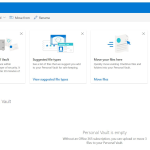 OneDrive Personal Vault rolling
  Unlocking Searchable Content OCR for OneDrive for Business Now Available in Microsoft 365 Admin Center
  Unlocking Efficiency with Microsoft 365 Archive A Smart Way to Manage Mailbox Storage
  Understanding the Different Types of Cloud Services (IaaS, PaaS, SaaS)
  Understanding Service Level Agreements (SLAs) in Microsoft 365
  Introduction to Microsoft 365 Apps for Business and Enterprise