
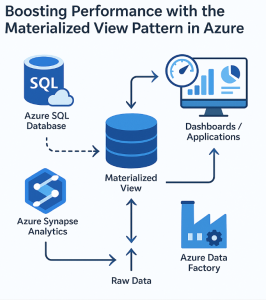
Modern data systems must strike a balance between high-performance querying and cost-effective data processing. In many scenarios, especially when working with large datasets or serving low-latency analytical dashboards, raw data queries can become a bottleneck. This is where the Materialized View pattern comes into play—a design approach that precomputes and stores query results for rapid access.
In this blog, we’ll explore what the Materialized View pattern is, why it matters, and how to implement it effectively in Microsoft Azure.
🔍 What Is the Materialized View Pattern?
A Materialized View is a precomputed result set derived from a query on one or more base tables. Unlike a regular view, which computes results on the fly, a materialized view physically stores the data. This greatly reduces query times for frequently accessed data, at the cost of needing to refresh the view when underlying data changes.
Think of it as caching the result of a complex or expensive query.
🚀 Benefits of Using Materialized Views
- Faster Query Performance: Eliminate the need to reprocess complex joins or aggregations.
- Cost Efficiency: Reduce compute usage for frequent queries.
- Simplified Reporting: Serve analytics or dashboards with minimal latency.
- Decoupled Systems: Provide read-optimized views for front-end apps without overloading transactional systems.
🛠️ Implementing Materialized Views in Azure
Azure offers several services that support or can be configured to support the Materialized View pattern. Let’s look at how to use this pattern with key Azure services.
1. Azure Synapse Analytics
Azure Synapse provides native support for materialized views. Here’s how you can use them:
✅ Use Case
Aggregate sales data by region daily.
📄 Example
sqlCopyEditCREATE MATERIALIZED VIEW SalesByRegion
AS
SELECT Region, SUM(Amount) AS TotalSales
FROM Sales
GROUP BY Region;
🔁 Refresh Strategy
Synapse allows both automatic and manual refreshes depending on your performance vs freshness needs.
2. Azure SQL Database / SQL Managed Instance
While not as flexible as Synapse, indexed views in Azure SQL can act as materialized views.
📄 Example
sqlCopyEditCREATE VIEW dbo.SalesSummary
WITH SCHEMABINDING
AS
SELECT Region, COUNT_BIG(*) AS SalesCount, SUM(Amount) AS TotalAmount
FROM dbo.Sales
GROUP BY Region;

CREATE UNIQUE CLUSTERED INDEX idx_SalesSummary ON dbo.SalesSummary (Region);
📝 Note: Indexed views have strict requirements but offer great performance.
3. Azure Data Factory + Azure Data Lake / Synapse
For more control, you can use Azure Data Factory (ADF) to schedule ETL pipelines that compute and store views in Azure Data Lake or Synapse tables.
✅ Use Case
Daily customer churn summary based on raw event logs.
🧩 Components
- ADF pipeline that runs a SQL query or Databricks job
- Writes the result to Delta Lake or Synapse dedicated pool
- Optionally updates Power BI dashboards
4. Azure Databricks + Delta Lake
In Databricks, you can write scheduled jobs to refresh precomputed views and store them in Delta Lake tables, acting as materialized views.
📄 Example
pythonCopyEditdf = spark.sql("""
SELECT customer_id, COUNT(*) AS purchase_count
FROM transactions
GROUP BY customer_id
""")
df.write.format("delta").mode("overwrite").save("/mnt/views/purchase_summary")
Schedule this job using Databricks Jobs to keep the view up-to-date.
🔁 Refresh Strategies
Choosing the right refresh strategy is key:
- On-demand refresh: Best for infrequent updates, e.g., monthly reports.
- Scheduled refresh: Suitable for daily/hourly KPIs.
- Incremental updates: Efficient when using Delta Lake or CDC (Change Data Capture) with Synapse or Databricks.
🧠 Design Tips
- Keep your views focused on specific, high-value queries.
- Monitor usage and refresh costs—precomputation isn’t free.
- Use partitioning where possible for scalable updates.
- Integrate with Power BI DirectQuery for real-time dashboards.
✅ When to Use This Pattern
Use the Materialized View pattern when:
- Your queries are slow and expensive to compute repeatedly.
- You can tolerate some delay between data change and view update.
- You want to decouple analytical workloads from transactional systems.
🚫 When Not to Use It
Avoid this pattern when:
- Your data changes too frequently to keep views consistent.
- You require immediate consistency between source and view.
- Storage cost of the materialized views outweighs the benefits.
The Materialized View pattern is a powerful way to boost performance and reduce compute overhead in Azure-based data architectures. Whether you’re working with Azure Synapse, SQL, Databricks, or Data Factory, Azure provides a rich toolkit for implementing this pattern at scale.
By precomputing and storing frequently queried data, you enable faster insights, smoother user experiences, and more efficient resource usage.
Extra posts:
 🚀 Materialized View Pattern in AWS Precompute for Performance
  Riding in Tandem Unlocking the Sidecar Pattern in Azure Microservices
  Secret Store Pattern in Azure Using Secure Vaults for Credentials and Secrets
  API Gateway Pattern in Azure Managing APIs and Routing Requests to Microservices
  Leveraging CQRS in Azure Separating Read and Write Operations for Performance and Scalability
  Service Mesh Architecture Pattern in Azure Handling Service-to-Service Communication, Security, and Observability