
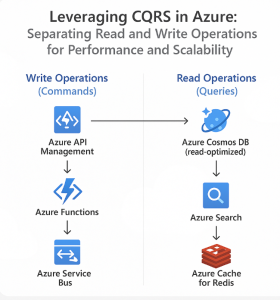
In today’s cloud-native world, high-performance, scalable applications are not just a luxury — they’re a necessity. As application complexity grows, so does the need to architect systems that can scale efficiently, remain responsive under heavy load, and evolve with minimal friction. This is where CQRS (Command Query Responsibility Segregation) comes into play.
In this blog post, we’ll explore the CQRS pattern, why separating read and write operations matters, and how to effectively implement it using Microsoft Azure to unlock performance and scalability benefits.
What is CQRS?
CQRS stands for Command Query Responsibility Segregation. It is a software design pattern that separates the responsibilities of reading data (queries) and writing data (commands) into different models.
- Commands: Actions that change the state of the system (e.g., create order, update profile).
- Queries: Operations that retrieve data without changing the state (e.g., get user details, list orders).
By separating these concerns, you can optimize each side independently, leading to more scalable, maintainable, and flexible systems.
Why Use CQRS?
1. Performance Optimization
Read operations often far outnumber write operations in most applications. By splitting them, you can:
- Use read-optimized databases (e.g., Azure Cosmos DB, read replicas).
- Scale read and write models independently.
2. Scalability
CQRS makes it easier to scale horizontally:
- You can deploy dedicated services for handling queries and commands.
- Read replicas can serve high-volume queries without impacting transactional write performance.
3. Security and Validation
- Command models can enforce strict validation rules and business logic.
- Query models can expose only necessary data, improving security.
4. Flexibility in Data Storage
- Use different data models for commands and queries (e.g., normalized for writes, denormalized for reads).
- You can even use different data stores (e.g., SQL for writes, NoSQL for reads).
CQRS on Azure: A Practical Approach
Microsoft Azure provides a rich set of services that make implementing CQRS straightforward and robust. Here’s how you can architect a CQRS-based system in Azure.
🛠️ 1. Azure Services for Commands
- Azure App Service / Azure Functions: Host command APIs or microservices.
- Azure SQL Database: Store normalized transactional data.
- Azure Service Bus / Event Grid: Decouple commands via messaging for eventual consistency and async processing.
- Azure API Management: Secure and manage command endpoints.
🔍 2. Azure Services for Queries
- Azure Cosmos DB / Azure Cache for Redis: Serve fast, scalable, denormalized query data.
- Azure Search: Full-text search over read models.
- Azure Functions (HTTP Triggers): Lightweight, stateless query endpoints.
- Azure Front Door / Azure CDN: Global acceleration for query responses.
🔁 3. Synchronizing Data Between Models
- Use Azure Event Grid or Service Bus Topics to publish events after a command modifies state.
- Event handlers (Functions, Logic Apps, etc.) update the read model asynchronously.
- This ensures eventual consistency, a core principle of CQRS.
Real-World Example: E-commerce Application
Imagine you’re building an online store. Here’s how CQRS could apply:
- Command Side: When a customer places an order, the command service validates input, stores it in SQL DB, and emits an
OrderPlacedevent. - Read Side: A separate service listens for
OrderPlaced, updates a denormalized view in Cosmos DB, and allows fast lookups of orders by customer, status, etc.
This architecture scales well on Azure:
- Add read replicas for high-volume catalog browsing.
- Use Azure Functions to scale command processing elastically.
- Employ Azure Monitor to track throughput and latency for each side independently.
Best Practices for CQRS in Azure
- Embrace Eventual Consistency: Design your UI and workflows to tolerate minor delays in read model updates.
- Model for Your Use Case: CQRS is ideal for complex domains. For simple CRUD apps, it may be overkill.
- Secure Each Side Separately: Use different authentication and authorization policies for commands vs. queries.
- Monitor and Log Independently: Use Azure Monitor and Application Insights to track each model’s performance and behavior.
CQRS is a powerful pattern that can significantly enhance the performance, scalability, and maintainability of modern applications. When combined with Azure’s cloud-native services, it provides a clean, resilient, and scalable architecture ideal for today’s dynamic workloads.
By thoughtfully separating reads and writes, using the right tools for each job, and embracing Azure’s cloud-native ecosystem, you can build systems that are not only fast and scalable but also robust and future-proof.
Extra posts:
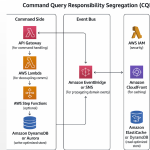 CQRS on AWS Separating Read and Write Operations for Performance and Scalability
 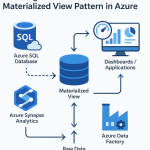 Boosting Performance with the Materialized View Pattern in Azure
  Scalability Patterns in the Cloud AWS & Azure Approaches
  Leveraging SharePoint for Performance Tracking Monitoring Team and Project Progress
  How to Cut Your Azure Bill in Half Without Losing Performance
  Azure Functions vs. Azure Container Apps Choosing Your Serverless Compute