
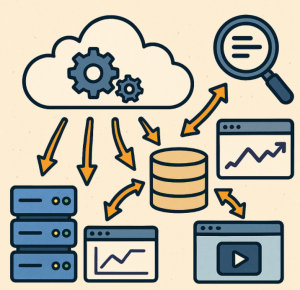
As modern applications move to distributed and cloud-native architectures, observability becomes critical for ensuring system reliability, diagnosing issues, and improving performance. Among the three pillars of observability—logs, metrics, and traces—logs often form the foundation for troubleshooting. However, in distributed environments, logs are scattered across multiple services, making centralized logging an essential pattern.
In this blog, we’ll explore observability patterns in Microsoft Azure with a focus on centralized logging, common challenges, and recommended design approaches.
Why Centralized Logging in Azure?
When applications are spread across Azure App Services, Azure Kubernetes Service (AKS), Functions, VMs, and PaaS services, logs can easily become fragmented. Centralizing logs ensures:
- Single Pane of Glass: Unified view of all application and infrastructure logs.
- Faster Troubleshooting: Correlating logs across components.
- Security & Compliance: Audit trails stored in a secure, tamper-proof location.
- Scalability: Easier to handle growing volumes of log data.
Key Observability Patterns for Centralized Logging in Azure
1. Azure Monitor & Log Analytics Workspace
At the heart of Azure’s observability ecosystem is Azure Monitor and its Log Analytics Workspace.
- Logs from multiple sources (VMs, AKS, App Services, Azure Firewall, etc.) can be ingested.
- Data is stored in a central workspace, queryable with Kusto Query Language (KQL).
- Integrates with Azure Monitor Alerts, Workbooks, and Azure Sentinel (for SIEM use cases).
Pattern:
- Configure diagnostics settings for Azure resources to send logs to a shared Log Analytics workspace.
- Use resource tags to partition and filter logs.
2. Event-Driven Log Collection with Event Hubs
Some scenarios require handling high-volume streaming logs.
- Route diagnostic logs or custom application logs to Azure Event Hubs.
- From Event Hubs, logs can be consumed by Stream Analytics, Databricks, or custom processors before being stored in a Log Analytics workspace or Azure Data Lake for long-term retention.
Pattern:
- Resource → Diagnostic Settings → Event Hub → Stream Processor → Central Storage.
3. Container and Microservices Logging in AKS
Kubernetes workloads generate logs from multiple pods and nodes.
- Use Azure Monitor for Containers or Fluent Bit/Fluentd to collect stdout/stderr logs.
- Forward them to a Log Analytics Workspace or Azure Storage.
- Correlate container logs with infrastructure metrics and traces.
Pattern:
- Fluent Bit DaemonSet → Log Analytics Workspace → Azure Monitor Dashboards.
4. Application-Level Centralized Logging (App Insights + Custom Telemetry)
For application developers, Application Insights offers rich telemetry, including distributed tracing.
- Application logs can be forwarded to Application Insights.
- You can enable diagnostic settings to automatically export logs to a Log Analytics Workspace for centralization.
- Useful for combining infrastructure and application-level logs.
Pattern:
- App Insights Telemetry + Diagnostic Settings → Log Analytics Workspace.
5. Hybrid and Multi-Cloud Centralized Logging
For organizations running workloads in hybrid or multi-cloud environments:
- Use Azure Arc to onboard non-Azure resources.
- Send logs from on-premises systems or AWS/GCP workloads into a centralized Azure Log Analytics Workspace.
Pattern:
- Arc-enabled servers → Azure Monitor Agent → Log Analytics Workspace.
Best Practices for Centralized Logging in Azure
- Standardize Log Formats: Use JSON logging for structured, machine-parsable logs.
- Set Retention Policies: Use Azure Monitor’s data retention rules and export older logs to Azure Data Lake for cost optimization.
- Implement Role-Based Access Control (RBAC): Restrict access to sensitive logs using Azure RBAC.
- Enable Alerts & Automation: Configure alerts based on KQL queries and trigger remediation workflows via Logic Apps or Azure Functions.
- Correlate Across Pillars: Combine logs with metrics and traces for full observability.
Centralized logging in Azure is not just about collecting logs—it’s about building an observability foundation that enables faster incident response, proactive monitoring, and compliance. By adopting patterns like Log Analytics Workspaces, Event Hubs for high-scale ingestion, container logging strategies, and hybrid log centralization with Azure Arc, organizations can create a reliable and scalable observability strategy.
With a strong centralized logging setup, your team will have the visibility needed to keep applications healthy and customers happy.
Extra posts:
 Azure Functions vs. Azure Container Apps Choosing Your Serverless Compute
  Service Mesh Architecture Pattern in Azure Handling Service-to-Service Communication, Security, and Observability
  Follow the Thread Distributed Tracing Patterns for Microservices in Azure
  Scalability Patterns in the Cloud AWS & Azure Approaches
  Building Resilient Applications Availability & Resilience Patterns in AWS and Azure
  Patterns vs. Anti-Patterns: The Architectural Compass