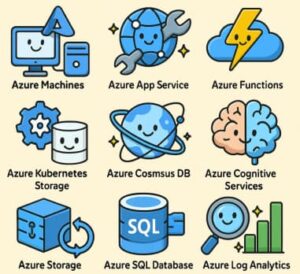
In today’s rapidly evolving cloud landscape, knowing your way around key cloud-platform services is no longer optional. If you’re working in IT, development, or business strategy, understanding the essential services on Microsoft Azure gives you a competitive edge. Azure supports everything from virtual machines to serverless functions to globally distributed databases. According to Microsoft, Azure offers “Compute, Storage, Networking, Databases, AI + Machine Learning” and many more categories.
Here are the top 10 Azure services everyone should know in 2025—what they are, why they matter, and when to use them.
Top 10 Azure Services
1. Azure Virtual Machines (Compute)
Azure Virtual Machines (VMs) form the foundation of Infrastructure as a Service (IaaS). They allow you to deploy Windows or Linux virtual servers in the cloud.
Why it matters: Ideal for legacy workloads, custom applications, and full OS control.
When to use: Migrating on-premises servers, running custom environments, or requiring high configuration control.
2. Azure App Service / Web Apps (PaaS)
A fully managed platform for hosting web apps, APIs, and mobile backends. It eliminates the need to manage infrastructure.
Why it matters: Simplifies operations and lets developers focus on code.
When to use: Deploying web apps, REST APIs, and mobile services that need quick scalability and high availability.
3. Azure Functions (Serverless)
Azure Functions is a serverless compute service that runs code in response to events or triggers.
Why it matters: Cost-efficient, scalable, and perfect for microservices or automation.
When to use: Event processing, background jobs, and automation tasks without managing servers.
4. Azure Blob Storage / Storage Accounts
A scalable and secure storage service for unstructured data such as files, images, videos, and backups.
Why it matters: Cost-effective and reliable data storage for any type of content.
When to use: For storing large files, backups, logs, and data lakes.
5. Azure SQL Database (Managed Relational Database)
A fully managed relational database that automatically handles backups, updates, and scaling.
Why it matters: Reduces management overhead and provides high performance and availability.
When to use: When you need a relational database without maintaining infrastructure.
6. Azure Cosmos DB (Globally Distributed NoSQL Database)
A globally distributed, multi-model NoSQL database that delivers low latency and high scalability.
Why it matters: Supports multiple data models and allows worldwide data replication.
When to use: High-scale applications requiring global reach and real-time performance.
7. Azure Data Factory (Data Integration / ETL)
A cloud-based data integration service used to create, schedule, and orchestrate data workflows.
Why it matters: Simplifies data movement and transformation across on-premises and cloud environments.
When to use: Data pipelines, analytics, and enterprise data integration projects.
8. Azure Active Directory (Identity & Access Management)
Azure AD provides secure identity management and access control for users and applications.
Why it matters: Essential for single sign-on (SSO), multi-factor authentication, and access governance.
When to use: Managing identities across cloud and on-premises environments or integrating SaaS applications securely.
9. Azure DevOps (CI/CD & Collaboration Tools)
Azure DevOps offers tools for version control, CI/CD pipelines, agile planning, and collaboration.
Why it matters: Enables continuous delivery, automation, and teamwork.
When to use: For managing software development lifecycles, automation, and DevOps practices.
10. Azure Logic Apps (Workflow Integration)
A low-code/no-code platform for building automated workflows that connect apps, data, and services.
Why it matters: Simplifies process automation and application integration.
When to use: Automating repetitive tasks, connecting systems, or orchestrating business workflows.
Bonus Notes & Trends
- The shift toward serverless and microservices architectures makes services like Functions, Logic Apps, and Cosmos DB increasingly important.
- Hybrid and multi-cloud adoption is on the rise, with Azure Arc and Azure Stack bridging on-premises and cloud systems.
- Security and governance remain core—identity, monitoring, and cost management are essential for any cloud environment.
- For SEO optimization, include long-tail keywords such as “how to use Azure Virtual Machines,” “Azure Cosmos DB for global apps,” and “Azure Data Factory ETL pipelines.”
These ten Azure services represent the backbone of Microsoft’s cloud platform. They cover the essentials—compute, storage, databases, serverless, identity, DevOps, and data integration.
Whether you’re an architect, developer, or business leader, mastering these Azure services will help you design efficient, scalable, and secure cloud solutions.
Start small—pick one service, explore Azure documentation, and build your expertise step by step.
Extra posts:
 Top 7 Azure Services You Didn’t Know You Needed
  Unlocking the Power of AI with Azure Cognitive Services
  Extracting Information from PDFs and Storing in a Database Using Azure AI Services
  Enhancing Copilot Bots with Azure OpenAI Services
  Top AI Photo Editing Tools to Transform Your Images in 2025 Top AI Tools for Video Making in 2025 Revolutionizing Content Creation