
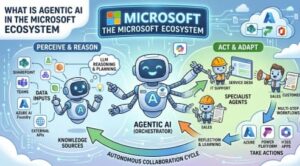
Artificial intelligence has rapidly moved from simple automation tools to intelligent systems that can understand, reason, and perform complex tasks. The next major evolution in this space is Agentic AI.
Traditional AI applications usually work by receiving a request, processing it, and generating a response. They are useful, but they depend heavily on humans to guide every step.
Agentic AI changes this approach.
Instead of only answering questions, AI agents can understand goals, create plans, use external tools, access business systems, maintain context, and complete tasks with limited human intervention.
Within the Microsoft ecosystem, Agentic AI combines cloud AI services, developer frameworks, and enterprise data platforms to create intelligent digital workers.
The main technologies supporting this ecosystem include:
- Azure AI Foundry for building and managing AI solutions
- Semantic Kernel for agent orchestration and tool integration
- Microsoft Graph for accessing enterprise data and applications
Together, these technologies provide the foundation for building powerful AI agents.
What Is Agentic AI?
Agentic AI refers to AI systems designed to act as agents rather than simple response generators.
An AI agent typically has four major capabilities:
1. Goal-Oriented Behavior
The first difference between generative AI and agentic AI is the ability to work toward a goal.
A normal AI assistant might answer:
“Here is how you create a sales report.”
An agentic AI system can work toward:
“Create my sales report and prepare it for my manager.”
The agent can determine what information is required, what systems need to be accessed, and what steps should happen next.
The goal becomes the starting point for action.
2. Planning and Reasoning
Agentic AI systems can break large tasks into smaller steps.
For example, if a user asks:
“Prepare a customer meeting summary and send a follow-up email.”
The agent may decide it needs to:
- Find the customer meeting details
- Retrieve notes and documents
- Analyze important points
- Generate a summary
- Draft an email
- Request approval before sending
This planning ability allows agents to handle workflows instead of single interactions.
3. Tool Usage and API Calling
Large language models are powerful, but they cannot directly perform business operations.
An AI model cannot independently:
- Update a CRM record
- Schedule a meeting
- Access company files
- Send an email
Agents solve this problem by using tools.
Tools can include:
- APIs
- Databases
- Enterprise applications
- Search systems
- Internal business services
The agent decides which tool is needed based on the task.
For example, a workplace assistant may use Microsoft Graph to access calendar information, retrieve documents, and interact with Microsoft 365 services.
4. Memory and Context
A key feature of useful AI agents is the ability to maintain context.
Without memory, every conversation starts from zero.
With memory, an agent can understand:
- Previous conversations
- User preferences
- Past tasks
- Business information
- Frequently used workflows
Memory helps agents provide more personalized and efficient experiences.
For enterprises, this is critical because employees often work with long-running projects and complex processes.
Microsoft Agentic AI Ecosystem Explained
Microsoft’s approach to Agentic AI focuses on combining AI models, cloud infrastructure, developer tools, and business data.
The ecosystem has three major building blocks:
Azure AI Foundry
Azure AI Foundry provides the platform for developing AI applications and intelligent agents.
It gives developers access to AI models, AI services, evaluation tools, deployment capabilities, and enterprise-grade infrastructure.
In an agent-based system, Azure AI Foundry provides the intelligence layer.
It helps organizations:
- Select and manage AI models
- Build AI-powered applications
- Test AI performance
- Deploy solutions securely
- Monitor AI workloads
The AI model is responsible for understanding language, generating responses, and supporting reasoning.
However, the model alone is not the complete agent.
The agent requires orchestration, memory, and access to tools.
Semantic Kernel: The Agent Orchestration Layer
Semantic Kernel is Microsoft’s open-source SDK for building AI-powered applications.
It acts as a connection layer between AI models and software systems.
The purpose of Semantic Kernel is to help developers create applications where AI can:
- Understand user goals
- Select available tools
- Execute workflows
- Manage context
- Connect with external services
A major feature of Semantic Kernel is its support for plugins.
Plugins allow developers to expose existing software functions to AI agents.
For example, a calendar plugin could provide functions like:
- Find available meeting times
- Create calendar events
- Update appointments
The AI agent can then decide when these functions should be used.
This creates a bridge between natural language and software operations.
How Semantic Kernel Enables Planning
Planning is one of the most important parts of agentic systems.
A user may provide a high-level objective, but the agent needs to determine the required actions.
For example:
“Help me prepare for my sales meeting.”
The agent could identify multiple tasks:
- Find customer history
- Review previous emails
- Collect recent activity
- Create discussion points
- Prepare a meeting summary
Semantic Kernel helps organize these workflows by connecting AI reasoning with executable functions.
This allows developers to create agents that behave more like assistants that complete work rather than chat interfaces.
Microsoft Graph: Connecting Agents to Enterprise Data
An AI agent becomes much more valuable when it can access real business information.
Microsoft Graph provides a unified way to connect applications with Microsoft 365 services.
Agents can work with data from:
- Outlook emails
- Calendar events
- Microsoft Teams
- OneDrive files
- SharePoint content
- User and organization information
For example, an employee could ask:
“Find the documents related to my last customer meeting and create a summary.”
An agent could use Microsoft Graph to:
- Locate the meeting
- Find related files
- Retrieve relevant information
- Generate a summary
Instead of employees manually searching through multiple applications, the agent coordinates the process.
Real-World Example: An Enterprise AI Agent Workflow
Consider a finance employee who asks:
“Analyze last month’s expenses and create a report.”
A traditional AI assistant might explain how to create the report.
An agentic AI system could:
First, understand the objective.
The agent identifies that it needs financial data, analysis, and reporting.
Next, it creates a plan.
The plan may include:
- Retrieve expense records
- Organize information
- Identify unusual spending
- Create a summary
- Generate a report
Then it calls the required tools.
The agent may connect to databases, business applications, or Microsoft services.
Finally, it produces the completed output.
This workflow demonstrates the difference between AI that generates text and AI that completes tasks.
Why Agentic AI Matters for Businesses
Organizations are moving toward AI systems that can support employees in daily workflows.
Agentic AI can help with:
Customer Service
Agents can:
- Review customer history
- Identify issues
- Suggest solutions
- Update customer records
Software Development
Developer agents can:
- Analyze problems
- Search documentation
- Generate code
- Assist with testing
Business Operations
Agents can:
- Create reports
- Manage workflows
- Summarize information
- Automate repetitive tasks
The goal is not to replace every human activity but to reduce manual work and allow employees to focus on higher-value decisions.
The Future of Agentic AI in Microsoft
The future of enterprise AI is moving beyond chat-based experiences.
AI agents will increasingly become part of everyday business processes.
Employees will interact with intelligent systems that can:
- Understand objectives
- Take action
- Use company knowledge
- Coordinate workflows
- Adapt to user needs
Microsoft’s combination of Azure AI Foundry, Semantic Kernel, and Microsoft Graph creates a strong foundation for this next generation of AI applications.
Agentic AI represents a shift from AI that simply responds to AI that actively helps accomplish goals.

Agentic AI in the Microsoft ecosystem combines three powerful ideas:
Azure AI Foundry provides AI capabilities and infrastructure.
Semantic Kernel gives developers the tools to build intelligent agent workflows.
Microsoft Graph connects agents with enterprise data and applications.
Together, these technologies allow organizations to create AI agents that can plan, use tools, maintain context, and automate complex tasks.
The future of AI is not only about generating answers. It is about building intelligent systems that can understand objectives and help people achieve real outcomes.
Extra posts:
 Agentic AI in Microsoft Teams: The Future of Workplace Automation (Technical Deep Dive)
  Agentic AI in IT: Self-Healing Systems and Smart Incident Response (Microsoft Ecosystem Perspective)
  How Microsoft Copilot Studio Fits Into the Power Platform Ecosystem
  Deep Dive: Implementing Retrieval-Augmented Generation (RAG) with Azure AI Search
  Automating Technical Proposal Drafts Using Copilot: The Future of Smarter Proposal Writing
 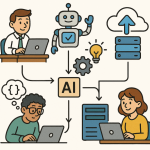 How Agentic AI Works and How to Build It in Azure