
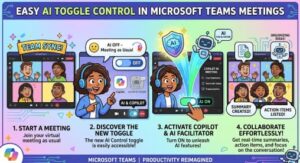
Microsoft Teams is about to give meeting organizers and presenters something many organizations have been asking for: more control over when artificial intelligence is active during a live meeting.
Starting with a phased rollout in August 2026, Microsoft Teams will introduce a new in-meeting control that allows licensed organizers and presenters to turn Meeting AI, including Microsoft 365 Copilot and Facilitator, on or off while a meeting is already underway.
The change is particularly significant for businesses that use AI meeting tools regularly but also need to discuss confidential, sensitive, or restricted information during some parts of a conversation. Instead of treating AI as an all-or-nothing decision made before a meeting starts, Teams will allow authorized users to make that decision in real time.
Microsoft updated the rollout information on August 21, 2026, moving the expected schedule later than originally announced.
A New Way to Control Meeting AI
Microsoft Teams has increasingly integrated AI into the meeting experience. Copilot can help participants understand discussions, identify important points and generate useful insights, while Facilitator can support meetings with AI-powered assistance and notes.
The new control is designed to make these capabilities more flexible.
For meetings where AI is permitted by an organization’s policies, licensed organizers and presenters will see a new Meeting AI control in the Teams meeting toolbar. From there, an authorized user can turn Meeting AI on or off during the meeting.
An AI status indicator will also help participants understand whether Meeting AI is currently active.
That visibility is important. AI-powered meeting features can involve meeting content, speech-to-text information and other meeting artifacts, so participants need to know when those capabilities are being used.
The change essentially gives meeting leaders a simple choice: use AI when it adds value and switch it off when the conversation requires greater privacy.
Why This Matters for Businesses
The timing is notable because organizations are becoming more comfortable with workplace AI while simultaneously paying closer attention to privacy, compliance and data governance.
A typical business meeting can move through several different types of discussion. A team might spend the first 30 minutes reviewing project milestones and asking Copilot to summarize the conversation. Later, the same meeting could move into a sensitive personnel matter, confidential business information or another topic that the organization does not want processed through AI meeting features.
Previously, organizations had to rely heavily on meeting settings and policies established before the meeting.
The new Teams capability provides another layer of control during the meeting itself.
For IT administrators, this does not replace existing policies. Instead, Microsoft says the new controls will respect the organization’s existing Meeting AI policies and meeting options.
If Meeting AI is disabled by policy, the new controls will not appear.
That means organizations remain in control at the administrative level, while eligible organizers and presenters gain more flexibility within the boundaries established by IT.
Turning AI Off Also Turns Off Recording and Transcription
One of the most important details of the update is that disabling Meeting AI has consequences beyond Copilot and Facilitator.
Microsoft says that when Meeting AI is turned off, recording and transcription are also turned off.
This is an important point for organizations updating their internal Teams guidance.
When Meeting AI is active with transcription, AI and transcription remain closely connected. Turning on Meeting AI automatically turns on transcription and generates a recap. Likewise, starting transcription automatically enables Meeting AI and recap functionality.
In practical terms, organizations and meeting leaders need to understand that transcription cannot simply be treated as an independent feature if they want to prevent Meeting AI from being used.
If the goal is to keep Meeting AI out of a particular portion of a meeting, users should make sure both Meeting AI and transcription remain off.
This dependency could become one of the most common questions for helpdesk and Microsoft 365 administrators after the feature reaches users.
What Happens to Existing AI Content?
Turning Meeting AI off does not erase content that was already generated.
Microsoft says previously generated artifacts remain available and continue to be governed by applicable retention policies.
That distinction matters.
For example, if Meeting AI was active during the first part of a meeting and generated notes or other artifacts, turning the feature off later does not mean those previously created materials disappear. Existing organizational retention and compliance rules continue to apply.
At the same time, once AI is disabled, new Copilot and Facilitator responses and notes will no longer be generated.
Organizations should therefore explain the difference between stopping new AI activity and deleting previously generated meeting content.
Who Gets the New Control?
The feature is aimed at licensed meeting organizers and presenters.
It applies to Microsoft 365 tenants where Meeting AI, including Copilot and/or Facilitator, has been enabled through organizational policy and is available in Meeting Options.
The feature will be available across:
- Microsoft Teams desktop
- Microsoft Teams web
- Microsoft Teams mobile
- Microsoft 365 Copilot and Meeting AI experiences
However, simply having Teams does not automatically mean every user will see the control.
Existing licensing requirements still apply, and organizational policies continue to determine whether Meeting AI can be used.
If an administrator has disabled Meeting AI through policy, the in-meeting toggles will not appear.
Microsoft Delays the Rollout Schedule
The rollout timeline has also changed.
Microsoft’s latest update, published August 21, 2026, says the Targeted Release rollout will begin in mid-August 2026 and is expected to finish by late August 2026.
For General Availability worldwide, Microsoft expects the rollout to begin in late August 2026 and finish by early September 2026.
That represents a delay compared with the earlier schedule, which had targeted early July for the initial rollout and mid-July for broader availability.
Because Microsoft 365 features are commonly deployed in stages, organizations may not see the new control immediately even after the rollout begins.
IT teams should therefore avoid assuming that a missing toggle means something is misconfigured. Availability can depend on the rollout stage, licensing, meeting policy and other existing settings.
No Immediate Administrative Action Required
The good news for Microsoft 365 administrators is that no action is required to enable the rollout.
Existing tenant policies, meeting options, sensitivity labels, retention policies, recording behavior and licensing requirements remain in place.
However, “no action required” does not necessarily mean “nothing to prepare.”
Microsoft recommends that organizations update internal training and documentation so users understand where the Meeting AI control appears and who is allowed to use it.
Helpdesk teams should also be prepared for questions about the relationship between Meeting AI, transcription and meeting recap.
That education could be especially important for employees who assume that switching off Copilot simply disables AI while leaving transcription unaffected.
What Employees Need to Know
For everyday Teams users, the main message is relatively simple.
If you are an eligible organizer or presenter and Meeting AI is allowed for the meeting, you may soon have the ability to switch it on or off during the conversation.
If a meeting moves into a sensitive subject, you can turn Meeting AI off.
But if you want to prevent AI meeting processing, remember that transcription also matters.
Starting transcription automatically enables Meeting AI and recap when the relevant configuration applies.
In other words, users should not start transcription while assuming that AI will remain disabled.
That connection should become a standard part of corporate Teams training.
A Small Teams Feature With a Bigger Privacy Message
On the surface, the new toggle may look like a minor Teams interface update.
It is actually part of a broader shift in how companies are managing workplace AI.
Organizations increasingly want employees to benefit from AI without losing control over when and how sensitive information is processed. Giving meeting leaders an in-the-moment control acknowledges that business conversations are not always predictable.
A meeting can begin as a routine project discussion and unexpectedly turn into a confidential conversation.
The ability to respond immediately gives organizations another practical safeguard while allowing AI to remain useful for the rest of the meeting.
The feature also reinforces an important principle: AI adoption does not have to mean AI is active all the time.
For Microsoft Teams users, the upcoming Meeting AI toggle should make that principle much easier to apply.
As the rollout progresses through late August and early September, organizations should watch for the new control, update their Teams documentation and make sure employees understand the connection between AI, transcription and recap.
For businesses already using Microsoft 365 Copilot and Facilitator, the update could prove to be a valuable improvement—not because it adds another AI capability, but because it gives people greater control over when those capabilities are used.
Extra posts:
 Microsoft Teams Rooms Gets Smarter: AI-Powered Facilitator Brings Real-Time Meeting Notes to Physical Meeting Rooms
  Microsoft Teams Adds Mandatory Participant Consent Before Meetings: What Admins Need to Know
  Microsoft Teams Introduces AI Meeting Recap Without Transcripts, Helping Organizations Balance Productivity and Compliance
  Microsoft Teams Mobile Calendar to Require Latest App Update by October 2026: Microsoft Announces Critical Change for iOS and Android Users
  Microsoft 365 Copilot Notebooks Get a Major Upgrade: What Users and IT Teams Need to Know
  Microsoft Outlook Is Retiring Meeting Insights: What Business Users Need to Know