
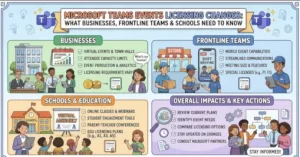
Microsoft is changing how Teams Events licensing works for business, frontline and education customers, separating event capabilities into two categories: foundational and advanced.
The changes are tied to a broader licensing shift that began in April 2026, when Microsoft moved Teams Events capabilities that had previously been associated with Teams Premium into Teams Enterprise. The latest update further clarifies which licenses provide event functionality, how many people can attend, and when organizations need additional capacity licenses.
The new structure is scheduled to roll out worldwide in late September 2026.
For IT and licensing teams, the key issue is straightforward: having Microsoft Teams does not necessarily mean an event organizer has access to every Teams Events capability.
Two Tiers Will Define Teams Events Capabilities
Microsoft is dividing Teams Events functionality into foundational event features and advanced event features.
Foundational licensing covers the capabilities organizations need to create and run Teams events. Advanced licensing adds broader production, management, engagement, customization and analytics capabilities.
Microsoft’s current Teams Events documentation confirms that eligible foundational licenses support events with up to 1,000 attendees when registration and full interactivity are involved, while events without registration and interactivity can support up to 10,000 attendees. Advanced licensing raises the interactive, registered-event threshold to 3,000 attendees.
That distinction matters because the license assigned to the event organizer determines which capabilities and capacity limits are available.
Which Microsoft Licenses Provide Teams Events?
The licensing structure differs depending on the type of organization.
Small and medium-sized businesses
For SMB customers, foundational Teams Events capabilities are available with:
- Microsoft 365 Business Basic
- Microsoft 365 Business Standard
- Microsoft 365 Business Premium
These licenses provide the core event functionality, but they do not include the advanced event feature category.
Frontline workers
Frontline organizations can use foundational Teams Events capabilities with:
- Microsoft 365 F1
- Microsoft 365 F3
- Office 365 F3
Advanced event features are not included in this category.
Enterprise customers
Enterprise customers are positioned differently.
Advanced Teams Events capabilities are available with:
- Office 365 E1
- Office 365 E3
- Office 365 E5
- Microsoft 365 E3
- Microsoft 365 E5
- Microsoft 365 E7
This is particularly important for organizations that require the full Teams Events feature set rather than basic event creation and delivery.
Microsoft describes advanced capabilities as including features such as event workflows, customization, production controls, monitoring, insights and higher engagement capacity.
Education customers
Education licensing is divided between student and faculty licenses.
Foundational event capabilities include eligible Office 365 and Microsoft 365 A1 licenses, as well as A3 and A5 licenses for students.
Faculty users with Office 365 or Microsoft 365 A3 and A5 licenses can access advanced event features.
That distinction means education administrators may need to check the specific license assigned to an event organizer rather than assuming all users in an academic tenant have identical Teams Events functionality.
Teams Premium Is No Longer the License for New Teams Events Capabilities
One of the most significant changes involves Teams Premium.
Microsoft says that, as of April 1, 2026, some features previously associated with Teams Premium moved into Teams Enterprise. New Teams Premium licenses purchased after that date do not directly provide the full Teams Events capability set.
There is an important transition period for existing customers.
Organizations that purchased Teams Premium before April 1, 2026 can continue using the previously included Teams Premium experiences until those licenses expire. Microsoft specifically notes that this includes the previous Teams Events functionality during the applicable term.
For organizations renewing or purchasing licenses now, however, the distinction is much more important.
Teams Premium should not be treated as the default license for the full Teams Events feature set.
Organizations that need advanced Teams Events capabilities should review whether event organizers have an eligible Teams Enterprise license.
Event Size Will Also Determine Licensing Requirements
The new model introduces clear capacity thresholds.
| Event configuration | Foundational | Advanced |
|---|---|---|
| Number of events | No limit | No limit |
| Maximum attendees with registration/full interactivity | 1,000 | 3,000 |
| Maximum attendees without registration/interactivity | 10,000 | 10,000 |
For organizations running large conferences, company-wide broadcasts, educational events or public-facing sessions, the 3,000-attendee threshold deserves particular attention.
Microsoft says organizations hosting events above that threshold need an Attendee Capacity Pack assigned to the organizer. These add-on licenses can extend event capacity to as many as 100,000 attendees.
The capacity pack model is based on the organizer’s assigned license and the maximum number of attendees the event needs to accommodate.
Microsoft currently lists capacity options ranging from 5,000 through 100,000 attendees.
What the Change Means for IT Administrators
For Teams and Microsoft 365 administrators, the update is less about changing how users join events and more about making sure the right people have the right licenses.
The first step is to identify the users who actually organize or produce Teams Events.
Organizations should then compare those users’ licenses against the new foundational and advanced categories.
A practical review should include:
- Event organizers: Identify employees responsible for scheduling or managing Teams Events.
- License assignments: Check whether organizers have foundational or advanced event eligibility.
- Event size: Identify events expected to exceed 1,000 or 3,000 attendees.
- Capacity packs: Determine whether large events require an Attendee Capacity Pack.
- Existing Teams Premium agreements: Check whether older Teams Premium licenses are still within their original term.
- Internal documentation: Update help-desk and deployment guidance so employees understand the new licensing model.
Microsoft’s documentation also confirms that administrators can manage event access through licensing assignments and Teams administrative controls.
What Organizations Should Watch Before the Rollout
The timing is especially relevant for organizations planning major events during the final quarter of 2026.
A licensing mismatch may not affect ordinary Teams meetings, but it can become significant when an organization needs advanced event controls or expects thousands of participants.
For example, a business planning a 5,000-person interactive event cannot simply rely on the standard 3,000-attendee advanced-event threshold. The organizer’s licensing and capacity requirements need to be addressed in advance.
Microsoft also says external event participants may be required to complete email one-time passcode verification. The company describes this as a service-protection measure intended to protect service health and reduce fraud or abuse, rather than a feature tied to a particular licensing tier.
The Bigger Teams Events Picture
The licensing change arrives as Microsoft continues consolidating its event experience in Teams.
Microsoft has retired Teams Live Events as of June 30, 2026 and is directing organizations toward the unified Teams Events experience for digital and hybrid events. Events scheduled before the retirement date remain supported through February 28, 2027.
That makes the licensing changes more consequential for organizations that previously depended on large-scale Teams broadcasting.
Instead of evaluating Teams Events as an isolated feature, Microsoft 365 administrators increasingly need to consider the event platform, organizer license, attendee capacity and required production features as one connected deployment decision.
What Happens Next
The worldwide rollout is expected to take place in late September 2026, making license reviews particularly timely for organizations with events scheduled soon.
The immediate task for administrators is not necessarily to change every Teams license. It is to identify which users organize events, understand the capabilities those users require and match their licenses to the expected audience size.
For organizations running events above 3,000 attendees, capacity planning becomes an additional licensing consideration.
As Teams continues moving toward a unified event experience, the distinction between standard collaboration licenses, Teams Premium and Teams Enterprise is becoming increasingly important. Organizations that review their event requirements before scheduling large programs can reduce the risk of discovering a licensing or capacity limitation shortly before an event goes live.
Source: Microsoft Teams Events licensing documentation and Microsoft Learn guidance.
Extra posts:
 Microsoft Teams Mobile Calendar to Require Latest App Update by October 2026: Microsoft Announces Critical Change for iOS and Android Users
  Microsoft Teams to Blur QR Codes From External Users by Default in New Security Update
  Microsoft 365 Copilot Licensing Shake-Up Explained
  Copilot Studio Pricing Explained for Enterprises: Licensing, Costs, and ROI in 2026
  Unlocking the Power of Microsoft Teams Premium Why It’s Worth the Investment
  Microsoft Teams and Google Calendar Sync Is Retiring: What Businesses Need to Know Before October 2026