
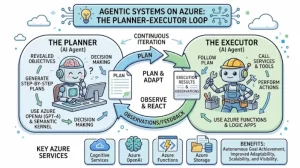
An AI agent that can answer a question is useful. An AI agent that can break a business problem into steps, call the right tools, evaluate results, and adjust its approach when something goes wrong is far more powerful. But building that kind of system requires more than connecting a large language model (LLM) to a collection of APIs.
The architecture matters.
The planner-executor pattern provides a practical way to build agentic systems that handle complex, multi-step workflows without losing control over execution. On Microsoft Azure, this pattern can combine Azure-hosted models, tool integrations, application services, and enterprise security controls to automate tasks such as incident investigation, document processing, customer support, and cloud operations.
For solution architects and developers, the central challenge is designing a loop that can reason about what needs to happen, execute actions safely, inspect the results, and decide what to do next. Here’s how that architecture works, where Azure fits in, and what to consider before putting it into production.
What Is the Planner-Executor Pattern?
The planner-executor pattern separates two responsibilities that are often mixed together in simpler AI applications.
- Planner: Interprets the user’s objective, identifies constraints, and creates a sequence of actionable steps.
- Executor: Performs those steps using approved tools, APIs, services, or application functions.
A third component, the evaluation and control layer, checks execution results and determines whether the system should continue, revise its plan, request human approval, or stop.
Consider a user asking an AI operations assistant to investigate a sudden increase in Azure application latency. A basic chatbot might explain common causes. A planner-executor agent could take a more structured approach:
- Retrieve relevant Azure Monitor metrics.
- Inspect application logs for errors and latency spikes.
- Compare the incident timeline with recent deployments.
- Correlate the evidence to identify likely causes.
- Produce a report with supporting evidence and recommended remediation.
The planner determines which investigations are necessary. The executor retrieves the data. The control layer checks whether the evidence supports the next decision.
This separation makes the workflow easier to test, monitor, and govern. It also prevents the model from treating every intermediate thought as an instruction that must immediately trigger a real-world action.
How the Planner-Executor Loop Works
The pattern is not simply a plan followed by a fixed sequence of API calls. Its main advantage is the feedback loop.
1. Interpret the goal and establish constraints
The process starts when the application receives a request. The system identifies the desired outcome, relevant context, available permissions, and any constraints that affect execution.
For example, “Investigate why the production API is slow” is too broad to execute safely without context. The agent may need to identify the affected service, the time window, the user’s authorization level, and whether it is allowed to access production telemetry.
The application should resolve these requirements before the planner creates its task list. Missing information may require a clarification question rather than a speculative plan.
2. Generate an actionable plan
The planner converts the goal into smaller tasks with clear inputs, expected outputs, and dependencies.
A useful plan is explicit enough for the application to validate. Instead of generating a vague instruction such as “check the logs,” the planner might produce a task containing:
- The target application or resource identifier.
- The time range to investigate.
- The permitted data source.
- The expected result format.
- The condition that determines whether another step is required.
The plan should also identify tasks that can run independently. Retrieving CPU metrics and querying application errors may be parallelizable, while comparing deployment timestamps against observed failures depends on the results of earlier investigations.
Treat the plan as structured data, not merely a paragraph of natural language. A typed schema makes it easier to validate required fields, reject unsupported operations, and enforce limits on task count and execution time.
3. Execute tasks through controlled tools
The executor takes an approved task and invokes the appropriate tool. In an Azure environment, these tools might include application APIs, Azure Monitor queries, Azure Functions, internal business services, or retrieval components backed by enterprise data.
The model should not receive unrestricted access to the underlying infrastructure. Instead, the application exposes a defined set of tools with explicit input schemas and permissions.
For example, an executor might be permitted to query telemetry for a specific resource but not change its configuration. A separate remediation tool could require elevated authorization and explicit human approval.
This design keeps the LLM responsible for selecting and interpreting actions while application code enforces what those actions are actually allowed to do.
4. Evaluate results and update the plan
Execution rarely produces perfect results on the first attempt. A query may return incomplete data, a service may time out, or the evidence may contradict the planner’s initial assumption.
The evaluation layer examines the output and chooses an appropriate next step:
- Continue when the task succeeds and the next dependency is satisfied.
- Retry transient failures within a bounded retry policy.
- Revise the plan when the available evidence changes the investigation.
- Escalate when the system lacks sufficient permissions or confidence.
- Stop when the objective is met or a safety limit is reached.
The important distinction is that a failed action should not automatically trigger unlimited retries or a completely new plan. The system needs explicit recovery rules, resource limits, and a clear definition of success.
5. Return a verifiable outcome
The loop ends when the requested objective has been achieved, the system determines that further progress is not possible, or an execution limit is reached.
The final response should summarize what happened, identify the evidence used, disclose unresolved uncertainties, and distinguish completed actions from recommendations.
For an operations workflow, this could mean reporting the most likely cause of latency, linking the relevant telemetry, and recommending a rollback without performing one automatically.
That distinction is critical in enterprise environments, where an incorrect action can be more costly than an incomplete answer.
Mapping the Pattern to Microsoft Azure
Azure provides several building blocks for implementing this architecture. The right combination depends on the workload, orchestration requirements, and existing application environment.
Azure AI Foundry and model access
Azure AI Foundry provides a platform for building and managing AI applications and agents, with access to supported models and development capabilities. Depending on the chosen agent framework and current service capabilities, it can serve as the model and agent layer that interprets requests, selects tools, and generates structured plans.
The planner should receive only the context it needs. Large amounts of unfiltered telemetry, documentation, or conversation history can increase cost and distract the model from the actual task.
For complex workflows, use a model output schema that specifies task names, dependencies, parameters, and completion criteria. Validate that output before passing it to the executor.
Azure Functions and application APIs
Azure Functions can host individual execution tools, particularly when tasks are event-driven or naturally divided into small operations. Existing application APIs and service endpoints can play the same role.
For example, an incident investigation agent might expose separate functions for querying metrics, retrieving deployment history, and creating an incident summary.
Keep these tools focused. A function that performs one well-defined operation is easier to secure and test than a generic endpoint that accepts arbitrary instructions.
Azure Logic Apps and workflow orchestration
Azure Logic Apps can help orchestrate integrations and business processes involving connectors, approvals, and established workflow steps. It is particularly useful when some parts of the process are deterministic and do not need an LLM to decide what happens next.
A practical architecture might let the planner identify the work to perform while Logic Apps handles a predefined approval or notification workflow. This avoids asking a probabilistic model to manage every operational detail.
Azure Monitor, Application Insights, and observability
Agents need visibility into both their own behavior and the systems they interact with. Azure Monitor and Application Insights can support monitoring of application components, execution latency, failures, and other operational signals, depending on the instrumentation used.
Record the plan version, task identifiers, tool invocations, execution duration, retry count, and final outcome. Avoid logging secrets, access tokens, or unnecessary personal data.
For production deployments, monitor the agent as an application, not just as a model endpoint.
Five Architecture Decisions That Make the Loop Reliable
Implementing the pattern is straightforward compared with operating it safely at scale. These five decisions deserve attention early in the design.
1. Use bounded planning
Limit the number of tasks, recursion depth, execution time, and total model calls. Define a maximum budget for each request.
Without these limits, an agent can spend too long reconsidering its plan or repeatedly investigating the same problem.
2. Separate planning from authorization
A model-generated plan is a proposal, not a permission grant. Validate every requested tool, resource identifier, and operation against application policies.
Use Microsoft Entra ID where appropriate for identity and access management, managed identities for supported Azure service-to-service authentication, and least-privilege role assignments. Require approval for destructive or high-impact actions.
3. Make execution resilient
Design tools to handle timeouts, throttling, transient failures, and partial results. Apply bounded retries with backoff where appropriate, and use idempotency controls for operations that might otherwise execute twice.
The planner should receive a structured error or status result, not an opaque exception message that encourages guesswork.
4. Preserve state and task history
Store enough state to understand which tasks have completed, which outputs they produced, and why the current plan changed.
For long-running workflows, persist execution state outside the model’s conversational context. This supports recovery after interruptions and provides a record for troubleshooting.
5. Evaluate the complete workflow
A correct plan does not guarantee a correct outcome. Test the full loop using representative requests, missing data, misleading evidence, tool failures, permission denials, and conflicting results.
Measure task completion rate, tool-call accuracy, latency, cost per workflow, retry frequency, and the rate of human intervention. Include tests that verify the agent stops when it should.
When to Use Planner-Executor Versus a Fixed Workflow
The planner-executor pattern is most useful when the exact steps depend on information discovered during execution. Incident investigation, complex research, and multi-source document analysis are good candidates.
A fixed workflow is usually better when the sequence is known, the requirements are stable, and every step must follow a predictable path. Examples include routine data synchronization, standard approval processes, and scheduled report generation.
A hybrid approach is often the strongest design. Use deterministic workflows for critical business rules, security checks, and approvals. Introduce planning where the system genuinely needs to adapt to new information.
This reduces unnecessary model calls while retaining flexibility where it creates measurable value.
Practical Takeaway: Start With One Bounded Workflow
The best way to adopt the planner-executor pattern on Azure is to choose a narrow, measurable business problem rather than building a general-purpose autonomous agent.
Start with a workflow that has a clear completion condition, a small set of approved tools, limited execution permissions, and a human escalation path. Implement structured planning, validate every task, record execution outcomes, and test recovery behavior before expanding the agent’s responsibilities.
Once the workflow is reliable, add capabilities incrementally: parallel execution, persistent state, richer retrieval, or additional tools. Measure whether each addition improves outcomes enough to justify its operational cost.
The architectural principle is simple: let the model decide what to investigate next, let controlled application components perform the work, and let explicit policies determine what the system is allowed to do.
That balance is what turns an experimental AI agent into a maintainable, observable, and production-ready system on Azure.
Extra posts:
 Building Resilient Cloud Architectures with Azure’s Agentic Agents: Migration, Observability, and Optimization
  Event-Driven Architectures for Agentic Systems: Building Responsive, Intelligent, and Scalable AI
  Building Resilient Systems with Immutable Infrastructure on Azure
  Building Resilient Applications Availability & Resilience Patterns in AWS and Azure
  How Agentic AI Works and How to Build It in Azure
  MLOps Architectures Building Scalable AI Systems