
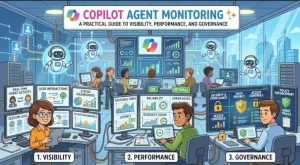
An AI agent can answer hundreds of questions correctly and still fail when it matters most. It might retrieve outdated information, call the wrong action, exceed its response-time target, or expose data to someone who should not have access. Without effective monitoring, these problems can go unnoticed until users report them—or a security incident forces the issue.
Copilot agent monitoring helps teams understand how agents behave, how well they perform, and whether they operate within defined business and security requirements. For solution architects, IT administrators, and developers working with Microsoft Copilot Studio and the broader Microsoft ecosystem, monitoring is an essential part of running AI agents in production.
The goal is not simply to count conversations. It is to connect technical signals with user outcomes, identify failures before they spread, and give teams enough evidence to improve their agents confidently.
What Is Copilot Agent Monitoring?
Copilot agent monitoring is the process of collecting, analyzing, and acting on information about an agent’s activity, reliability, performance, and operational health.
Depending on the agent’s architecture and deployment model, monitoring may cover:
- Conversation quality: Whether the agent understands user requests and provides useful, relevant responses.
- Execution reliability: Whether topics, tools, connectors, APIs, and other dependencies complete successfully.
- Performance: Response latency, timeout frequency, throughput, and service availability.
- Security and compliance: Access controls, data handling, policy violations, and auditability.
- Business outcomes: Task completion rates, escalation frequency, user satisfaction, and cost per successful interaction.
Microsoft Copilot Studio provides analytics and conversation-level troubleshooting capabilities for supported agent experiences. Azure Application Insights and Azure Monitor can provide additional telemetry for custom components and instrumented applications, while Microsoft Purview and Microsoft Entra provide complementary governance and identity controls.
These capabilities serve different purposes. No single dashboard automatically provides complete visibility into every Copilot agent, especially when an agent combines Microsoft services with custom APIs, external systems, and third-party models.
Why Monitoring Matters for Production AI Agents
Traditional application monitoring often focuses on predictable technical behavior: server availability, CPU utilization, database latency, and HTTP errors. AI agents introduce another layer of uncertainty.
An agent can return an HTTP 200 response and still produce an incorrect answer. A tool call can succeed while returning incomplete information. A conversation can finish without achieving the user’s actual objective.
That makes monitoring an operational discipline as much as a technical one.
Consider an internal IT support agent designed to reset passwords and troubleshoot access issues. A conventional dashboard might show that the agent is available and responding quickly. A more useful monitoring approach would also reveal whether authentication checks are working, whether the correct support workflow is being triggered, and how often users abandon conversations or escalate to a human technician.
Monitoring helps teams answer four important questions:
- Is the agent available? Are its components responding within acceptable limits?
- Is it behaving correctly? Are responses grounded in appropriate information, and are tools executing as intended?
- Is it operating safely? Are identity, access, data protection, and policy controls functioning as designed?
- Is it delivering value? Are users completing the tasks the agent was built to support?
These questions should shape the monitoring strategy before an agent reaches production.
5 Essential Areas to Monitor
1. Conversation Quality and User Outcomes
Start with the experience users actually receive. Track whether conversations resolve requests, produce useful answers, or require human intervention.
Useful metrics include:
- Conversation completion and abandonment rates.
- Escalation or handoff frequency.
- Unanswered and fallback response rates.
- User feedback and satisfaction scores, where available.
- Task-specific success rates validated against business outcomes.
In Copilot Studio, use the available analytics and conversation transcripts to investigate recurring fallback responses, unsuccessful interactions, and patterns in user behavior. Exact metrics and reporting capabilities depend on the agent type and the platform experience in use.
Do not treat conversation volume as a measure of success. An agent that handles 10,000 conversations but resolves only a small percentage of requests may be less valuable than one that reliably completes 1,000 high-impact tasks.
2. Tool Calls, Integrations, and Workflow Execution
Many agents rely on actions, connectors, plugins, Power Automate flows, or custom APIs to retrieve information and perform tasks. These dependencies are common sources of operational failures.
Monitor:
- Tool and API success rates.
- Failed actions, exceptions, and timeout counts.
- Dependency response times.
- Retry frequency and rate-limit errors.
- Authentication and authorization failures.
For example, an HR agent might successfully interpret a request for annual leave but fail when submitting the request to an HR system. Monitoring only the conversational response could make the interaction appear successful when the business transaction never completed.
Instrument custom APIs and workflows to record execution status, correlation identifiers, duration, and sanitized error details. Connect these records to the agent’s conversation or activity identifiers where supported.
This makes it easier to trace a failed request across multiple components without relying on guesswork.
3. Latency, Availability, and Capacity
Users notice slow agents, particularly when a response depends on several sequential tool calls.
Measure end-to-end response time alongside the duration of individual dependencies. Track median latency and higher percentiles, such as p95, because averages can hide the slowest and most frustrating interactions.
Other useful indicators include:
- Timeout and error rates.
- Requests per minute and workload spikes.
- API throttling and quota consumption.
- Availability of critical downstream services.
- Model or service errors exposed through supported telemetry.
Azure Monitor and Application Insights can help monitor instrumented applications and services, including custom APIs and integrations. Use Copilot Studio’s native analytics and troubleshooting features for the agent-specific signals they expose.
Set service-level objectives around the tasks users need to complete. A simple informational agent may tolerate a slightly longer response than an agent supporting a time-sensitive operational workflow.
4. Security, Identity, and Data Governance
Monitoring must account for what an agent can access and what it does with the information it retrieves.
A well-designed monitoring program should examine authentication failures, unusual access patterns, sensitive-data exposure risks, and attempts to bypass intended controls. It should also verify that actions execute using the correct identity and permissions.
Microsoft Entra helps manage identity and access, while Microsoft Purview can support applicable data governance, auditing, and compliance requirements across supported Microsoft environments.
Practical controls include:
- Applying least-privilege permissions to agent actions and service identities.
- Reviewing access to connected data sources.
- Auditing privileged operations and relevant configuration changes.
- Evaluating data loss prevention policies and sensitive-data handling.
- Restricting access to transcripts, logs, and diagnostic records.
Logging itself introduces risk. Conversations can contain personal information, confidential documents, or credentials accidentally pasted by users. Avoid storing unnecessary message content, redact sensitive values, apply appropriate retention policies, and restrict access to monitoring systems.
Monitoring can help identify suspicious behavior, but it does not replace secure architecture, access controls, or formal compliance reviews.
5. Cost and Resource Consumption
An agent that performs well technically may still be expensive to operate. Costs can increase when conversations trigger repeated tool calls, long-running workflows, unnecessary model requests, or excessive retries.
Track the usage and billing indicators available for your deployment, such as message or capacity consumption, API usage, workflow executions, and applicable model costs.
Useful questions include:
- Which workflows consume the most resources?
- Are agents repeatedly retrieving the same information?
- Do failed requests trigger unnecessary retries?
- Are some tasks better handled by deterministic workflows?
- Is resource consumption proportional to successful task completion?
Interpret usage data according to the licensing and billing model in effect. Not every cost category will appear in one monitoring dashboard.
The most meaningful optimization target is often cost per successfully completed task, rather than cost per conversation alone.
How to Set Up Copilot Agent Monitoring
A practical implementation does not require building a large observability platform on day one. Start with the signals that matter most to your agent’s purpose.
Step 1: Define Baselines and Success Criteria
Document the agent’s expected behavior and establish measurable targets.
For example, an IT support agent might have targets for task completion, p95 response latency, failed tool calls, and escalation frequency. Establish baseline values during testing, then refine the thresholds using production evidence.
Avoid arbitrary thresholds that generate constant alerts without helping anyone take action.
Step 2: Enable Native Agent Analytics
Review the monitoring, analytics, and troubleshooting options available in Microsoft Copilot Studio or the relevant Copilot environment.
Use conversation analytics to understand user behavior and inspect supported conversation details when investigating failures. Confirm which metrics are available for your specific agent type, environment, and deployment model.
Native analytics should be the first layer of visibility, not the only layer.
Step 3: Instrument Custom Dependencies
If the agent calls custom services, APIs, or external systems, add application-level telemetry to those components.
Azure Application Insights can capture supported application traces, exceptions, requests, and dependency information. Azure Monitor can help consolidate operational signals and configure alerts for supported resources.
Use consistent correlation identifiers wherever the architecture allows. This helps connect a user-facing failure with the underlying API request, workflow execution, or dependency error.
Step 4: Create Actionable Alerts and Dashboards
Build dashboards around operational questions rather than collecting every available metric.
Start with a small set of indicators:
- Failed conversations or workflows.
- Elevated tool-call error rates.
- p95 latency breaches.
- Authentication or authorization failures.
- Unusual usage or resource consumption.
Configure alerts for sustained problems and significant changes from normal behavior. Assign an owner to each alert and document the first diagnostic steps.
Step 5: Review, Test, and Improve
Monitoring only creates value when teams act on what they learn.
Review recurring failures, compare performance across releases, and test fixes against representative conversations. Maintain evaluation scenarios for important business tasks, including ambiguous requests, missing permissions, invalid inputs, and unavailable dependencies.
Where appropriate, use controlled releases and compare outcomes before expanding deployment. Treat changes to prompts, knowledge sources, tools, and permissions as changes that may affect production behavior.
Practical Takeaways: Turn Telemetry Into Better Agent Operations
Copilot agent monitoring works best when conversation analytics, application telemetry, security controls, and business metrics reinforce one another.
For a Microsoft-focused implementation, begin with Copilot Studio’s available analytics, add Azure Monitor and Application Insights for instrumented custom components, and use Microsoft Entra and Purview capabilities where relevant to your identity and governance requirements.
Then make the monitoring program operational: define ownership, establish realistic thresholds, protect diagnostic data, and investigate failures from the user’s request through the underlying workflow.
Your next step: Choose one production agent, identify its three most important failure scenarios, and define a measurable signal and response procedure for each. That small exercise will reveal monitoring gaps quickly—and provide a practical foundation for scaling observability across your wider Copilot environment.
The objective is not to collect more telemetry for its own sake. It is to make every production agent easier to understand, safer to operate, and more reliable for the people who depend on it.
Extra posts:
 Building an Enterprise ServiceNow AI Copilot Agent with Microsoft Copilot Studio: A Complete Guide to IT Operations Automation, Ticket Auditing, and Engineer Performance Intelligence
  When to Choose Agent Builder Instead of Power Apps: A Practical Guide for Modern Businesses
  Automating Governance with ShareGate A Practical Guide for Businesses
  Supercharging Solution Architecture with Copilot A Practical Guide
  How Do I Secure Copilot? A Practical Guide to Protecting Your AI Assistant
  Governance of AI Agents with Microsoft Entra & Agent 365