
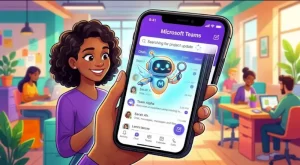
Microsoft is making it easier for people to get AI-powered answers while working on the go. Starting in mid-November 2026, Microsoft Teams users on iOS and Android will be able to launch a Copilot conversation directly from the mobile search experience, without leaving search to open Copilot separately.
The update introduces two entry points for asking Copilot questions: a contextual suggestion that appears as users type at least two words, and an Ask Copilot button at the top of the search results page. Microsoft expects the worldwide rollout to finish by late November 2026, and organizations will not need to take administrative action to enable the feature.
For employees who regularly use Teams to find workplace information, the change is designed to reduce friction between searching for something and getting an answer.
What Is Changing in Microsoft Teams Mobile?
The update brings Microsoft Copilot closer to a familiar part of the Teams mobile interface: the search box.
Previously, users who wanted to ask Copilot a question could need to leave their current search workflow, open Copilot separately, and enter their question again. The new integration gives them a more direct route from a search query to an AI-assisted conversation.
Microsoft is introducing two ways to access the feature.
1. Ask Copilot While Typing
When users enter two or more words in the Teams mobile search box, an option to ask Copilot will appear alongside the usual search suggestions.
This gives users an opportunity to turn a search phrase into a question for Copilot before proceeding to the regular results page. Instead of treating every query as a request to locate a message or piece of content, users can choose to seek an AI-generated answer.
For example, someone typing “project launch” could use the Copilot option to explore a related question, such as what information they need to prepare for a launch. This is an illustrative example of how the feature might be used, not a claim about a specific result Copilot will return.
2. Ask Copilot From Search Results
The second entry point appears after users press Enter to run a search.
An Ask Copilot button will remain available at the top of the search results page. Users can select it to open Copilot with their query, giving them another opportunity to move from searching to asking questions without restarting the process.
Both options serve the same basic purpose: users can carry their existing query into Copilot rather than manually re-entering it in a separate interface.
How the New Copilot Search Experience Works
The workflow is designed to be straightforward for existing Teams mobile users.
- Open Teams search: Start a search from the search box in the mobile app on iOS or Android.
- Enter a query: Type at least two words to trigger the relevant Copilot suggestion.
- Choose how to proceed: Select the Copilot suggestion while typing, or submit the search and use the Ask Copilot button on the results page.
- Continue the conversation: Copilot opens with the query, allowing users to ask follow-up questions within the same conversational flow.
The ability to ask follow-up questions is an important part of the update. Users can continue exploring their original question instead of repeatedly switching between search and a separate Copilot interface.
The announcement does not specify additional changes to the underlying search engine, new Copilot capabilities, or a broader redesign of Teams mobile. The focus is on improving access to Copilot through an existing feature.
Microsoft Teams Mobile Copilot Search: Rollout Timeline
Microsoft plans to make the feature generally available worldwide during November 2026.
| Rollout detail | What organizations can expect |
|---|---|
| Platforms | Microsoft Teams for iOS and Android |
| Availability | General availability worldwide |
| Rollout begins | Mid-November 2026 |
| Expected completion | Late November 2026 |
| Administrator action | None required |
| Access and controls | Existing Copilot licensing and administrative controls continue to apply |
The rollout is scheduled to begin in mid-November and finish by late November. Availability may therefore depend on when the update reaches an individual organization.
As the rollout is scheduled for a future date relative to this article’s publication on October 27, 2026, users should not assume the feature is already available in their Teams app.
Why This Update Matters for Workplace Productivity
The change is relatively small in interface terms, but it addresses a common challenge in workplace software: moving between different tools to complete a single task.
Employees often begin with an incomplete question. They may search for a project name, a topic discussed in a meeting, or information related to an ongoing assignment. A list of search results can help them locate content, but it does not always provide the explanation or synthesis they need.
Integrating Copilot into the search flow creates a more direct path from an initial query to a conversational request.
Less Switching Between Search and AI
The most immediate benefit is convenience. Users can start a Copilot conversation from the search experience they are already using instead of navigating away and entering their question again.
Reducing these small interruptions could make the feature especially useful for employees who rely on Teams throughout the day or need to find information while away from their desks.
A More Natural Way to Ask Questions
Traditional search is often built around keywords. Conversational AI offers another approach: users can ask questions, refine their requests, and follow up when the first answer does not fully address their needs.
By placing the Copilot option alongside standard search suggestions, Microsoft is making those two approaches available within the same workflow.
However, the update does not mean conventional search is being replaced. Users can still use the regular search suggestions and results, while the Copilot option offers an alternative when an AI-assisted response is more appropriate.
Better Continuity Across Follow-Up Questions
The ability to continue a conversation using the original query provides another practical advantage. Users may start with a broad question and then narrow it down through additional prompts.
Keeping this interaction within the same flow can reduce the need to recreate context manually. The precise answers Copilot can provide will still depend on the question, available information, licensing, and the organization’s existing controls.
What IT Administrators Need to Know
Microsoft says no administrator action is required for this rollout. The feature will become available automatically as the update reaches an organization.
Importantly, the integration will follow existing Copilot licensing and administrative controls. The announcement does not indicate that the update automatically grants new Copilot entitlements or overrides an organization’s existing access settings.
Although no technical configuration is required, IT teams may still want to prepare employees for the change.
Practical steps include:
- Update internal guidance: Add the new Ask Copilot entry points to Teams mobile search documentation.
- Inform employees: Explain that the Copilot option may appear after they type two or more words and that another entry point is available on the search results page.
- Reinforce approved usage practices: Remind users to follow their organization’s existing policies for handling workplace information with AI tools.
- Prepare support teams: Let help desks know about the interface change so they can answer questions when it becomes available.
These are optional readiness measures rather than mandatory deployment tasks. Organizations that already have established Microsoft 365 Copilot guidance may only need a small documentation update.
Security and Compliance Considerations
The supplied announcement identifies no specific new compliance considerations for this feature.
It also states that the new experience remains subject to existing Copilot licensing and administrative controls. Organizations should therefore assess the feature within the context of their current Microsoft 365 governance policies rather than assuming that a new search entry point changes their security arrangements.
For IT and compliance teams, the sensible approach is to maintain existing policies governing AI usage, information access, and employee handling of business data. Any organization-specific review should follow its normal internal processes.
The absence of newly identified compliance considerations should not be interpreted as a guarantee that every use case is appropriate for every organization.
What Organizations Should Watch Next
The immediate question for users is when the new option will appear in their Teams mobile app. With the rollout scheduled for mid-to-late November 2026, organizations can use the intervening period to communicate the change and update their support materials.
It will also be worth observing how employees use the two entry points in practice. Some may prefer asking Copilot directly from the typing suggestions, while others may find the button on the results page more useful after reviewing their search results.
The announcement does not provide adoption forecasts, measured time savings, or performance benchmarks, so the productivity impact will need to be assessed through actual use rather than assumed in advance.
For organizations already using Microsoft 365 Copilot, the update represents a more convenient way to access the assistant from Teams mobile. For administrators, it is a relatively low-effort change that requires awareness and communication rather than a new deployment project.
As the worldwide rollout progresses through November, the key development to watch is how smoothly Copilot becomes part of employees’ everyday search habits. The broader direction is clear: Microsoft is bringing conversational AI closer to the places where people already work, making it easier to move from finding information to asking what it means and what to do next.
Extra posts:
 Microsoft 365 Copilot Personalization: New Work Insights Feature Rolls Out in October 2026
  Microsoft Teams to Allow Custom Blocked File Extensions in November 2026
  Microsoft 365 Copilot’s Legal Agent Goes Worldwide: What Legal Teams Need to Know
  Microsoft Outlook for Android and iOS Restores Send Availability Feature Worldwide
  Microsoft Copilot in PowerPoint: New Project Kickoff Presentation Feature Arrives in October 2026
  Microsoft Teams Mobile Calendar to Require Latest App Update by October 2026: Microsoft Announces Critical Change for iOS and Android Users