
In today’s legal environment, speed matters just as much as accuracy. Legal teams are under constant pressure to draft contracts faster, review documents more efficiently, and maintain airtight compliance standards. At the same time, firms and corporate legal departments are handling larger volumes of sensitive information than ever before. This is where AI-powered tools like Microsoft Copilot are transforming the way legal professionals work.
But for legal teams, adopting AI is not just about productivity. It is about doing so securely, ethically, and responsibly.
Copilot is becoming a valuable assistant for lawyers, paralegals, compliance officers, and in-house counsel who want to streamline document creation while reducing repetitive tasks. When implemented correctly, it helps legal teams draft documents securely, improve collaboration, and maintain governance standards without sacrificing confidentiality.
The Growing Need for Secure AI in Legal Workflows
Legal professionals handle highly confidential information every day. Contracts, litigation files, intellectual property agreements, employee records, and regulatory documents all contain sensitive data that must remain protected.
Traditional drafting processes often involve:
- Reusing old templates
- Copying clauses manually
- Emailing versions back and forth
- Spending hours on repetitive edits
- Reviewing formatting inconsistencies
These workflows increase the risk of human error, outdated clauses, accidental disclosures, and compliance issues.
AI tools like Copilot can simplify many of these tasks. However, security becomes the biggest concern when introducing AI into legal operations. Legal teams need assurance that client data remains protected, confidential, and compliant with industry regulations.
That is why enterprise-grade AI platforms are gaining traction. Unlike public AI tools that may expose sensitive prompts or data, Copilot integrates directly within secure business environments, allowing legal professionals to work inside existing compliance frameworks.
How Copilot Supports Legal Document Drafting
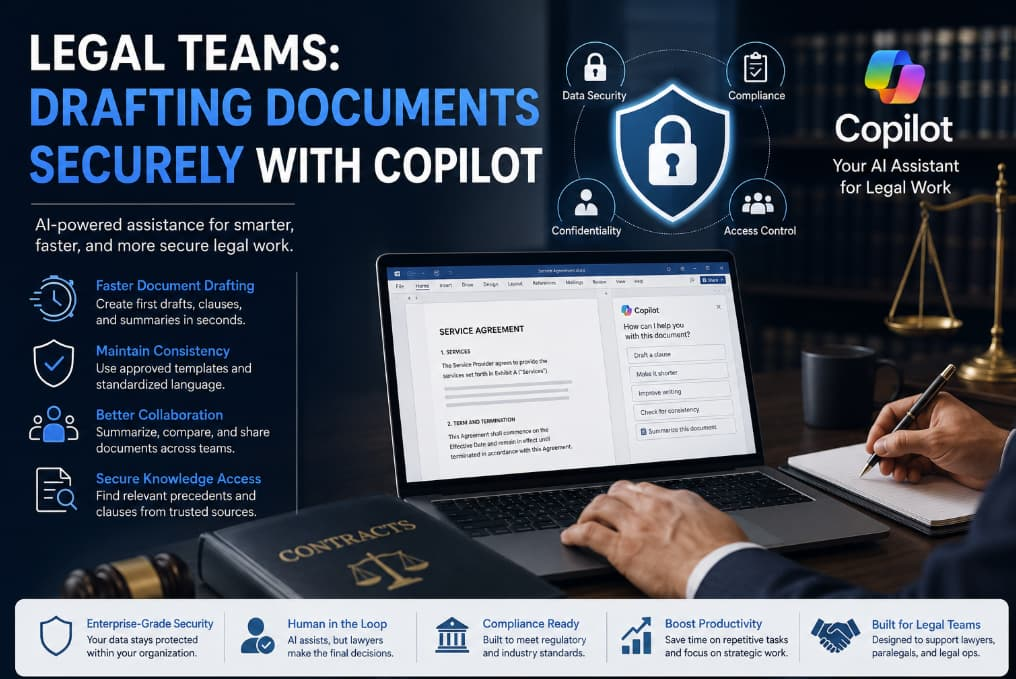
Copilot acts like an intelligent drafting assistant embedded within productivity platforms such as Word, Outlook, and Teams. Instead of starting every document from scratch, legal teams can use AI-generated suggestions to accelerate drafting while keeping human oversight in control.
Here are several ways legal professionals are using Copilot securely.
1. Faster Contract Drafting
Creating contracts manually can consume valuable hours. Copilot helps lawyers generate first drafts based on templates, prior agreements, or specific prompts.
For example, a legal professional can ask Copilot to:
- Draft a non-disclosure agreement
- Create a vendor contract summary
- Generate a service agreement outline
- Rewrite clauses in plain language
- Suggest alternative wording for liability sections
This reduces administrative workload and allows attorneys to focus on strategic legal review instead of repetitive drafting.
2. Improved Consistency Across Documents
One of the biggest challenges for legal departments is maintaining consistency across hundreds of documents. Small inconsistencies in wording or outdated clauses can create significant legal risks.
Copilot helps standardize language by referencing approved templates and internal knowledge sources. Legal teams can create preferred clause libraries and use AI assistance to ensure uniformity across contracts and agreements.
This consistency becomes especially valuable for organizations managing high contract volumes.
3. Enhanced Collaboration Between Teams
Legal drafting rarely happens in isolation. Attorneys, compliance teams, HR departments, procurement managers, and executives often collaborate on the same documents.
Copilot improves collaboration by helping teams:
- Summarize long agreements quickly
- Extract key obligations
- Highlight changes between versions
- Generate meeting notes
- Draft follow-up communications
Instead of spending time searching through lengthy files, stakeholders can focus on decision-making and risk assessment.
4. Secure Knowledge Retrieval
Legal professionals often spend hours searching internal repositories for precedent documents, clauses, or policy references.
Copilot can surface relevant internal information securely within authorized systems. This allows lawyers to locate approved language faster while maintaining governance controls.
Rather than relying on memory or outdated folders, legal teams gain a smarter way to access institutional knowledge.
Why Security Matters for Legal AI Adoption
While AI delivers productivity gains, legal departments must prioritize security before implementation.
Using unsecured AI platforms can expose organizations to serious risks, including:
- Confidentiality breaches
- Regulatory violations
- Client trust issues
- Data leakage
- Ethical concerns
- Intellectual property exposure
This is why secure enterprise AI solutions matter.
Copilot is designed with enterprise-grade security frameworks that align with organizational permissions and compliance standards. Access controls, authentication systems, and data governance policies help ensure that sensitive information remains protected.
Legal teams should also establish clear AI usage policies, including:
- Approved use cases
- Human review requirements
- Data handling procedures
- Confidentiality safeguards
- Prompt management guidelines
- Audit and monitoring practices
AI should support legal professionals, not replace legal judgment.
Best Practices for Drafting Documents Securely with Copilot
Adopting AI successfully requires both technology and process discipline. Here are some practical best practices legal teams should follow.
Establish Clear Governance Policies
Organizations should define how AI tools may be used within legal operations. Governance policies should cover:
- Which data can be entered into AI systems
- Approved document types
- Confidentiality standards
- Human review obligations
- Compliance requirements
Strong governance reduces misuse and supports responsible adoption.
Train Legal Staff Properly
AI literacy is becoming essential for modern legal teams. Lawyers and staff should understand:
- How Copilot generates responses
- The importance of verifying outputs
- Prompt-writing best practices
- Security limitations
- Ethical considerations
Training helps teams use AI effectively while minimizing risk.
Keep Humans in the Review Loop
AI-generated content should never bypass professional legal review. Copilot can accelerate drafting, but attorneys remain responsible for final accuracy, compliance, and legal interpretation.
Human oversight is especially important for:
- Jurisdiction-specific language
- Regulatory compliance
- Litigation-sensitive content
- Complex negotiations
- High-risk agreements
AI is a productivity assistant, not a substitute for legal expertise.
Integrate AI with Existing Security Infrastructure
Legal departments should ensure Copilot aligns with existing security controls, including:
- Identity management systems
- Data retention policies
- Access permissions
- Encryption standards
- Compliance monitoring
Integration with enterprise security frameworks helps maintain trust and regulatory alignment.
The Future of AI in Legal Operations
AI adoption in the legal industry is accelerating rapidly. Legal teams are increasingly expected to deliver faster turnaround times while controlling costs and managing growing workloads.
Copilot represents a major shift in how legal work gets done. Instead of spending excessive time on repetitive drafting tasks, legal professionals can focus more on strategic thinking, negotiation, risk mitigation, and client advisory work.
In the future, AI-powered legal workflows may include:
- Automated clause risk analysis
- Intelligent compliance monitoring
- Real-time contract insights
- Predictive legal analytics
- Advanced document summarization
- Workflow automation across departments
However, trust will remain the foundation of legal AI adoption. Security, transparency, and governance will determine whether organizations can safely scale AI across legal functions.
Legal teams are entering a new era where AI can dramatically improve efficiency without compromising confidentiality. Secure AI platforms like Copilot help legal professionals draft documents faster, maintain consistency, and collaborate more effectively while staying aligned with enterprise security standards.
The key is responsible implementation.
Organizations that combine AI productivity with strong governance, human oversight, and security-first practices will gain a competitive advantage in modern legal operations.
For legal professionals, the future is not about replacing expertise with AI. It is about using intelligent tools to eliminate repetitive work, reduce risk, and create more time for high-value legal strategy.