
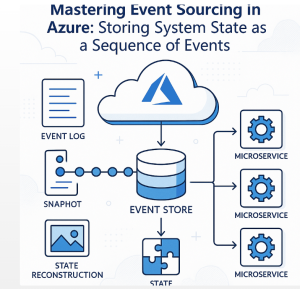
An order changes from Pending to Paid. A customer adds an item to a shopping cart, removes it, and adds another. A payment is authorized, declined, and eventually retried.
A traditional database usually stores only the latest state. Event sourcing takes a different approach: store every meaningful change as an event, then reconstruct the current state from that history.
For Azure applications, this pattern can provide a durable audit trail, support complex business workflows, and make it easier to rebuild read models when requirements change. But event sourcing is not simply “put events in Azure.” It changes how an application handles data, concurrency, queries, schema evolution, and consistency.
Here’s how to approach event sourcing in Azure without turning a useful architecture pattern into unnecessary complexity.
What Is Event Sourcing?
In a conventional CRUD application, an order might look like this:
OrderId: 10482
Status: Paid
Total: $149.99
CustomerId: 7821
When the status changes, the application updates the existing record.
With event sourcing, the system records the operations that produced that state:
OrderCreated
ItemAdded
ItemAdded
PaymentAuthorized
OrderConfirmed
The current order state is derived by replaying those events in sequence.
The event store therefore becomes the authoritative record of what happened. Instead of asking only, “What is the order’s current status?” the system can answer questions such as:
- When was the order created?
- Which items were added or removed?
- When was payment authorized?
- What did the order look like yesterday?
- Which business operation caused the current state?
The key design principle is that events are append-only. You generally don’t edit an old event to correct history. If something needs to be reversed, you record another event representing that change.
Why Use Event Sourcing in Azure?
Event sourcing is particularly useful when history is part of the business problem, not merely a technical detail.
Consider financial transactions, inventory movements, insurance claims, order processing, or complex customer workflows. Knowing the current state is important, but knowing how the system arrived there can be equally valuable.
Azure’s architecture guidance highlights auditability and historical reconstruction as important benefits, while also warning that event sourcing introduces substantial complexity. It isn’t intended to replace CRUD in every application.
The pattern becomes especially interesting when combined with CQRS (Command Query Responsibility Segregation).
In a CQRS-based design, the write side records events while separate read models are optimized for queries. Those read models can be rebuilt from the event history when necessary.
That separation can look like this:
                    Commands
                       |
                       v
              +------------------+
              | Domain / Write   |
              | Model            |
              +--------+---------+
                       |
                    Events
                       |
                       v
              +------------------+
              | Event Store      |
              | Append Only      |
              +--------+---------+
                       |
              +--------+---------+
              |                  |
              v                  v
       Read Model A         Read Model B
       Order Queries        Reporting
The important point is that the event store is not normally your query database. It is the historical source from which optimized views can be created.
Choosing Azure Services for the Architecture
There isn’t one mandatory Azure service for event sourcing. The right choice depends on whether you’re storing the authoritative event history, transporting events, building projections, or serving queries.
Azure Cosmos DB as an Event Store
Azure Cosmos DB is one practical option for implementing an event store.
A Cosmos DB container can be designed around append-only event documents, with each event containing information such as:
{
  "eventId": "evt-01872",
  "aggregateId": "order-10482",
  "eventType": "PaymentAuthorized",
  "version": 5,
  "timestamp": "2026-09-25T12:15:00Z",
  "data": {
    "amount": 149.99,
    "currency": "USD"
  }
}
The aggregateId identifies the entity or consistency boundary, while the event version can help enforce ordering and optimistic concurrency.
Cosmos DB’s Change Feed can then provide a mechanism for processing newly changed documents asynchronously and incrementally. This makes it useful for building downstream projections and integrating loosely coupled components.
Microsoft’s current Cosmos DB event-sourcing sample demonstrates exactly this style of architecture, including append-only events and Change Feed-based processing.
Azure Event Hubs for High-Volume Event Streaming
Azure Event Hubs is designed for high-throughput event ingestion and streaming. It uses partitions to support parallel processing and horizontal scaling.
That makes Event Hubs useful when your architecture needs to distribute events to multiple consumers or process large event streams.
However, don’t automatically treat Event Hubs as your permanent business event store.
Event Hubs is primarily a streaming platform with configurable retention. An event-sourced domain typically needs a durable source of truth from which an aggregate can be reconstructed reliably over the required lifetime of the data.
A common architecture is therefore:
Application
    |
    v
Domain / Event Store
    |
    +----> Projection Consumer ----> Read Database
    |
    +----> Integration Consumer ---> Other Services
    |
    +----> Analytics Consumer -----> Data Platform
The exact implementation varies, but separating durable domain history from transient or retention-based event transport can make the architecture easier to reason about.
Event Sourcing and CQRS: A Natural Combination
Event sourcing and CQRS are often discussed together, but they solve different problems.
Event sourcing answers:
How should we persist changes to the system?
CQRS answers:
How should we separate operations that change state from operations that read state?
When combined, events can drive one or more read models.
Suppose an e-commerce platform needs three different views:
- A customer-facing order history
- An operations dashboard
- A finance reporting model
Trying to force all three workloads into one normalized database can create complicated queries and competing performance requirements.
Instead, each read model can consume the same event stream and maintain a representation optimized for its workload.
This also creates an important architectural advantage: if the reporting requirements change, you can build a new projection from the historical events instead of reconstructing missing information from today’s database state.
Don’t Replay Thousands of Events for Every Request
Event replay is one of the first performance problems developers encounter with event sourcing.
Imagine an account with 50,000 historical events. Replaying all 50,000 events every time someone requests the current balance is wasteful.
This is where snapshots help.
A snapshot stores the calculated state at a particular event version:
Events 1-1000
      |
      v
  Snapshot
      |
      +---- Events 1001-1050
                 |
                 v
          Current State
Instead of replaying the entire history, the application loads the latest snapshot and processes only the events that occurred afterward.
Snapshots don’t replace events. They are performance optimizations derived from the event history.
Azure’s CQRS guidance specifically recommends strategic snapshotting when replaying long event histories becomes expensive.
The Hard Parts: Ordering, Concurrency, and Schema Evolution
The biggest mistakes with event sourcing usually happen when teams focus on storing events but underestimate the operational rules around them.
Ordering
Events for the same aggregate generally need a well-defined sequence.
An OrderConfirmed event shouldn’t be processed before the events that establish the order’s valid state.
If Azure Event Hubs is involved, remember that ordering is guaranteed within a partition, not globally across all partitions. Partitioning strategy therefore matters.
Optimistic Concurrency
Two requests may try to modify the same aggregate simultaneously.
For example:
Request A -> Order version 12 -> writes version 13
Request B -> Order version 12 -> writes version 13
Both cannot safely become version 13.
A common solution is to require the expected stream version when appending events. If the stored version has changed, the second operation fails and must be retried or rejected according to the business rules.
Event Schema Evolution
Events live much longer than application deployments.
Your application might understand:
PaymentAuthorized v1today and require additional information six months later.
That means event schemas should be designed for evolution. Depending on the system, you might use versioned event contracts, upcasters, tolerant readers, or explicit migration strategies.
Deleting or rewriting historical events simply because the current application model changed defeats one of the main reasons for adopting event sourcing.
When Event Sourcing Is the Wrong Choice
This matters as much as understanding the benefits.
If your application is essentially:
Create record
Read record
Update record
Delete record
and there is no strong requirement for historical reconstruction, event sourcing may add complexity without enough return.
You now need to think about:
- Event contracts
- Replay behavior
- Projection failures
- Idempotency
- Concurrency
- Event versioning
- Snapshots
- Eventual consistency
- Operational monitoring
- Data retention
- Rebuilding read models
Microsoft’s Azure Architecture Center explicitly describes event sourcing as a complex pattern and recommends adopting it when benefits such as auditability and historical reconstruction justify those trade-offs.
That’s a useful rule for architecture reviews: don’t introduce event sourcing because events are fashionable; introduce it because the domain benefits from an event history.
A Practical Azure Event Sourcing Checklist
Before implementing the pattern, answer these questions:
- What is the aggregate?
Define the consistency boundary whose state will be reconstructed from events. - What events represent meaningful business changes?
Avoid creating events for every trivial implementation detail. - Where is the authoritative event store?
Separate the system of record from downstream messaging and projections. - How will events be ordered?
Define sequencing rules per aggregate and understand partition behavior. - How will projections recover?
Assume consumers can fail and design for retries and idempotent processing. - When will snapshots be created?
Establish a strategy before event streams become expensive to replay. - How will event schemas evolve?
Treat events as durable contracts, not temporary application objects. - Do you actually need event sourcing?
Compare its benefits against the complexity of a conventional CRUD model.
Practical Takeaway: Start With the Domain, Not the Azure Service
The strongest event-sourcing implementations don’t begin with, “Should we use Cosmos DB or Event Hubs?”
They begin with the business domain.
Identify the entities whose history matters. Define the meaningful events that change those entities. Establish the consistency and ordering rules. Then choose Azure services that support those requirements.
For many Azure architectures, a combination of an append-only event store, asynchronous consumers, CQRS, materialized read models, and strategic snapshots provides a powerful foundation.
But the real value isn’t simply storing more data. It’s preserving the sequence of decisions and state changes that produced the system’s current state.
That historical record can support auditing, reconstruction, new projections, integrations, and evolving business requirements—provided the additional complexity is justified.
The next logical step is to model one concrete aggregate, such as an order or shopping cart, and walk through its commands, events, event stream, projection, and snapshot strategy end to end.
Sources for further technical reference
Microsoft Learn: Azure Event Sourcing Pattern
Microsoft Learn: Azure Cosmos DB Event Sourcing Sample
Microsoft Learn: CQRS Pattern
Microsoft Learn: Azure Cosmos DB Change Feed
Microsoft Learn: Azure Event Hubs
Extra posts:
 Implementing Event Sourcing in AWS Modeling State as a Sequence of Events
  Extracting Information from PDFs and Storing in a Database Using Azure AI Services
  The Hybrid Cloud Playbook Mastering Azure Stack
  Global Azure Bootcamp Free event Event Based Design Architecture Pattern in Azure
  Azure Functions vs. Azure Container Apps Choosing Your Serverless Compute