
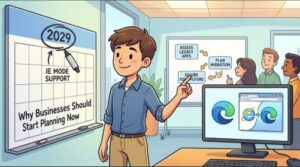
Microsoft is giving organizations more time to move away from legacy Internet Explorer-dependent applications, but that extra time should not be mistaken for a reason to delay modernization.
The company has reminded IT administrators that Internet Explorer (IE) mode in Microsoft Edge will continue to be supported through at least the end of 2029. The announcement does not introduce a new feature or change the current configuration of Edge. Instead, it is a planning reminder for organizations that still rely on older websites and business applications that were built for Internet Explorer.
For many businesses, IE mode has become a practical bridge between older technology and today’s modern browser environment. Although the standalone Internet Explorer desktop application has been retired, organizations can continue accessing certain legacy applications through IE mode in Microsoft Edge.
That support is useful, particularly for companies with old internal systems, enterprise applications, or websites that cannot yet be upgraded. However, Microsoft is encouraging administrators to think beyond the immediate deadline. Modernizing applications can take months or even years, especially in large organizations with complex dependencies.
IE Mode Is Not Going Away Immediately
The most important point for organizations is that there is no immediate requirement to disable IE mode.
Microsoft’s latest communication is a reminder of the support timeline first announced in 2021. IE mode will remain supported through at least the end of 2029 across Microsoft’s Worldwide, GCC, GCC High, and DoD environments.
Microsoft also says it will provide at least one year of notice before IE mode is retired.
That means organizations currently using IE mode can continue operating their legacy applications while developing a longer-term migration strategy.
For IT teams, however, the additional time should be viewed as an opportunity to plan rather than a reason to postpone action.
Why IE Mode Still Matters to Businesses
Internet Explorer may be considered legacy software, but many organizations still have applications that were designed around technologies associated with the older browser.
Some internal business systems were developed years or even decades ago. They may rely on outdated web technologies, browser-specific functionality, or integrations that do not work properly in modern browsers.
Replacing those systems is rarely as simple as installing a new application.
A legacy application might be connected to databases, authentication systems, reporting platforms, business workflows, or other software used across an organization. Changing one component can therefore affect several others.
This is one reason Microsoft is encouraging organizations to begin identifying their IE mode dependencies now.
The challenge is not necessarily the 2029 date itself. The bigger issue is the amount of work that may be required before an organization can safely operate without those legacy dependencies.
Who Needs to Pay Attention?
The announcement primarily affects organizations that actively use IE mode in Microsoft Edge to access legacy websites or applications.
If a company has completely moved away from IE mode, there is no immediate impact and no action is required.
For organizations that still use it, administrators should determine exactly which applications depend on IE mode and how important those applications are to daily operations.
A company may discover that only a handful of old applications require IE mode. In other cases, the dependency could be much larger and involve critical systems used by hundreds or thousands of employees.
The first step is therefore visibility.
Start With an IE Mode Dependency Inventory
One of Microsoft’s key recommendations is to inventory applications and websites that still require IE mode.
This can start with an organization’s existing Enterprise Mode Site List, along with information about current IE mode usage.
The goal is to create a clear list of applications that cannot yet operate normally in modern browsers.
That inventory should go beyond simply recording application names.
IT teams may also want to document:
- Who uses each application
- What business process depends on it
- How critical the application is
- What technologies or integrations it relies on
- Whether the application is actively maintained
- Who owns the application internally
- Whether a supported replacement already exists
- How difficult modernization is likely to be
This information can help organizations prioritize migration work instead of treating every legacy application as the same problem.
Modernization Could Take Several Forms
Once applications have been identified, organizations can evaluate what should happen to each one.
Not every legacy application will necessarily need to be rebuilt from scratch.
Depending on the application and its business role, organizations could consider several options, including updating, rehosting, replacing, or rebuilding the application.
For example, a relatively simple internal website might be updated to work with modern web standards. A more complex system could potentially be replaced with a commercial SaaS platform.
In other cases, rehosting or rebuilding may make more sense.
The appropriate strategy will depend on the application’s technical architecture, business importance, cost, security requirements, and future role within the organization.
The Internet Explorer Desktop App Is Already Retired
It is also important to distinguish between Internet Explorer itself and IE mode.
The Internet Explorer desktop application has been retired. Organizations should not interpret Microsoft’s IE mode support announcement as a return of the traditional Internet Explorer browser.
Instead, IE mode exists inside Microsoft Edge to allow organizations to continue running certain legacy websites and applications.
This distinction matters because businesses that still have legacy dependencies should be thinking about how to eliminate those dependencies rather than building new systems around them.
IE mode is essentially providing additional runway for organizations that need time to modernize.
Why Early Planning Can Reduce Business Risk
Migration projects often take longer than expected.
A legacy application may initially appear to be a simple browser compatibility issue, only for an IT team to discover undocumented dependencies or outdated infrastructure underneath it.
That is particularly challenging when the application is business-critical and the people who originally developed or maintained it are no longer available.
Starting early gives organizations time to investigate those problems while IE mode is still available.
It also allows companies to test replacements gradually instead of attempting a rushed migration close to the eventual retirement date.
For large enterprises, this could be especially important. A business with hundreds of legacy applications cannot realistically modernize everything at once.
Prioritization becomes essential.
Microsoft App Assure Can Help Eligible Customers
Organizations that encounter application compatibility problems can also look at Microsoft’s App Assure program.
Microsoft says App Assure provides no-cost assistance to eligible customers experiencing application compatibility issues involving Microsoft Edge and IE mode.
This could be useful for organizations that have identified legacy applications but are unsure how to address compatibility problems during migration.
Organizations should review Microsoft’s eligibility requirements and available support information before relying on the service as part of their migration strategy.
What IT Administrators Should Do Now
For organizations still dependent on IE mode, the next step does not have to be an emergency migration.
Instead, IT leaders can treat Microsoft’s reminder as a prompt to begin structured planning.
A practical approach could include four stages.
First, identify the dependencies. Find every website and application that requires IE mode.
Second, assess business importance. Determine which applications are critical and which can potentially be retired.
Third, develop modernization plans. Decide whether each remaining application should be updated, replaced, rehosted, or rebuilt.
Finally, test and migrate gradually. Give teams enough time to validate modernized applications before removing their IE mode dependency.
This approach can make the eventual transition considerably less disruptive.
No Immediate Change, But a Clear Long-Term Message
For now, Microsoft’s message is relatively straightforward: IE mode continues to work, and organizations do not need to disable it immediately.
The longer-term message is equally clear. Businesses should not assume that IE mode will remain available indefinitely.
Support through at least the end of 2029 provides organizations with valuable time, but modernization projects can be complicated. Waiting until the final stages of support could leave IT teams dealing with rushed migrations, compatibility problems, unexpected costs, and business disruption.
For organizations that have already moved away from IE mode, there is nothing new to do.
For everyone else, the best starting point is understanding exactly where IE mode is still being used.
The 2029 milestone may still seem distant, but enterprise technology migrations have a habit of taking longer than planned. Building an inventory today gives organizations a clearer picture of the work ahead and more time to make informed modernization decisions.
In that sense, Microsoft’s latest announcement is less about an immediate deadline and more about using the remaining support period wisely.
Extra posts:
 Windows 10 Enterprise LTSC 2021 End of Support: What Businesses Need to Know Before January 2027
  Microsoft Edge Gets Smarter: Microsoft 365 Copilot Brings Contextual Answers to Tabs, Documents and YouTube
  Microsoft Edge to Kill Manifest V2 by 2027: What Users, IT Teams and Extension Developers Need to Know
  Microsoft Teams PowerPoint Live Gets a Light Mode for Presenters
  Supercharge Your Debugging with Remote Tools for Microsoft Edge
  Microsoft Teams Call Quality Dashboard Gets a Major Refresh: New UI, Dark Mode and Better Accessibility Coming in 2026