
Artificial Intelligence is no longer limited to chatbots answering customer queries or virtual assistants scheduling meetings. Enterprises are now building intelligent AI agents capable of automating workflows, orchestrating business processes, integrating enterprise systems, and assisting employees in real-time. As organizations scale their AI adoption, architecture becomes the defining factor between isolated experiments and enterprise-wide transformation.
Microsoft has positioned Microsoft Copilot Studio as a low-code and enterprise-ready platform for building AI agents that integrate with business systems securely and efficiently. With Copilot Studio, enterprises can design conversational AI solutions, automate workflows, connect data sources, and deploy AI copilots across departments without building every component from scratch.
In this article, we will explore the most important Enterprise AI Agent Architecture Patterns using Copilot Studio, how they work, and why they matter for modern digital transformation strategies.
Why Enterprise AI Architecture Patterns Matter
As AI adoption grows, organizations quickly realize that a single chatbot architecture is not sufficient for every use case. Customer support, HR onboarding, IT service management, finance automation, and sales enablement all require different architectural approaches.
Enterprise AI architecture patterns provide reusable frameworks that help organizations:
- Standardize AI deployments
- Improve scalability
- Enhance governance and compliance
- Reduce implementation complexity
- Accelerate AI adoption
- Improve maintainability
- Optimize performance and cost
Using architecture patterns with Copilot Studio allows enterprises to build modular, scalable, and secure AI ecosystems rather than isolated AI applications.
Core Enterprise AI Agent Architecture Patterns
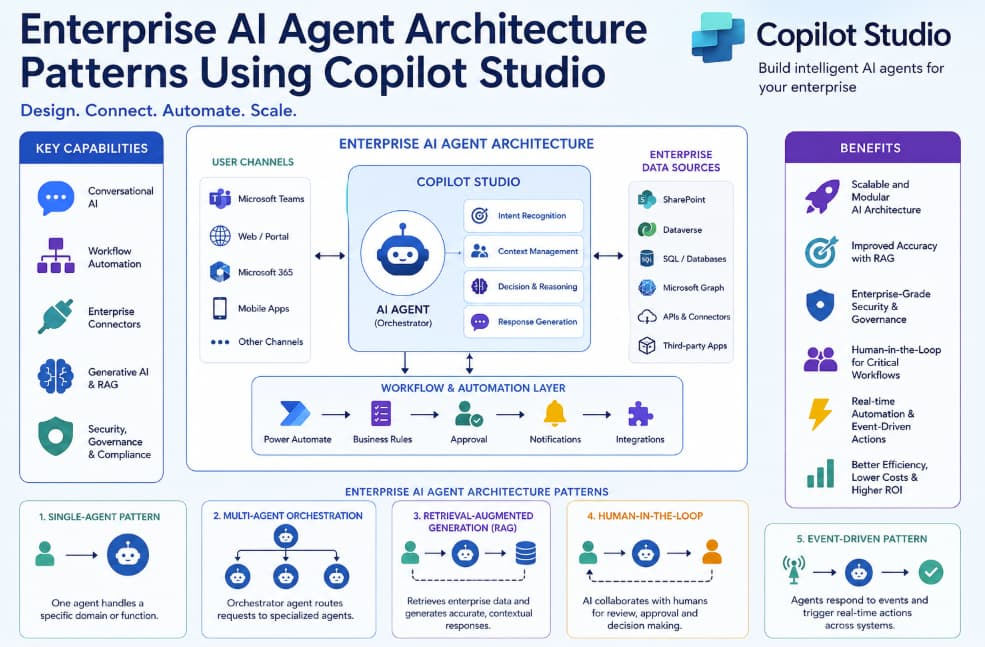
1. Single-Agent Architecture Pattern
The single-agent architecture is the simplest and most common implementation pattern in Copilot Studio. In this model, one AI agent handles a dedicated business function or domain.
Example Use Cases
- HR assistant
- IT helpdesk copilot
- Internal policy assistant
- FAQ automation
- Employee onboarding assistant
How It Works
The AI agent connects to enterprise knowledge sources such as:
- SharePoint
- Microsoft Dataverse
- Internal documentation
- CRM systems
- ERP platforms
The agent processes user requests and provides responses using retrieval-augmented generation (RAG), workflows, and business logic.
Advantages
- Easy to deploy
- Faster implementation
- Lower operational complexity
- Ideal for pilot projects
Challenges
- Limited scalability across departments
- Difficult to manage cross-functional workflows
- Can create siloed AI experiences
This architecture is best suited for organizations beginning their enterprise AI journey.
2. Multi-Agent Orchestration Pattern
As enterprise AI systems grow, organizations often require multiple specialized AI agents working together. This is where the multi-agent orchestration pattern becomes essential.
In this model:
- One orchestrator agent manages requests
- Specialized sub-agents handle domain-specific tasks
- Agents collaborate dynamically
Example
A customer support AI ecosystem may include:
- Billing agent
- Technical support agent
- Order tracking agent
- Returns management agent
The orchestrator determines which agent should handle the user request.
Benefits
- Better scalability
- Improved specialization
- Higher response accuracy
- Easier maintenance
Copilot Studio Capabilities
Copilot Studio enables orchestration using:
- Power Automate flows
- AI routing logic
- Plugin integrations
- Context sharing
- API-based handoffs
This architecture pattern is becoming increasingly popular in enterprise environments because it mirrors how departments operate in real organizations.
3. Retrieval-Augmented Generation (RAG) Pattern
One of the biggest challenges in enterprise AI is ensuring that AI agents provide accurate and up-to-date information. The Retrieval-Augmented Generation pattern solves this issue.
How RAG Works
Instead of relying only on pretrained models, the AI agent retrieves relevant enterprise data before generating a response.
The process includes:
- User submits a query
- Agent searches enterprise knowledge sources
- Relevant content is retrieved
- AI generates a context-aware response
Enterprise Data Sources
Common enterprise integrations include:
- SharePoint
- OneDrive
- SQL databases
- Microsoft Graph
- Salesforce
- ServiceNow
- Confluence
Why RAG Matters
RAG dramatically reduces hallucinations and improves trustworthiness.
Benefits include:
- More accurate answers
- Better compliance
- Real-time information retrieval
- Reduced misinformation risks
Copilot Studio supports RAG architectures through Microsoft Graph connectors, Dataverse integrations, and external APIs.
4. Human-in-the-Loop Architecture Pattern
Not every business process should be fully autonomous. Enterprises often require human approval, escalation, or supervision for sensitive decisions.
The Human-in-the-Loop (HITL) architecture pattern ensures that AI agents collaborate with human employees instead of replacing them entirely.
Common Use Cases
- Financial approvals
- Legal document review
- Healthcare workflows
- Compliance checks
- HR escalations
Workflow Example
- AI agent processes a request
- Confidence score is evaluated
- If confidence is low, the request escalates to a human
- Human reviews and finalizes the outcome
Advantages
- Improved governance
- Reduced operational risk
- Better compliance management
- Increased trust in AI systems
Copilot Studio integrates seamlessly with Microsoft Teams and Power Automate, enabling smooth human-agent collaboration workflows.
5. Event-Driven AI Agent Architecture
Modern enterprises operate in real-time environments where events continuously trigger business actions.
The event-driven architecture pattern allows AI agents to respond dynamically to events such as:
- Customer purchases
- Security incidents
- Workflow approvals
- Inventory changes
- Support ticket creation
Example
When a cybersecurity alert is triggered:
- An AI security agent analyzes the threat
- Retrieves historical patterns
- Suggests remediation steps
- Escalates critical issues automatically
Benefits
- Real-time automation
- Faster response times
- Improved operational efficiency
- Reduced manual intervention
Copilot Studio supports event-driven automation through integrations with:
- Power Automate
- Azure Functions
- APIs
- Event triggers
- Microsoft Sentinel
Security and Governance in Enterprise AI Architecture
Enterprise AI cannot succeed without strong governance and security frameworks.
Organizations deploying AI agents through Copilot Studio should focus on:
Identity and Access Management
Using Azure Active Directory ensures secure authentication and role-based access control.
Data Protection
AI agents should only access authorized enterprise data sources.
Compliance
Industries such as healthcare and finance require compliance with:
- GDPR
- HIPAA
- SOC 2
- ISO 27001
Monitoring and Auditing
Enterprises should track:
- AI interactions
- Workflow execution
- Data access logs
- User activity
- Model performance
Microsoft’s enterprise ecosystem provides strong compliance and governance capabilities that align with large-scale AI deployments.
Best Practices for Building Enterprise AI Agents
Start with Focused Use Cases
Avoid trying to automate every process immediately. Begin with high-impact workflows.
Design Modular Architectures
Modular AI architectures improve scalability and maintenance.
Prioritize Integration Strategy
Enterprise AI success depends heavily on integrations with existing systems.
Build for Governance Early
Security and compliance should be embedded into the architecture from day one.
Measure Business Outcomes
Track KPIs such as:
- Response time reduction
- Cost savings
- Employee productivity
- Customer satisfaction
- Automation rates
Future of Enterprise AI Agent Architectures
The future of enterprise AI is moving toward autonomous AI ecosystems where multiple AI agents collaborate intelligently across business functions.
Emerging trends include:
- Autonomous workflow orchestration
- AI-to-AI communication
- Self-improving AI agents
- Context-aware enterprise copilots
- Hybrid human-AI decision systems
Platforms like Copilot Studio are accelerating this transformation by making enterprise AI development more accessible, scalable, and secure.
Organizations that adopt structured architecture patterns today will be better positioned to scale AI initiatives tomorrow.
Enterprise AI is rapidly evolving from isolated chatbots into sophisticated ecosystems of intelligent agents capable of automating business operations, improving employee productivity, and enhancing customer experiences.
Using the right architecture patterns in Microsoft Copilot Studio helps organizations build scalable, secure, and maintainable AI solutions that align with enterprise requirements.
Whether implementing single-agent assistants, multi-agent orchestration systems, RAG architectures, human-in-the-loop workflows, or event-driven automation, enterprises need a structured approach to AI design.
As AI adoption continues to accelerate, businesses that invest in robust enterprise AI architectures will gain a significant competitive advantage in operational efficiency, innovation, and digital transformation.
Extra posts:
 How to Build Your First AI Agent in Copilot Studio in 15 Minutes
  Designing Multi-Agent Systems in Copilot Studio
 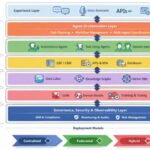 Reference Architecture for Agentic AI in Enterprise IT
  Visualize Workflows and Architecture with Mermaid Charts in Visual Studio 2026
  Exploring IBM Architect AI Transforming Enterprise Architecture with AI
  Microsoft Copilot and the AI-First Enterprise A Strategic Perspective