
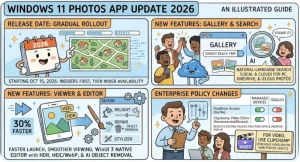
Microsoft is preparing to roll out an updated Photos experience for Windows 11, bringing a refreshed photo library, a native image viewer, and an updated photo editor to consumer and business users. The rollout is scheduled to begin in October 2026 and continue through mid-December, giving organizations time to review application management policies and prepare support teams for the change.
According to Microsoft’s announcement, the updated experience is designed to make it easier to browse, organize, and discover photos and videos stored locally on a PC or in OneDrive. The update is associated with Microsoft 365 Roadmap ID 568931 and is expected to preserve existing controls governing app installation, updates, and cloud storage access.
For most businesses, the announcement does not introduce an immediate configuration requirement. However, IT administrators who deliberately block Microsoft Photos through AppLocker or other Windows management policies should review their configurations before the new experience reaches managed devices.
Windows 11 Photos App Update 2026: Release Timeline
Microsoft plans to introduce the updated Photos experience in stages, starting with Windows Insiders before expanding availability to the wider Windows 11 user base.
The announced rollout milestones are:
- October 15, 2026: The updated experience is expected to begin rolling out to Windows Insiders over the following days.
- October 26, 2026: Microsoft expects to begin expanding availability to Windows 11 retail users.
- Mid-October to mid-December 2026: The general availability rollout is scheduled to take place worldwide, with completion expected by mid-December.
These dates represent the planned rollout rather than a guarantee that every eligible device will receive the update on a specific day. Availability may vary as Microsoft expands distribution.
The phased approach gives Microsoft an opportunity to introduce the experience progressively while users and organizations adapt to the changes. Administrators should therefore avoid assuming that every Windows 11 device will display the new interface immediately after the initial release.
What’s New in the Updated Windows 11 Photos App?
The update focuses on improving how users access and work with their image collections. Rather than introducing an entirely separate destination for photos, Microsoft plans to enhance the Photos experience that Windows users already know.
1. A Refreshed Photo Library
The updated app will feature a refreshed photo library intended to make browsing and organizing photos and videos more convenient.
For everyday users, a central photo library can simplify access to personal pictures, work-related images, screenshots, and other visual files. For organizations, the ability to work with locally stored content remains important because employees often handle images without needing to connect to a cloud account.
Microsoft’s announcement does not specify every interface change or detail of the new organization tools. Users should therefore distinguish the confirmed library refresh from any additional features that have not been announced.
2. A Native Photo Viewer in Windows
The updated experience will include a native Photo Viewer for images opened from File Explorer and other locations within Windows.
This matters because opening an image is a common Windows task, whether someone is reviewing a screenshot, checking a product image, or examining a document attachment. A more integrated viewing experience can help make the transition between browsing files and viewing images feel more consistent.
The announcement confirms the native viewer’s inclusion but does not establish specific performance improvements, supported formats, or new editing capabilities. Those details should be assessed when the updated experience becomes available.
3. An Updated Native Photo Editor
Microsoft is also updating the native photo editor, giving users another reason to access Photos for routine image-related tasks.
A built-in editor is useful for people who need to make basic changes without installing separate software. In business environments, employees may also benefit from having a familiar application available for everyday visual tasks.
However, Microsoft has not detailed all the editor’s revised tools in the supplied announcement. It would be premature to claim that the update adds particular filters, advanced editing features, or artificial intelligence capabilities without further confirmation.
4. Local Photos Remain Available Without OneDrive Sign-In
One of the most important details for users and IT administrators is that the Photos app will continue to work with local content without requiring users to sign in to OneDrive.
This distinction matters in environments where employees store images on their PCs, work with files offline, or are not permitted to connect personal cloud accounts. The update is intended to preserve access to locally stored photos even when cloud functionality is restricted.
Users who sign in with a work or school account can also see their OneDrive photos alongside local content. This provides a combined browsing experience for supported cloud and local collections, subject to the organization’s existing policies.
How OneDrive Integration Will Work
The updated Photos experience will continue to support OneDrive integration, but the available functionality will depend on account access and organizational configuration.
For users who sign in with an eligible work or school account, photos stored in OneDrive can appear alongside images saved locally on the PC. This may help employees locate relevant images without switching repeatedly between separate storage locations.
Organizations that restrict OneDrive access should pay particular attention to the distinction between blocking cloud functionality and blocking the Photos app itself.
Microsoft identifies two relevant policy settings:
- DisablePersonalSync: Prevents users from signing in to personal OneDrive accounts in Photos.
- DisableNucleusSync: Prevents the use of any OneDrive account in Photos.
These policies restrict OneDrive functionality within the app. They do not, by themselves, prevent users from opening Photos and working with locally stored content.
For IT teams, that separation is important. A policy designed to prevent cloud synchronization should not automatically be interpreted as a requirement to remove the entire application.
What the Update Means for Enterprise IT Administrators
Although Microsoft does not identify new compliance considerations, the package and application management details warrant attention in managed Windows environments.
The main issue is not a mandatory migration or a new security requirement. Instead, administrators need to ensure that existing policies continue to produce the intended outcome after the updated experience is introduced.
Review App Installation and Removal Policies
Organizations that disable or remove Store-originated applications through the DisableStoreOriginatedApps policy should review how that configuration affects the update.
According to Microsoft’s guidance, the updated experience will not be installed on devices affected by this policy. Organizations that intentionally prevent Store-originated apps from being installed may therefore see different behavior from devices where those restrictions do not apply.
Administrators should confirm that the current configuration reflects their organization’s intended software deployment approach rather than changing policies solely to accommodate the Photos update.
Check AppLocker Rules for Microsoft Photos
The most specific action item concerns organizations that use AppLocker packaged-app rules to block Microsoft Photos.
Microsoft advises administrators to update those rules to include the package name Microsoft.OneDrive.Photos if they intend to continue blocking the application.
This is a practical but important distinction. An application-blocking rule that targets an earlier package identity may not automatically cover the updated package.
IT teams should review their existing AppLocker configuration, validate the relevant package identity, and test the resulting policy behavior before relying on it across managed devices.
Administrators can consult Microsoft’s documentation for managing packaged apps with AppLocker.
Prepare the Help Desk for User Questions
Users may notice a different photo library, a changed image-viewing experience, or differences in how the application appears after the rollout.
Support teams should be prepared to explain that the update is an expected Windows 11 change rather than automatically treating it as an application malfunction. They should also understand that access to OneDrive content depends on the organization’s existing account and synchronization restrictions.
A short internal support note can cover the expected rollout period, the updated package name, local-photo availability, and the distinction between app access and cloud access.
Does the Windows 11 Photos Update Introduce Compliance Risks?
Microsoft’s announcement identifies no new compliance considerations associated with the updated experience.
That is reassuring for organizations seeking to maintain established software management and data access controls. Existing app installation, update, and OneDrive policies are expected to remain effective.
However, the absence of newly identified compliance concerns does not eliminate the need for normal internal review. Organizations with strict application allowlists, endpoint security requirements, or restrictions on cloud storage should verify that their policies continue to behave as intended.
A sensible review should cover:
- Whether Microsoft Photos is permitted on managed Windows 11 devices.
- Whether AppLocker rules include the updated
Microsoft.OneDrive.Photospackage where necessary. - Whether personal and work or school OneDrive access matches organizational policy.
- Whether help desk documentation reflects the updated experience.
- Whether any internal application inventory or software deployment documentation needs revision.
These checks are operational safeguards, not evidence that Microsoft has identified a new compliance problem.
Recommended Action Plan for Organizations
Most organizations do not need to make immediate configuration changes. Still, a small amount of preparation can reduce avoidable support requests and prevent unintended changes to application access.
Before the rollout:
- Review Windows policies governing Store-originated applications.
- Inspect AppLocker packaged-app rules that block Microsoft Photos.
- Confirm that OneDrive restrictions reflect the organization’s intended access model.
- Notify the help desk and prepare a short user-facing explanation.
- Monitor the rollout on a limited set of devices before assessing broader deployment behavior.
Organizations that do not block Photos and do not have unusual application management requirements may need little more than routine monitoring.
Those that enforce strict application control should prioritize the AppLocker package-name review. This is the clearest configuration-specific recommendation in Microsoft’s announcement.
What Happens Next?
The updated Photos experience is expected to begin reaching Windows Insiders in mid-October 2026, with the wider Windows 11 retail rollout expected to start on October 26. Microsoft anticipates completing the worldwide general availability rollout by mid-December.
The immediate question for users will be how the refreshed library, native viewer, and editor perform in everyday use. For IT departments, the more relevant question is whether existing controls continue to govern the application exactly as intended.
Organizations should watch for further Microsoft documentation as the rollout progresses, particularly any additional details about the updated editor, package behavior, and deployment availability. Until those details are confirmed, administrators should focus on the announced policy implications rather than assuming the update requires a wider Windows configuration change.
The overall message is straightforward: the Photos experience is changing, but the underlying management approach is intended to remain familiar. With a targeted review of application-blocking rules and clear communication to support teams, most organizations should be able to prepare for the rollout without a major deployment project.
Extra posts:
 OneDrive Photos Comes Under IT Control: Microsoft Adds Admin Policy Support for Windows 10 and 11
  Microsoft Planner AI Status Reports: Features, Rollout Date, and Copilot Licensing
  Windows 11 26H2 Is Here: How to Get the 2026 Update and What Changes for Your PC
  Windows August 2026 Security Update Is Here: What You Need to Know Before You Restart
  Microsoft Authenticator Update 2026: New iOS and Android Features Explained
  Microsoft Windows Autopatch Breaks the No-Reboot Rhythm: September 2026 Hotpatch Update Will Require a Restart