Skip to content

How to Generate Formulas Using Copilot in Excel

In recent years, artificial intelligence has transformed the way we work in productivity tools, and Microsoft Excel is no exception. With the introduction of Copilot in Microsoft 365, users can now generate formulas, automate workflows,… 

Analyzing Sales Data with Copilot

In today’s fast-paced business world, being able to efficiently analyze sales data is crucial for making informed decisions. Traditionally, this required advanced spreadsheet skills, experience with formulas, or even specialized data analysis tools. But with… 

Goodbye, Hours of Chart-Making: Hello, Copilot

Taking a neat table of numbers and turning it into a beautiful, insightful chart can feel like a chore. You know, clicking through menus, tweaking axis labels, and hoping you picked the right type of… 

Security and Compliance Considerations When Using Copilot in Enterprise Environments

We see these new AI tools, like Copilot, helping us do work faster, write better emails, and summarize long documents. It’s like having a super-smart assistant right next to you. But for people who look… 

Stop Guessing Your Guide to Asking Copilot Questions About Your Spreadsheets

Let’s be honest—how many times have you opened an enormous Excel file and instantly felt your brain shut down a little? You know the insights are in there somewhere… the trend that matters, the weird… 

AI Terms Explained for Microsoft 365 Users

Welcome to the future of work! If your days revolve around Word, Excel, Outlook, and Teams, you’ve probably noticed something huge changing: Artificial Intelligence (AI) isn’t just a sci-fi concept anymore; it’s right there in… 

How to Measure ROI from Copilot Deployment

“So, you’ve rolled out Copilot. Now what?”That’s the question every IT leader and business owner asks after the initial excitement fades. Sure, Copilot feels like magic—automating tasks, summarizing meetings, and even drafting emails—but how do… 

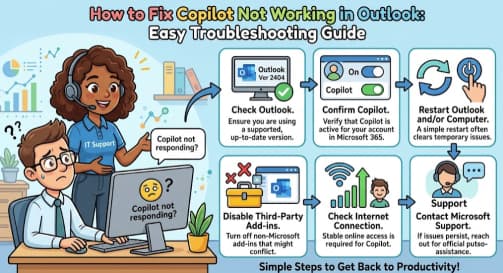
Troubleshooting Copilot Failures: A Guide to Diagnosing “Not Grounded” and “Permission Denied” Errors

A practical, human-friendly guide for helpdesk and support teams Microsoft Copilot is becoming a daily companion for knowledge workers—drafting documents, summarizing chats, automating tasks, and surfacing insights across Microsoft 365. But as helpful as Copilot… 

Monitoring Security and Compliance Metrics for Copilot: A Human-Centered Guide

As organizations continue adopting AI-powered tools like Microsoft Copilot, one theme keeps rising to the surface: trust. Companies want to leverage Copilot to boost productivity, streamline workflows, and assist employees in their day-to-day tasks—but not… 

Building Copilot Usage Dashboards in Power BI A Complete Guide

As AI tools become essential in everyday workflows, organizations increasingly want to understand how these tools are being used. Microsoft Copilot—now integrated across Microsoft 365—promises improvements in productivity, decision-making, and collaboration. But like any tool,… 

How to Build Effective Copilot Usage Dashboards in Power BI

In today’s business environment, leveraging AI-powered tools such as Microsoft 365 Copilot isn’t just about deploying them — it’s about understanding how they’re used, measuring their impact, and guiding adoption to ensure they deliver tangible… 

Using Microsoft 365 Admin Reports to Track Copilot Adoption

In today’s fast-moving business world, deploying advanced productivity tools like Microsoft 365 Copilot is only the beginning. What truly matters is understanding how your organization is using these tools and whether they’re delivering real value.…