
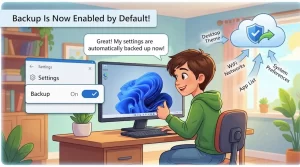
Microsoft has switched Windows settings backup to an enabled-by-default model for eligible commercial devices with the release of Windows 11, version 26H2.
The change took effect with the general availability of Windows 11 26H2 on September 29, 2026. It means organizations that have left the relevant backup policy at Not Configured may now have Windows settings and Microsoft Store app lists backed up automatically, without an administrator having to explicitly turn the feature on.
The change is designed to make backup a baseline resilience capability for managed Windows PCs, particularly when devices are reset, replaced, upgraded or otherwise need to be recovered.
There is an important distinction, however: backup is being enabled by default, but restore is not. Microsoft says administrators must still configure restore behavior separately.
What Microsoft Changed in Windows 11 26H2
Windows settings backup was previously something organizations could configure through management policies. With Windows 11 26H2, Microsoft is changing the default behavior for devices that fall within the eligible scope.
The policy now effectively follows this model:
- Policy explicitly enabled: The existing setting remains enabled.
- Policy explicitly disabled: The existing setting remains disabled.
- Policy set to Not Configured: Eligible devices receive the new default-on behavior.
- Restore policy: Remains separately controlled by administrators.
Microsoft describes the move as part of a broader effort to make Windows devices more resilient during recovery and replacement scenarios.
That distinction matters for IT teams because the update does not simply override existing administrative decisions. Explicit configuration continues to take precedence over Microsoft’s new default.
Which Devices Are Affected?
The default-on behavior does not apply universally to every Windows PC.
Microsoft’s current guidance says the change applies to eligible devices running Windows 11, version 26H2 or later, provided the relevant backup policy is set to Not Configured and the device is within Microsoft’s supported environment for the feature. Devices in privacy-sensitive regions and sovereign or restricted cloud environments are excluded from the default-on behavior.
The practical checklist for administrators is therefore:
- Windows 11 version 26H2 or later
- Backup policy set to Not Configured
- Device located in an eligible region
- Device not hosted in a sovereign or restricted cloud environment
A device with an administrator explicitly setting the policy to either enabled or disabled is not switched to a different state simply because it moves to Windows 11 26H2.
What Gets Backed Up?
The feature is focused on supported Windows settings and the user’s Microsoft Store app list.
Microsoft says the capability is intended to help users recover their familiar environment after events such as device replacement, reset or other recovery situations. The goal is not to create a complete image backup of the entire PC. Instead, it preserves supported configuration information that can help re-establish a user’s Windows experience.
That distinction is important for organizations evaluating the feature alongside existing backup and disaster-recovery products.
Windows settings backup should not be treated as a replacement for a comprehensive endpoint backup strategy where one is required. Its role is narrower: preserving supported settings and application-list information as part of the Windows recovery experience.
Backup Is On by Default — Restore Isn’t
This is arguably the most important detail for administrators.
The new default concerns backup, not automatic restoration.
Microsoft’s Windows IT Pro guidance explicitly states that restore behavior remains unchanged and requires separate administrative configuration.
In other words, an organization can now have settings backup operating automatically on eligible devices while still retaining administrative control over whether and how those settings are restored.
For IT teams, that creates two separate policy questions:
- Should Windows settings and the Microsoft Store app list be backed up?
- Should Windows restore those settings, and under what circumstances?
The new 26H2 default answers the first question for eligible devices whose policy remains Not Configured. It does not answer the second.
Why the Change Matters for IT Departments
Device recovery is rarely convenient.
A laptop can be damaged, replaced, reset or reimaged with little warning. Even when an organization’s files and cloud services remain available, users can lose time recreating preferences and rebuilding a familiar Windows environment.
Microsoft is positioning automatic settings backup as a way to reduce that friction.
The company’s Windows IT Pro team describes the change as moving backup from an opt-in configuration step toward a baseline capability for eligible managed devices.
For administrators, the benefit is also operational. A fleet with thousands of devices can be difficult to audit if individual backup settings depend entirely on whether a policy was explicitly configured years earlier.
The new default establishes a clearer baseline for devices that have no explicit policy decision.
What IT Admins Should Check Now
Organizations don’t necessarily need to make a change.
If the existing configuration is intentional and eligible devices are already in the desired state, Microsoft says no action is required.
However, administrators should review the current policy state before assuming the new default matches organizational requirements.
The main options are:
Keep the new default:
Organizations that want backup enabled can leave eligible devices with the backup policy set to Not Configured.
Explicitly enable backup:
Administrators can configure the policy as enabled. Microsoft notes that this provides an explicit administrative signal rather than relying on the new default.
Opt out:
Organizations that do not want the feature can explicitly disable the backup policy through Microsoft Intune, Group Policy or another supported MDM solution. Explicit policy settings take precedence over the default.
Configure restore separately:
Organizations that want users or devices to benefit from restoration must review and configure the restore policy independently.
Microsoft Intune and Group Policy Remain Important
The default-on change does not remove administrative controls.
Microsoft says Windows settings backup can continue to be managed through Microsoft Intune, Group Policy and other mobile device management systems. That gives organizations a way to make their intended configuration explicit rather than relying solely on Windows’ default behavior.
For larger environments, that distinction can matter for auditing and policy management.
An administrator may decide that an explicit “enabled” or “disabled” setting better reflects organizational intent, even when the effective behavior would otherwise be identical under the Windows 11 26H2 default.
What About Windows 11 Version 26H1?
Microsoft has also addressed devices that originally ran Windows 11 version 26H1.
Those devices are scheduled to receive the same default-on treatment when they update to a later supported feature release. The change therefore isn’t limited to devices that began their lifecycle directly on Windows 11 26H2.
For organizations managing mixed Windows 11 versions, this makes it worth tracking the policy state before future feature updates reach those devices.
The Broader Shift Toward Windows Resilience
Microsoft’s messaging around this change goes beyond a single backup policy.
The company has described Windows settings backup as part of a broader resilience effort, with recovery, replacement and reimaging becoming increasingly important parts of endpoint management.
That direction also fits with the way Windows 11 version 26H2 is being delivered. Microsoft says 26H2 is provided as an enablement package for eligible devices running Windows 11 versions 25H2 and 24H2, with the goal of providing a familiar and relatively fast update experience.
For IT departments, the practical implication is that backup configuration should be considered alongside the broader lifecycle of managed PCs—not only when a recovery incident occurs.
What Happens Next?
For organizations deploying Windows 11 26H2, the immediate task is straightforward: check the existing Windows settings backup policy and determine whether its current state matches organizational requirements.
If the policy is Not Configured and the devices are eligible, the new default can take effect automatically. If an organization has already explicitly enabled or disabled the policy, that choice continues to be honored.
The more significant question will be how organizations handle the second half of the equation: restore.
Because restore remains separately controlled, the arrival of default-on backup does not by itself create an end-to-end recovery strategy. IT teams will still need to decide how restoration should work, which users or devices should receive it, and how the capability fits into their existing endpoint recovery and compliance processes.
For now, Windows 11 26H2 marks a clear change in Microsoft’s default posture: for eligible managed devices, Windows settings backup is moving from something administrators had to deliberately enable toward a standard baseline unless an organization explicitly chooses otherwise.
Extra posts:
 Windows 11 26H2 Is Here: How to Get the 2026 Update and What Changes for Your PC
  How to Use File History for Backup in Windows 11
  Windows 11 Privacy Settings You Should Change Right Now
  Privacy Settings to Review Right After Installing Windows 11
  Windows 11 for Gamers Settings That Actually Boost FPS
  Hidden Settings That Make Multitasking Easier in Windows 11